
MCP server · Analytics
Prometheus MCP server
by yshngg
Lets your AI ask your Prometheus monitoring system questions and read its data for you.
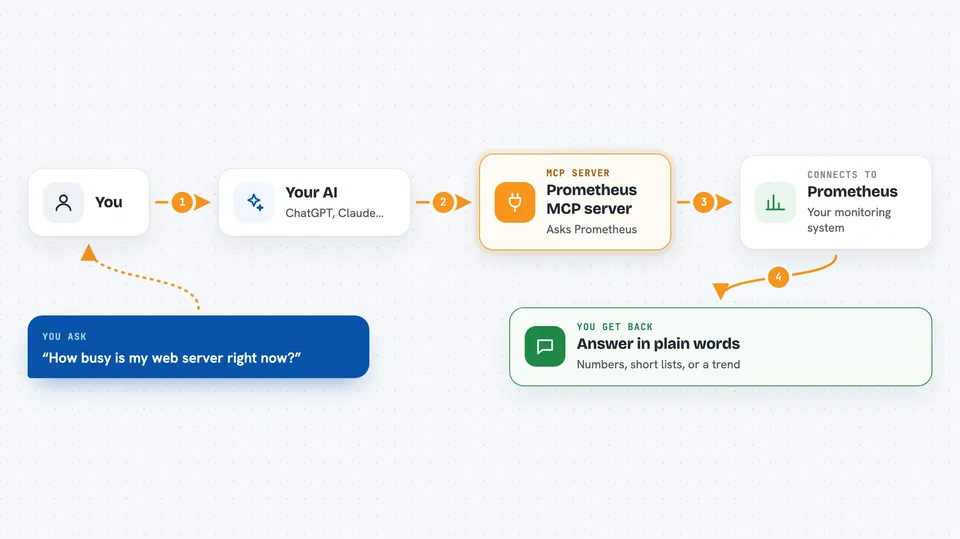
This is a small helper that connects your AI assistant to Prometheus, a tool many teams use to watch how their computers and apps are doing. Once it is set up, you can ask your AI things about your monitoring data in plain words instead of writing tricky queries yourself. It is handy for anyone who checks dashboards or gets alerts but does not want to learn PromQL.
What is an MCP server? The 30-second version
On its own, your AI can only chat with you. An MCP server is a small helper program that gives your AI a new skill or a connection to another app or service. This one connects your AI to Prometheus, so when you ask a question, the AI can go look things up there and bring the answer back to your chat.
What this MCP server does
You type a question in your AI chat, like how busy a server is right now. The AI passes that question to this helper program. The helper talks to your Prometheus server and asks it for the numbers or lists you need. Prometheus sends the data back, and the helper hands it to your AI. Your AI then explains the result to you in normal words.
 Click to zoom
What you can do with it
- Ask for the current value of any metric right now
- Ask for a metric over a time range, like the last hour
- List which metrics, labels, or targets exist in your system
- Check which alerts are firing right now
- Look up the rules your Prometheus is running
- Check whether Prometheus is healthy and ready
- Ask the AI to reload the Prometheus configuration
Try asking your AI
- “What is the current CPU usage on my web server?”
- “Show me the request rate over the last hour.”
- “Which alerts are firing right now?”
- “List all the metric names that start with http.”
What it gives back to you
You get answers in your chat: numbers, short lists, or tables the AI builds from the data. For example, it might say your server is at 42 percent CPU, or list three alerts that are currently firing. If you ask about a time range, it can describe the trend in words. It can also confirm when it has done something, like reloading the config.
Before you start
What you need
- A running Prometheus server and its web address, like http://localhost:9090
- The Go programming language installed, or Docker, to run this helper
- An MCP client like Claude Desktop or OpenCode
Good to know
Some actions can change or delete data in your Prometheus, like deleting series or cleaning tombstones, so be careful about what you ask the AI to do.
Install it with your AI
Add Prometheus MCP server to your AI, no technical skills needed
You don't install anything by hand. You copy one prompt, paste it into an AI that can work on your computer, and it checks, installs and connects the server for you, asking you when it needs something.
Sign in to get the install prompt
Members get a ready-made prompt that lets the Claude desktop app check Prometheus MCP server, install it and connect it for them, step by step. You don't need any technical skills: you copy, paste and answer a few questions. Your connected AI can also find and install any of the 4,609 MCP servers here for you.
Who it's for
People who check monitoring dashboards or alerts at work but are not comfortable writing PromQL queries themselves.



