
MCP server · Research
AI-First Scraper MCP server
by yubinkim444
Let your AI read web pages and search results as clean text, without ads or messy code.
This is a small helper that lets your AI read web pages for you. Instead of getting a jumble of ads and code, your AI gets clean, readable text. It is handy for anyone who asks their AI to look things up online and wants a tidy answer.
What is an MCP server? The 30-second version
On its own, your AI can only chat with you using what it already knows. An MCP server is a small helper program that gives your AI a new skill or a connection to an app or service. This one connects your AI to a web scraper and a search engine. So when you ask about something online, your AI can go fetch the page or search the web and bring back clean text to work with.
What this MCP server does
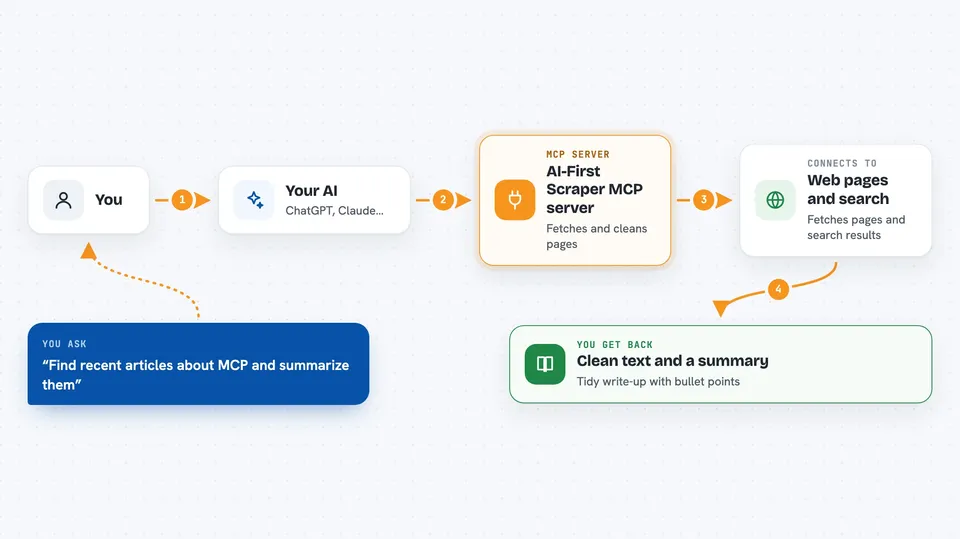
You ask your AI a question that needs something from the web. Your AI uses this helper to fetch a page, fetch several pages at once, or run a web search. The helper talks to the scraper and search services, which strip out ads and clutter and turn the pages into clean Markdown text. Your AI then reads that text and gives you a summary or answer in the chat.
 Click to zoom
What you can do with it
- Fetch a single web page and read it as clean text
- Fetch up to 25 web pages at the same time
- Search the web and get the top results already cleaned up
- Summarize articles without wading through ads
- Compare information across several pages in one go
- Turn a PDF or HTML page into readable Markdown
Try asking your AI
- “Use search_web to find the top 3 recent articles about MCP and summarize each in 5 bullets”
- “Fetch this page and tell me the main points: https://example.com/article”
- “Fetch these 5 pages and compare what they say about remote work”
- “Search the web for the latest news on electric cars and give me a short summary”
What it gives back to you
You get back clean Markdown text for each page or search result, plus your AI's own summary or answer built from that text. In the chat, it looks like a tidy write-up with bullet points or paragraphs, not raw web code. If you asked for several pages, you get a section for each one.
Before you start
What you need
- An MCP-compatible app like Claude Desktop, Cursor, or Cline
- Python and uvx installed if you use the no-install option (uvx comes with the uv tool)
Good to know
It reads pages from the web, so anything you ask it to fetch will be sent to the scraper and search services, and results depend on those services being online.
Install it with your AI
Add AI-First Scraper MCP server to your AI, no technical skills needed
You don't install anything by hand. You copy one prompt, paste it into an AI that can work on your computer, and it checks, installs and connects the server for you, asking you when it needs something.
Sign in to get the install prompt
Members get a ready-made prompt that lets the Claude desktop app check AI-First Scraper MCP server, install it and connect it for them, step by step. You don't need any technical skills: you copy, paste and answer a few questions. Your connected AI can also find and install any of the 4,361 MCP servers here for you.
Who it's for
Anyone who asks their AI to look things up online, like researchers, writers, analysts, and students who want clean summaries instead of messy web pages.


