AI agent for physiotherapists
Patient Outcome Measure Collection Agent
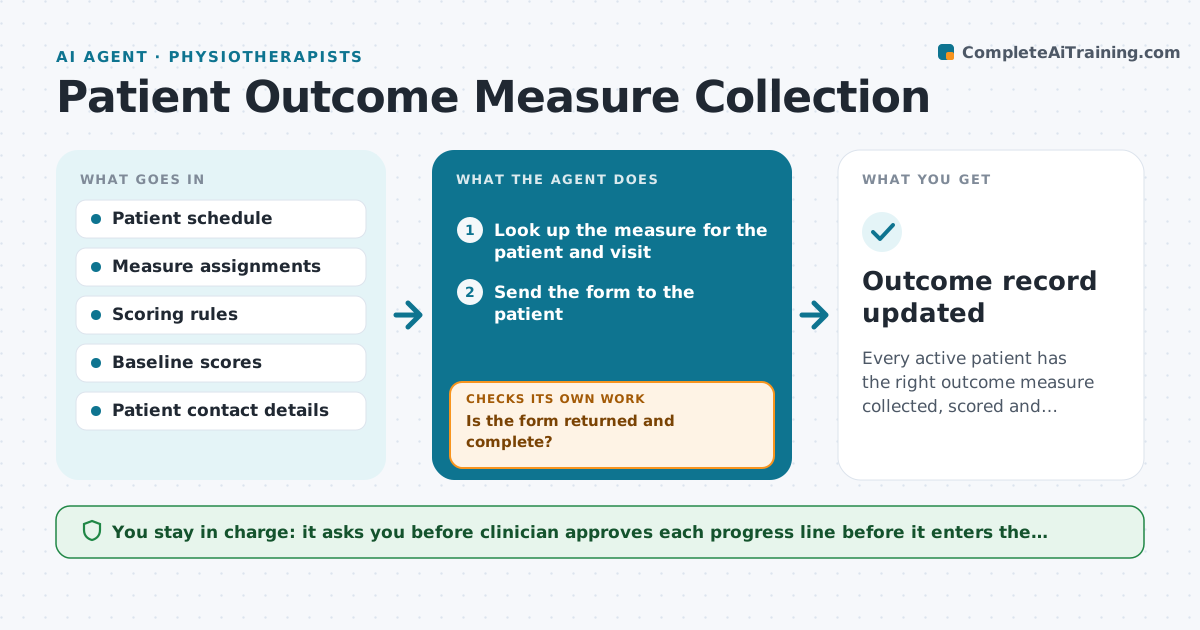
Every active patient has the right outcome measure collected, scored and charted at each planned visit.
What it does
Outcome questionnaires are handed out irregularly, so a clinician cannot show a patient or a payer how much progress has been made. The agent knows which measure each patient should complete and at which visits, sends the form before the visit, and scores the reply. If a score is missing or looks impossible, such as a total above the scale maximum, it asks again or flags it. It compares each score with the baseline, works out change against the clinic's threshold, and drafts a short progress line for the chart. The clinician approves the line. Edge case: a patient whose form has one blank item, where the agent applies the scoring rule for missing items rather than guessing.
How it works
Follow the arrows from top to bottom. The orange dashed arrow is the loop: when a check fails, the agent goes back and tries again.
Read the steps as a list
- Visit scheduled where a measure is due
- Look up the measure for the patient and visit
- Send the form to the patient
- Check whether it has been returned
- Is the form returned and complete?If not: Send one reminder, and if still missing flag it for the visit. Back to step 4.
- Score the form using the measure's rule
- Is the score possible and complete?If not: Ask the patient to confirm the item or mark it invalid. Back to step 6.
- Compare with baseline and the clinic threshold
- Draft a progress line for the chart
- Clinician approves the chart entryThe agent waits here for your OK.
- Outcome record updated
How it decides
It scores with the published rule for each measure and compares change with the clinic's threshold, flagging impossible values rather than using them.
- Score only with the published method
- Flag totals outside the scale range
- Use the clinic's threshold for meaningful change
- Send one reminder before the visit
Make it yours
Every agent is a starting point. You choose these settings for your own situation.
- Measure assigned to each condition
- Visit numbers for collection
- Threshold for meaningful change
- Reminder timing (default 1 reminder)
What keeps you in control
It always asks you first
- Clinician approves each progress line before it enters the chart
Hard limits
- Never change a score without the patient's confirmation
- Do not share scores with anyone outside the clinic
It stops when
- Done: score recorded and approved
- Stop: patient cannot complete the form and the clinician decides on another method
Set it up
We guide you through the set-up, step by step
Members get the full set-up guide for this agent. No technical skills needed: you copy, paste and upload.
- One set of instructions to paste into your AI, with the clicks for ChatGPT, Claude, Microsoft 365 Copilot, Gemini and Grok
- The agent then walks you through connecting your own data, one source at a time
- A downloadable copy with the flow chart, the rules and the full guide