MCP server · Productivity
Content Summarizer MCP server
by 0xshellming
Let your AI turn long text, web pages, PDFs and EPUB books into short, clear summaries.
This is a small helper that gives your AI the skill of summarizing long things. You hand it a chunk of text, a web link, a PDF or an EPUB book, and it comes back with a short version that keeps the important parts. It is handy if you read a lot for work and want the gist fast.
What is an MCP server? The 30-second version
On its own, your AI can only chat with you using what it already knows. An MCP server is a small helper program that gives your AI one extra skill or a connection to something outside the chat. This one connects your AI to a summarization service built on Google's Gemini 1.5 Pro model. So when you ask for a summary, your AI passes the content to this helper, and the helper sends back the short version.
What this MCP server does
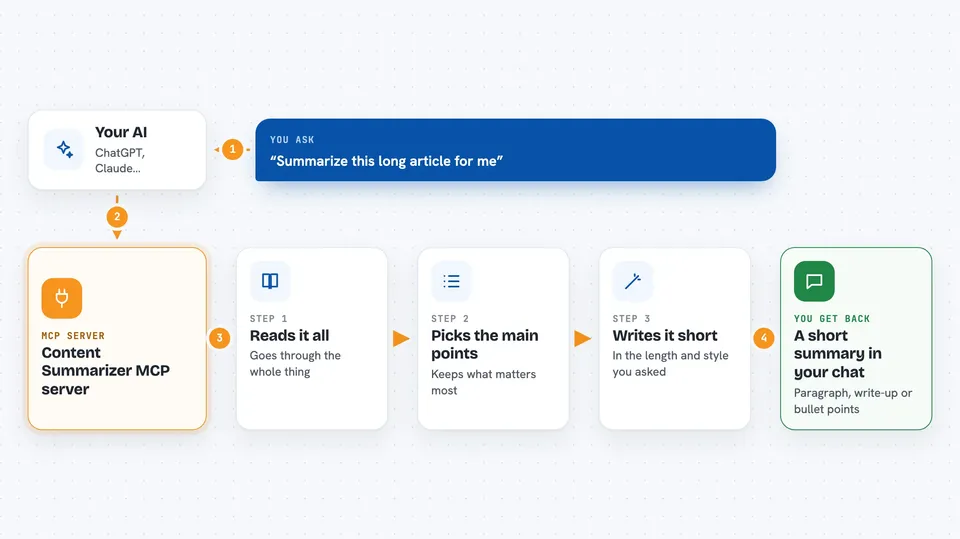
You give your AI something long: a pasted article, a web address, a PDF file or an EPUB book. Your AI passes that content to this helper server. The helper sends it to the summarization service, which reads it and writes a shorter version. You get that shorter version back in the chat, in the length, language and style you asked for. You can also tell it to focus on one specific angle, like the numbers or the action points.
 Click to zoom
What you can do with it
- Summarize a long block of pasted text
- Summarize a web page from its link
- Summarize a PDF document
- Summarize an EPUB book
- Choose how long the summary should be
- Ask for the summary in another language
- Ask for bullet points instead of paragraphs
Try asking your AI
- “Summarize this article in 200 words: https://example.com/some-article”
- “Turn this PDF into a short bullet list of the main points”
- “Give me a detailed summary of this text in French, focusing on the budget numbers”
- “Summarize this EPUB chapter in plain English, concise style”
What it gives back to you
You get text back in the chat: a short summary of whatever you handed over. It can be a paragraph, a longer write-up or a bullet list, depending on the style you asked for. You can also set a maximum length so it stays short. It does not change or save anything on your side, it just gives you the summary.
Before you start
What you need
- Node.js installed on your computer
- The pnpm tool installed
- The project downloaded from GitHub and built once
- The Claude desktop app or another app that supports MCP servers
Good to know
It sends whatever content you give it to an outside summarization service, so avoid feeding it private or confidential documents.
Install it with your AI
Add Content Summarizer MCP server to your AI, no technical skills needed
You don't install anything by hand. You copy one prompt, paste it into an AI that can work on your computer, and it checks, installs and connects the server for you, asking you when it needs something.
Sign in to get the install prompt
Members get a ready-made prompt that lets the Claude desktop app check Content Summarizer MCP server, install it and connect it for them, step by step. You don't need any technical skills: you copy, paste and answer a few questions. Your connected AI can also find and install any of the 4,361 MCP servers here for you.
Who it's for
Anyone who reads a lot for work, like researchers, students, analysts or busy office workers who want the short version of long documents.