
MCP server · Notes
Memora MCP server
Give your AI a lasting memory: it saves facts, finds them later, and shows how they connect.
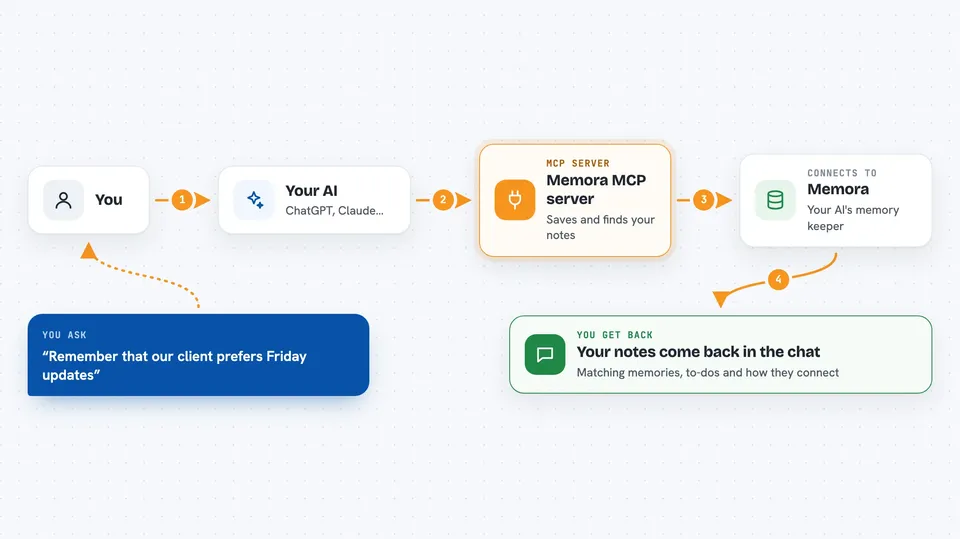
Memora is a memory helper for your AI. Normally your AI forgets everything when the chat ends, but Memora lets it save notes, facts and to-dos in a place that stays around. It is handy if you use your AI for ongoing work and keep repeating the same background information.
What is an MCP server? The 30-second version
On its own, your AI can only chat. It cannot remember things between conversations or look anything up on its own. An MCP server is a small helper program that gives your AI a new skill or a connection to another service. Memora is that helper here: it gives your AI a memory store it can write to and read from when you ask.
What this MCP server does
You tell your AI something worth keeping, like a decision, a fact or a to-do. Your AI passes it to Memora, which saves it in a small database on your computer or in the cloud. Later, when you ask about that topic, your AI asks Memora to look it up. Memora searches by meaning, not just exact words, and hands back the matching notes, related items and where they came from. It can also show your saved notes as a picture of connected dots.
 Click to zoom
What you can do with it
- Save facts, decisions and notes so your AI remembers them next time
- Search your saved memories by meaning, not just exact keywords
- Ask for a topic digest that bundles related notes, open to-dos and sources
- Update an old memory without losing the earlier version
- Find and merge duplicate memories
- See your memories as a connected knowledge graph
- Store longer documents as searchable pieces
Try asking your AI
- “Remember that our client prefers weekly updates on Fridays.”
- “What do you know about the pricing project? Give me a digest.”
- “Add a to-do to follow up with the design team next week.”
- “Find any memories that say the same thing and merge them.”
What it gives back to you
You get answers in the chat, written in normal sentences. Memora can return lists of matching memories, a topic summary with open to-dos and related items, or a graph picture of how things connect. When it saves or changes something, it tells you what it did.
Before you start
What you need
- Python installed on your computer, so you can run the pip install command
- An OpenAI API key if you want the smart search and automatic sorting (a kind of password for apps; you get one from OpenAI)
- Optional: a Cloudflare or Amazon S3 account if you want your memories stored in the cloud
Good to know
Memora can change and delete your saved memories, so be careful with requests to merge or remove things, and keep a backup if the notes matter to you.
Install it with your AI
Add Memora MCP server to your AI, no technical skills needed
You don't install anything by hand. You copy one prompt, paste it into an AI that can work on your computer, and it checks, installs and connects the server for you, asking you when it needs something.
Sign in to get the install prompt
Members get a ready-made prompt that lets the Claude desktop app check Memora MCP server, install it and connect it for them, step by step. You don't need any technical skills: you copy, paste and answer a few questions. Your connected AI can also find and install any of the 4,361 MCP servers here for you.
Who it's for
People who use their AI for long-running projects and are tired of repeating the same background details, such as writers, researchers, project managers and support staff.





