MCP server · Research
x402 Scraper Engine MCP server
by ami-guru
Let your AI read webpages, summarize them, check sites for scams, and search Twitter, paying a few cents per request.
This is a helper that lets your AI read webpages, turn them into clean text, summarize long articles, check websites for scam signals, and search Twitter. It is handy if you want your AI to work with live web content without signing up for a bunch of subscriptions. Each request costs a small amount of a digital currency called USDC, paid from a crypto wallet you set up.
What is an MCP server? The 30-second version
On its own, your AI can only chat with you using what it already learned. An MCP server is a small helper program you connect to your AI that gives it a new skill. This one connects your AI to a web service that reads pages, summarizes them, checks them for risks, and searches Twitter. Once connected, you just ask in normal words and the AI uses this helper behind the scenes.
What this MCP server does
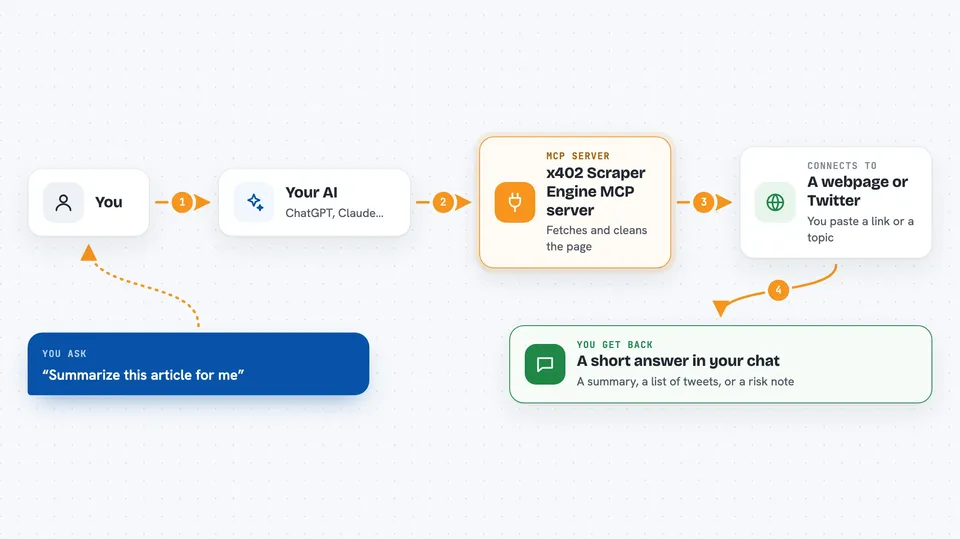
You ask your AI something like "summarize this article" and paste a link. The AI sends the link to this helper. The helper fetches the page, cleans it up, and either returns the text or runs a short summary through a language model. It sends the result back to your AI, which shows it to you in the chat. For Twitter or security checks, it does the same thing but with different tools.
 Click to zoom
What you can do with it
- Turn any webpage into clean, readable text
- Summarize a long article into a short brief
- Check a website or crypto contract for scam signals
- Search Twitter for a topic, hashtag, or cashtag
- Look up a Twitter profile and recent tweets
- Run a multi-source web search and get a summary
Try asking your AI
- “Summarize this article for me: https://news.ycombinator.com”
- “Is this website safe to use? https://example-dex.org”
- “What are people saying on Twitter about $BASE right now?”
- “Look up the recent tweets from this Twitter handle”
What it gives back to you
You get back plain text in the chat. Sometimes it is a clean version of a webpage, sometimes a short summary, sometimes a list of tweets, and sometimes a risk score with notes. The AI shows it to you like any other answer.
Before you start
What you need
- A crypto wallet on the Base network with a small amount of USDC in it
- The wallet's private key (a long password that lets the helper pay for requests)
- Node.js installed on your computer (the free program that runs the helper)
- An AI app that supports MCP servers, like Claude Desktop or Cursor
Good to know
Each request spends a small amount of real USDC from your wallet, so keep only a small balance in it and check the price before running many requests.
Install it with your AI
Add x402 Scraper Engine MCP server to your AI, no technical skills needed
You don't install anything by hand. You copy one prompt, paste it into an AI that can work on your computer, and it checks, installs and connects the server for you, asking you when it needs something.
Sign in to get the install prompt
Members get a ready-made prompt that lets the Claude desktop app check x402 Scraper Engine MCP server, install it and connect it for them, step by step. You don't need any technical skills: you copy, paste and answer a few questions. Your connected AI can also find and install any of the 4,609 MCP servers here for you.
Who it's for
People who want their AI to read live webpages, summarize them, or check Twitter without paying for monthly subscriptions.