
MCP server · Coding
Manim-Slides MCP server
Lets your AI write, render and export animated slide presentations as HTML, PDF, PPTX or MP4.
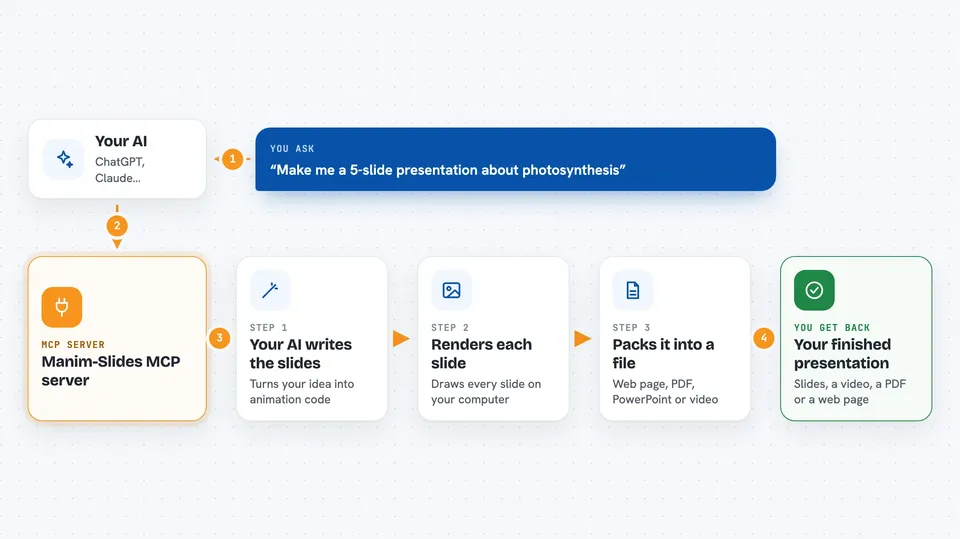
This is a helper program that lets your AI build animated slide presentations for you. You describe the talk you want, and the AI writes the animation code, renders it, and turns it into a presentation file. It is handy for teachers, students and anyone who needs a polished deck with moving diagrams.
What is an MCP server? The 30-second version
On its own, your AI can only chat with you. An MCP server is a small helper program that gives your AI a new skill or a connection to another tool. This one connects your AI to Manim-Slides, a tool for making animated presentations. So when you ask for a deck, the AI can actually render the slides and hand you back real files.
What this MCP server does
You tell your AI what kind of presentation you want, for example a title slide, an agenda and a few diagrams. The AI writes the animation code and sends it to this helper. The helper runs the code on your computer, renders each slide, and keeps a cache so it only redoes the slides that changed. Then it can compile everything into an interactive web page, a PDF, a PowerPoint file or a single video. If something goes wrong, the error goes back to the AI so it can fix it and try again.
 Click to zoom
What you can do with it
- Render animated slides from code your AI writes
- Compile a deck into an interactive Reveal.js web page
- Export the whole presentation as a PDF or PowerPoint file
- Stitch all slides into one MP4 video
- Preview a single slide as an image, video or GIF
- Take screenshots of every slide in the deck
- Make a grid contact sheet to review the whole deck at a glance
Try asking your AI
- “Make me a 5-slide presentation about photosynthesis with animated diagrams”
- “Turn this into a title slide, an agenda and a two-column comparison”
- “Render the deck and export it as a PDF”
- “Show me a screenshot of every slide so I can check the layout”
What it gives back to you
You get back file paths and short summaries in the chat. Depending on what you asked for, that can be a rendered video, a web page, a PDF, a PowerPoint file, or a set of images. It can also show you a preview image of a single slide or a grid of the whole deck. The AI reads the errors and progress messages so it can fix problems on its own.
Before you start
What you need
- Python 3.10 or newer
- uv, a tool that manages Python environments
- Manim Community Edition, which needs FFmpeg and LaTeX installed
- Manim-Slides
Good to know
This runs code on your own computer, so only use it with an AI you trust, and keep an eye on what it renders since big decks can take a while.
Install it with your AI
Add Manim-Slides MCP server to your AI, no technical skills needed
You don't install anything by hand. You copy one prompt, paste it into an AI that can work on your computer, and it checks, installs and connects the server for you, asking you when it needs something.
Sign in to get the install prompt
Members get a ready-made prompt that lets the Claude desktop app check Manim-Slides MCP server, install it and connect it for them, step by step. You don't need any technical skills: you copy, paste and answer a few questions. Your connected AI can also find and install any of the 4,361 MCP servers here for you.
Who it's for
Teachers, students, researchers and anyone who gives talks and wants animated slides without learning animation code.



