
MCP server · Productivity
mailbox.bot MCP server
by arbengine
Lets your AI send real printed letters, certified mail and postcards, and read incoming scanned mail.
This is a helper that connects your AI assistant to mailbox.bot, a service that prints and mails real paper for you. You describe the letter you want to send, and the service prints it, stamps it, puts it in the post and tracks it. It is handy if you send notices, invoices or certified letters and would rather not do the printing and post office trip yourself.
What is an MCP server? The 30-second version
On its own, your AI can only chat with you. An MCP server is a small helper program that gives your AI one extra skill, in this case a connection to mailbox.bot. Once it is connected, your AI can ask mailbox.bot to print and mail a letter for you, or to fetch a scan of something that arrived in your mailbox. You still ask in normal words, and the helper does the technical part behind the scenes.
What this MCP server does
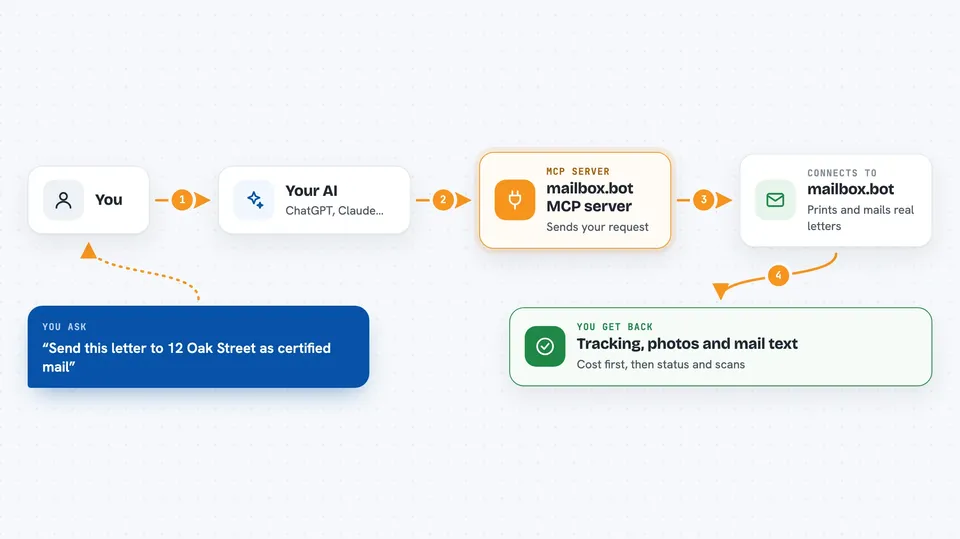
You tell your AI what you want, for example to send a certified letter to an address. Your AI passes that request to this helper, which talks to mailbox.bot over the internet. mailbox.bot prints the document, mails it, photographs it and tracks it through the postal system. Later, your AI can check the status or pull back the tracking details and photos. It can also read incoming scans and PDFs that arrive through a forwarding address you control, and turn them into text your AI can work with.
 Click to zoom
What you can do with it
- Send a first-class letter or a certified letter from a PDF or common document file
- Send postcards and larger batch mailings to many addresses
- Preview the cost before anything is printed or charged
- Track a mailing and see proof photos and delivery status
- Read incoming scans, PDFs and provider notices as text
- Set a spending cap or daily limit so nothing runs away
- Test the whole process with sandbox keys that cost nothing
What it gives back to you
You get answers in the chat: cost estimates before sending, tracking numbers and delivery status, and links or previews of the printed document so you can check it. When you read incoming mail, you get the text pulled out of the scan or PDF, often as a short summary. If something was mailed, it tells you what was sent and when. Nothing appears on paper until you approve it.
Before you start
What you need
- A mailbox.bot account
- An API key from mailbox.bot (a kind of password for apps; the site gives you one)
- The hosted address https://mailbox.bot/api/mcp added to your AI app
Good to know
This sends real mail and can spend real money, so check the cost preview and keep your spending caps on before you approve a large mailing.
Install it with your AI
Add mailbox.bot MCP server to your AI, no technical skills needed
You don't install anything by hand. You copy one prompt, paste it into an AI that can work on your computer, and it checks, installs and connects the server for you, asking you when it needs something.
Sign in to get the install prompt
Members get a ready-made prompt that lets the Claude desktop app check mailbox.bot MCP server, install it and connect it for them, step by step. You don't need any technical skills: you copy, paste and answer a few questions. Your connected AI can also find and install any of the 4,609 MCP servers here for you.
Who it's for
People who send paper mail as part of their job, like office managers, small business owners, legal and property staff, and anyone handling notices or certified letters.





