
MCP server · Research
webfetch MCP server
by ashlrai
Your AI can search for images across many sources and tell you the license and credit line for each one.
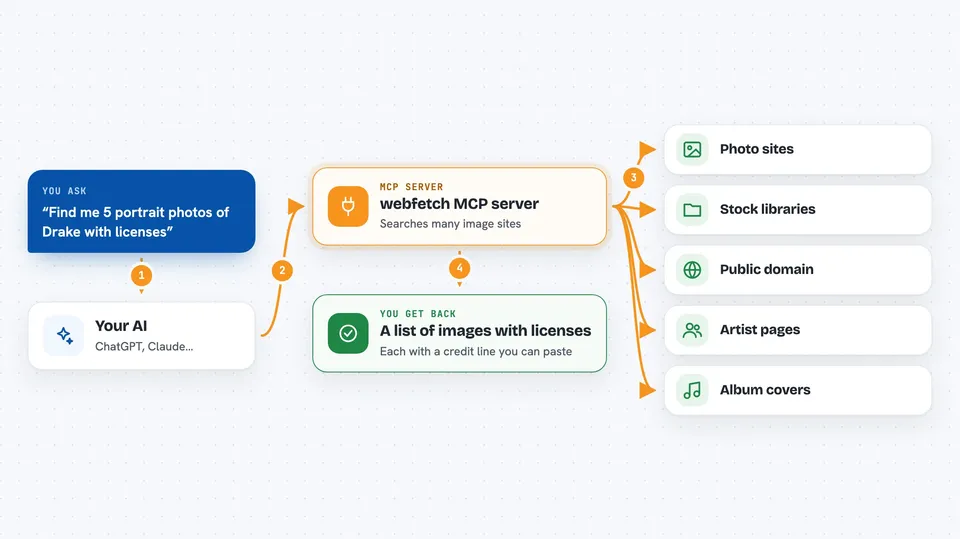
webfetch is a helper that lets your AI search for pictures across many image websites at once, and it always tells you what license each picture comes with. It is handy if you write blog posts, make slides, or put together anything where you need to know whether you are allowed to use an image. You do not need to be technical to use it once it is set up.
What is an MCP server? The 30-second version
On its own, your AI can only chat with you. An MCP server is a small helper program that gives your AI a new skill or a connection to an app or service. This one connects your AI to webfetch, which searches many image providers at the same time. So when you ask for a picture, your AI can actually go look for one and bring back the details you need.
What this MCP server does
You ask your AI for an image, for example a portrait of a singer or a photo of a city. Your AI passes your request to this helper. The helper then asks many image websites at once, collects the results, and sorts them so the ones with clear licenses come first. It skips images where the license is unknown, so you do not accidentally use something you are not allowed to. Then it hands the results back to your AI, which shows them to you with the license and credit line already written out.
 Click to zoom
What you can do with it
- Search for images across many sources with one request
- See the license and credit line for each image
- Filter results by size, like only images wider than 1200 pixels
- Find portraits or album covers for a specific artist
- Download an image and save it to your computer
- Run many image searches at once from a list
Try asking your AI
- “Find me 5 portrait photos of Drake and tell me the license for each”
- “Search for a photo of the Eiffel Tower at night, at least 1200 pixels wide”
- “Get me the album cover for Radiohead's OK Computer and the credit line”
- “Download the best public domain image of a bald eagle you can find”
What it gives back to you
You get back a list of images, each with a title, a link, the size, the license tag, and a ready-made credit line you can paste under the picture. If you ask it to download one, it saves the file and tells you where it went. Sometimes it also gives you a short summary of what it found. Everything shows up right in your chat.
Before you start
What you need
- The Claude desktop app or another AI tool that supports MCP servers
- Node.js 18 or newer if you install it with npx
- Free API keys from some image sites if you want to search there (the site gives you one when you sign up)
Good to know
It only returns images it can prove a license for, but you should still check the credit line and terms before you publish anything.
Install it with your AI
Add webfetch MCP server to your AI, no technical skills needed
You don't install anything by hand. You copy one prompt, paste it into an AI that can work on your computer, and it checks, installs and connects the server for you, asking you when it needs something.
Sign in to get the install prompt
Members get a ready-made prompt that lets the Claude desktop app check webfetch MCP server, install it and connect it for them, step by step. You don't need any technical skills: you copy, paste and answer a few questions. Your connected AI can also find and install any of the 4,361 MCP servers here for you.
Who it's for
Anyone who needs images for work and has to be careful about licenses, like bloggers, marketers, teachers, and designers.


