
MCP server · Productivity
Taskwarrior MCP server
by awwaiid
Lets your AI read, add and finish your Taskwarrior tasks just by asking in plain words.
This is a small helper that connects your AI assistant to Taskwarrior, the to-do list program that lives on your own computer. Once it is set up, you can ask your AI things like what is on your list today, or tell it to add a task, and it will do that for you. It is handy if you already use Taskwarrior and want to talk to your task list instead of typing commands.
What is an MCP server? The 30-second version
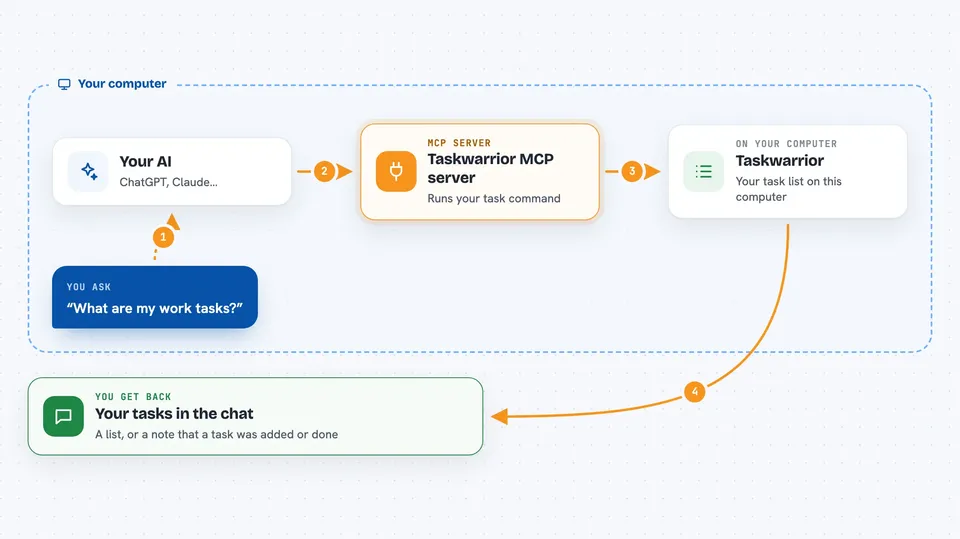
On its own, your AI can only chat. It cannot see your task list or change it. An MCP server is a small helper program that gives your AI a new skill, and in this case the skill is talking to Taskwarrior on your machine. So when you ask about your tasks, your AI passes the request to this helper, the helper runs the task command, and the answer comes back to you in the chat.
What this MCP server does
You ask your AI something about your tasks, like what is still pending or what is due for a project. The AI sends that request to this helper program running on your computer. The helper runs your local task command, which is the same program you would use in a terminal. It reads the result, or makes the change you asked for, and hands it back to the AI. Then the AI shows you the list or confirms the change in plain language.
 Click to zoom
What you can do with it
- See all your pending tasks
- Filter tasks by project name
- Filter tasks by one or more tags
- Add a new task with a description
- Add a due date, priority, project or tags to a task
- Mark a task as complete
Try asking your AI
- “What are my current work tasks?”
- “Add a task to call my sister, high priority”
- “Show me all tasks tagged with home”
- “Mark task 1 as done”
What it gives back to you
You get answers in the chat, usually as a list of your pending tasks with their details. When you add or complete a task, the AI tells you what it did, like which task was added or marked done. If you filter by project or tag, you see only the tasks that match. It is all shown as normal text in the conversation, not as a separate file.
Before you start
What you need
- Taskwarrior installed and set up on your computer
- Node.js installed so the helper can run
- The Claude desktop app or another AI app that supports MCP servers
Good to know
It uses task numbers to find tasks, and Taskwarrior sometimes renumbers tasks when you add or remove them, so a task you meant to complete could be the wrong one if the list changed.
Install it with your AI
Add Taskwarrior MCP server to your AI, no technical skills needed
You don't install anything by hand. You copy one prompt, paste it into an AI that can work on your computer, and it checks, installs and connects the server for you, asking you when it needs something.
Sign in to get the install prompt
Members get a ready-made prompt that lets the Claude desktop app check Taskwarrior MCP server, install it and connect it for them, step by step. You don't need any technical skills: you copy, paste and answer a few questions. Your connected AI can also find and install any of the 4,361 MCP servers here for you.
Who it's for
People who already use Taskwarrior and want to manage their tasks by chatting with an AI instead of typing commands.





