
MCP server · Notes
memex MCP server
Give your AI a long-term memory so it remembers what you told it in past chats.
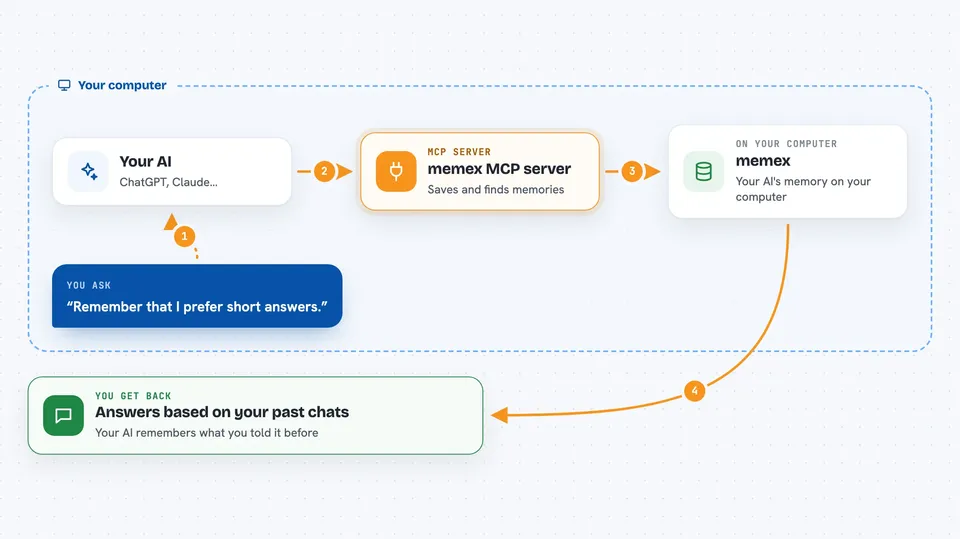
memex is a memory service for AI assistants. Normally your AI forgets everything when a chat ends. With memex connected, it can save facts and preferences and look them up again later, ranked by what is both relevant and recent.
What is an MCP server? The 30-second version
On its own, your AI can only chat. An MCP server is a small helper program that gives your AI a new skill or a connection to another service. This one connects your AI to memex, a memory store that runs on your own computer. Once connected, your AI can save notes about you and search them again when you ask.
What this MCP server does
You talk to your AI like normal. When something is worth remembering, the AI sends it to memex, which turns the text into a kind of searchable fingerprint and saves it in a local database. Later, when you ask a question, the AI searches memex for the most useful saved notes. memex ranks results by how closely they match your question and how recently they were saved, then hands the best ones back to the AI.
 Click to zoom
What you can do with it
- Save a fact or preference so your AI remembers it next time
- Search your saved memories by meaning, not just exact words
- Ask how many memories are stored for you
- Delete a specific memory you no longer want kept
- Label memories as events, facts, or instructions
- Let old conversation notes get summarised automatically
Try asking your AI
- “Remember that I prefer short answers and dislike long explanations.”
- “What do you know about how I like to communicate?”
- “Save this as a fact: my main project is called Bluebird.”
- “How many memories do you have about me?”
What it gives back to you
You get answers in the chat, based on what your AI found in memex. When it saves something, it confirms the memory was stored. When it searches, it can show you the matching notes and how well they scored. It can also tell you a simple count of how many memories exist for you.
Before you start
What you need
- Docker and Docker Compose installed on your computer
- The memex service running locally (started with docker compose up)
- The Claude desktop app or Claude Code, or another AI tool that supports MCP
Good to know
It stores what you tell it in a local database, so avoid saving passwords, private keys, or anything you would not want kept on your machine.
Install it with your AI
Add memex MCP server to your AI, no technical skills needed
You don't install anything by hand. You copy one prompt, paste it into an AI that can work on your computer, and it checks, installs and connects the server for you, asking you when it needs something.
Sign in to get the install prompt
Members get a ready-made prompt that lets the Claude desktop app check memex MCP server, install it and connect it for them, step by step. You don't need any technical skills: you copy, paste and answer a few questions. Your connected AI can also find and install any of the 4,066 MCP servers here for you.
Who it's for
People who use an AI assistant regularly and want it to remember their preferences, projects, and past conversations between sessions.




