
MCP server · Notes
Basic Memory MCP server
Give your AI a lasting memory of your notes, so it remembers what you told it before.
Basic Memory is a memory helper for your AI. It keeps your notes as simple text files on your own computer, and your AI can read and write them too. It is handy if you are tired of repeating yourself to ChatGPT or Claude every time you start a new chat.
What is an MCP server? The 30-second version
On its own, your AI can only chat. It forgets everything the moment you close the window. An MCP server is a small helper program that gives your AI a new skill, and this one connects your AI to your own collection of notes. Once it is connected, your AI can look things up in your notes and add new ones when you ask.
What this MCP server does
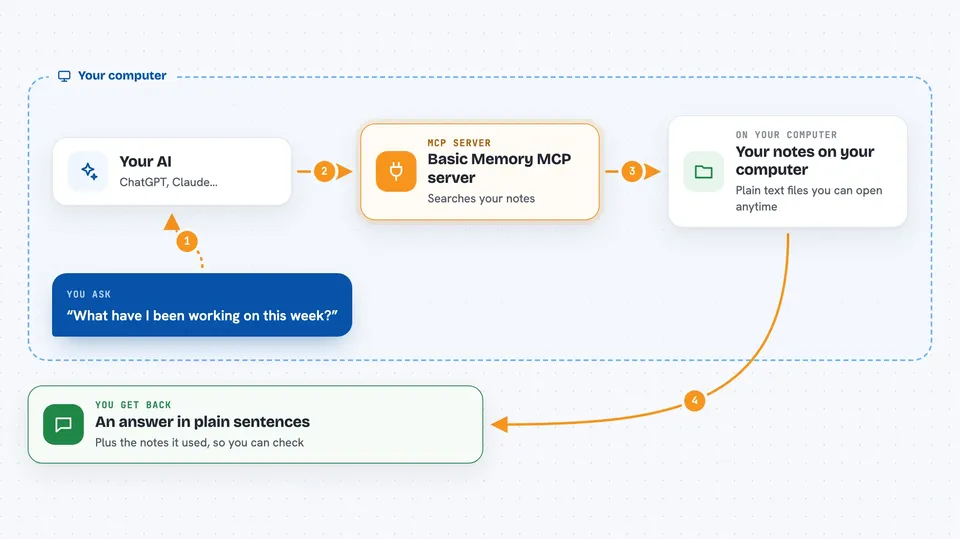
You ask your AI something, like what you worked on last week. Your AI passes that question to this helper program. The helper looks through your notes, which are stored as plain text files on your computer, and finds the parts that match. Your AI then reads those parts and answers you in plain language. If you ask it to remember something, it writes a new note file for you.
 Click to zoom
What you can do with it
- Save a note about a decision you just made
- Search your notes by meaning, not just exact words
- Ask what you have been working on recently
- Link related notes together so context builds up
- Update or add to an existing note
- Keep the same notes in sync across your devices if you use the cloud option
Try asking your AI
- “Create a note about our project architecture decisions.”
- “Find information about JWT auth in my notes.”
- “What have I been working on this week?”
- “Add a note that the client meeting moved to Thursday.”
What it gives back to you
You get answers in the chat, written in normal sentences. When it finds notes, it shows you the matching text so you can see where the answer came from. When it saves something, it tells you the note was created or updated. Your notes themselves stay as plain text files you can open in any text editor.
Before you start
What you need
- The Claude desktop app or another AI app that supports MCP
- Python installed through a tool called uv (the README shows the one-line install)
- Or a Basic Memory cloud account if you prefer not to install anything
Good to know
Your AI can create, change, and delete notes in your memory folder, so it is worth keeping a backup of anything important.
Install it with your AI
Add Basic Memory MCP server to your AI, no technical skills needed
You don't install anything by hand. You copy one prompt, paste it into an AI that can work on your computer, and it checks, installs and connects the server for you, asking you when it needs something.
Sign in to get the install prompt
Members get a ready-made prompt that lets the Claude desktop app check Basic Memory MCP server, install it and connect it for them, step by step. You don't need any technical skills: you copy, paste and answer a few questions. Your connected AI can also find and install any of the 4,361 MCP servers here for you.
Who it's for
Anyone who uses an AI assistant for work and wants it to remember past conversations, notes, and decisions without repeating themselves.





