
MCP server · Notes
Callimachus MCP server
by BetaBots-LLC
Let your AI search your past coding chats across 11 tools so it can recall what you already did.
Callimachus is a local helper that keeps a searchable copy of your past conversations with coding assistants like Claude Code, Codex, and Cursor. Once it is connected, your AI can look back through that history when you ask it something. It is handy if you keep re-explaining the same project or forget how you solved a problem last month.
What is an MCP server? The 30-second version
On its own, your AI can only chat with you using what is in the current conversation. An MCP server is a small helper program that gives your AI a new skill or a connection to something outside the chat. This one connects your AI to Callimachus, which is a local index of your past coding conversations. So when you ask about earlier work, the AI can look it up there and answer with what it finds.
What this MCP server does
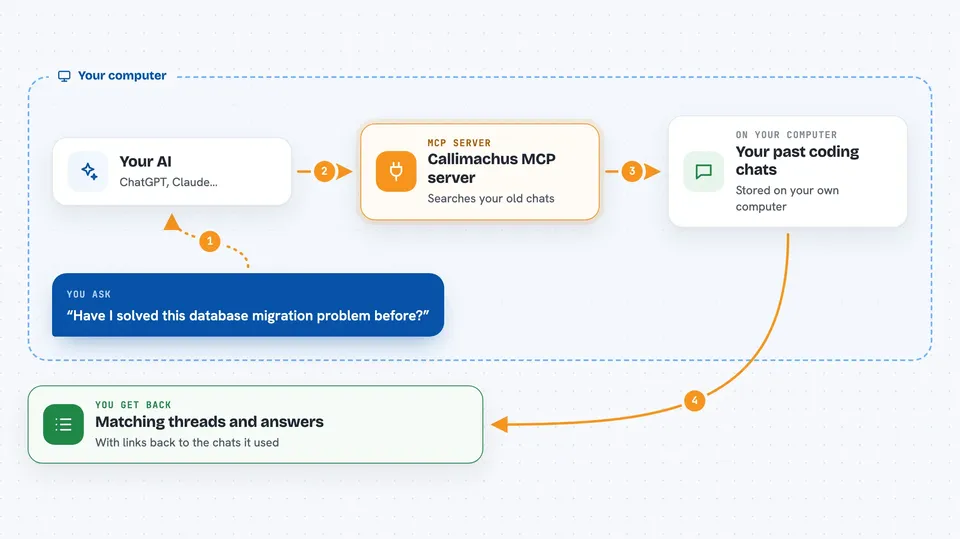
You ask your AI a question about your past work, like whether you have dealt with a certain error before. The AI sends that question to the Callimachus helper running on your computer. The helper searches its local index of your old conversations, using both keywords and meaning-based matching. It sends back the matching threads, decisions, or notes. Your AI then turns that into an answer for you in the chat.
 Click to zoom
What you can do with it
- Search your past coding conversations by keyword or topic
- Find threads that touched a specific file path
- Recall decisions and gotchas recorded for a project
- List open TODOs from your history
- Ask a question and get a cited answer from your own threads
- Check whether a decision was already settled before you change it
- Save a snapshot of a session so you can pick it up later
Try asking your AI
- “Have I solved this database migration problem before?”
- “What did we decide about the vector index setup?”
- “Show me threads that touched embed/mod.rs”
- “What open TODOs do I have in this project?”
What it gives back to you
You get back a list of matching threads with short details, or a written answer with citations pointing to the threads it used. It can also return lists of decisions, gotchas, TODOs, or snapshots. Everything shows up right in your chat as text you can read and copy.
Before you start
What you need
- The Callimachus desktop app installed and running, or the callimachus-mcp command available
- Your past coding chats indexed at least once
- Node.js if you plan to run it with npx
Good to know
It reads your past coding conversations and can write notes into its own memory, so be aware that your history is being searched and updated.
Install it with your AI
Add Callimachus MCP server to your AI, no technical skills needed
You don't install anything by hand. You copy one prompt, paste it into an AI that can work on your computer, and it checks, installs and connects the server for you, asking you when it needs something.
Sign in to get the install prompt
Members get a ready-made prompt that lets the Claude desktop app check Callimachus MCP server, install it and connect it for them, step by step. You don't need any technical skills: you copy, paste and answer a few questions. Your connected AI can also find and install any of the 4,609 MCP servers here for you.
Who it's for
Developers and anyone who works with coding assistants daily and wants their AI to remember past sessions.





