
MCP server · Research
SearXNG MCP server
by bumbaRasch
Lets your AI search the web, images, news, videos and papers through your own private SearXNG setup.
This is a helper that connects your AI assistant to SearXNG, a search engine you run yourself. Once it is set up, your AI can look things up on the web, in the news, in images, in videos and in scientific papers, and read web pages for you. It is handy for people who want search inside their AI without signing up for a paid search service or handing their queries to a big company.
What is an MCP server? The 30-second version
On its own, your AI can only chat with what it already knows. An MCP server is a small helper program that gives your AI a new skill. This one gives it a connection to your own SearXNG search engine. So when you ask a question that needs fresh information, the AI can go and search there and bring the answers back to you.
What this MCP server does
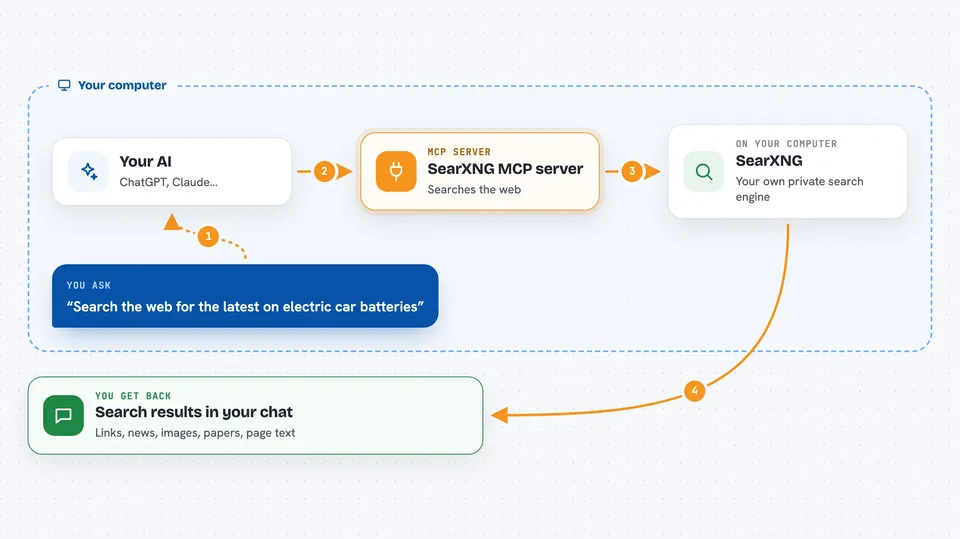
You ask your AI something that needs looking up, like a recent news story or a paper on a topic. The AI sends your request to this helper program. The helper then asks your SearXNG search engine, which gathers results from many search sources at once. The results come back to your AI, which reads them and writes you a normal answer in the chat. If you want, the AI can also open a specific page and read it for you.
 Click to zoom
What you can do with it
- Search the web and get ranked results with short answers and info boxes
- Find news articles with publish dates and a freshness filter
- Look up images, videos and music with links and details
- Search scientific papers with abstracts and PDF links
- Fetch a web page and read it as clean text, including text PDFs
- Get search suggestions to refine a query before searching
- Check which search engines your SearXNG instance has turned on
Try asking your AI
- “Search the web for the latest on electric car batteries and summarize the top results”
- “Find news from the past week about the housing market in my country”
- “Look up recent papers about attention in machine learning and list the PDF links”
- “Fetch this page and give me a short summary of the main points”
What it gives back to you
You get back normal chat answers built from the search results: lists of links with titles and short descriptions, news items with dates, image and video details, or paper abstracts. When the AI fetches a page, it shows you the cleaned-up text or a summary of it. Everything is presented as information to read, not as commands, so your AI treats it as data.
Before you start
What you need
- Node.js version 22.19 or newer
- Docker to run the SearXNG search engine on your own computer
- A SearXNG instance running locally (the README shows a one-line setup)
Good to know
Search results and fetched pages come from the open web, so treat what they say as information to check, not as instructions to follow, and be careful about letting your AI act on anything a page tells it to do.
Install it with your AI
Add SearXNG MCP server to your AI, no technical skills needed
You don't install anything by hand. You copy one prompt, paste it into an AI that can work on your computer, and it checks, installs and connects the server for you, asking you when it needs something.
Sign in to get the install prompt
Members get a ready-made prompt that lets the Claude desktop app check SearXNG MCP server, install it and connect it for them, step by step. You don't need any technical skills: you copy, paste and answer a few questions. Your connected AI can also find and install any of the 4,609 MCP servers here for you.
Who it's for
People who want private, no-signup web search inside their AI assistant, especially those comfortable running a small Docker setup on their own machine.


