MCP server · Research
OpenZIM MCP server
by cameronrye
Lets your AI search and read offline Wikipedia and other ZIM knowledge archives on your own computer.
This is a small helper program that connects your AI assistant to ZIM files. A ZIM file is a whole website packed into one file, like an offline copy of Wikipedia or Stack Exchange. It is handy if you want your AI to answer questions from a trusted offline library instead of guessing from memory.
What is an MCP server? The 30-second version
On its own, your AI can only chat with you using what it already learned. An MCP server is a small helper program that gives your AI one new skill or one new connection. This helper connects your AI to ZIM archives, which are offline copies of big knowledge sites like Wikipedia. So when you ask a question, your AI can actually look it up in those files and read the real article text.
What this MCP server does
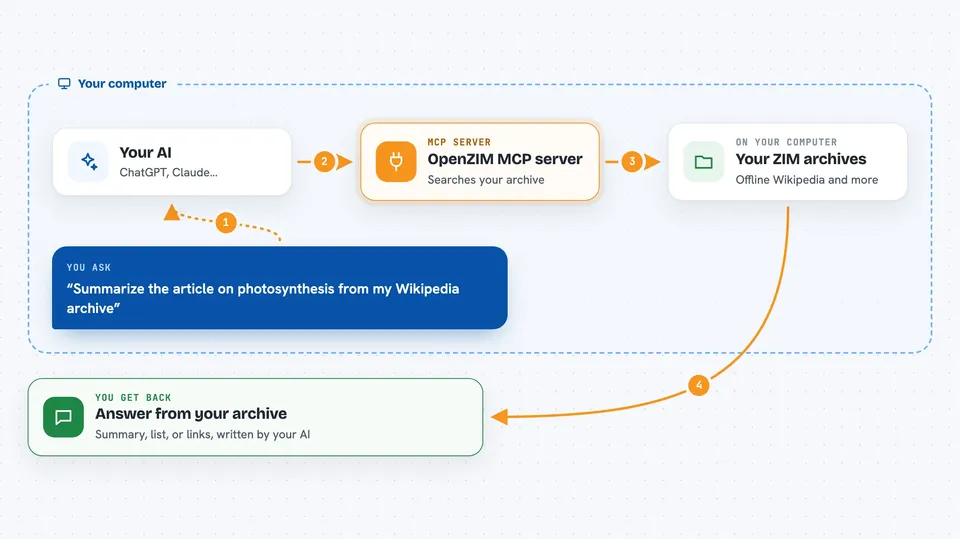
You point the helper at a folder on your computer that holds your ZIM files. When you ask your AI something, the AI sends the request to this helper. The helper opens the right archive, searches it, and pulls out the matching article or section. Then it hands that text back to your AI, which reads it and answers you in the chat. It can also list what is inside an archive and show which pages link to a page.
 Click to zoom
What you can do with it
- Search a ZIM archive by keyword and get matching articles
- Read a full article or just one section of it
- Browse what is inside an archive, like article lists and metadata
- Find which pages link to a given page
- Check that an archive file is not damaged
- Ask a plain question and let the helper pick the right action for you
Try asking your AI
- “Summarize the article on photosynthesis from my Wikipedia archive”
- “Search my archive for pages about the water cycle”
- “Show me the table of contents for the article on climate change”
- “What links to the article on renewable energy in my archive”
What it gives back to you
You get answers in the chat, written by your AI from the real archive text. Depending on what you asked, that can be a summary, a list of matching article titles, a full section of text, or a list of pages that link to another page. It can also report simple facts about an archive, like its name and size breakdown.
Before you start
What you need
- A ZIM file saved in a folder on your computer (you can download one free from the Kiwix library)
- The uv tool installed, or Python, or Docker, depending on how you choose to run it
- An MCP client like the Claude desktop app
Good to know
It only reads the ZIM files you point it at, so it cannot change or delete them, but it can read anything inside those archives, so keep private files out of that folder.
Install it with your AI
Add OpenZIM MCP server to your AI, no technical skills needed
You don't install anything by hand. You copy one prompt, paste it into an AI that can work on your computer, and it checks, installs and connects the server for you, asking you when it needs something.
Sign in to get the install prompt
Members get a ready-made prompt that lets the Claude desktop app check OpenZIM MCP server, install it and connect it for them, step by step. You don't need any technical skills: you copy, paste and answer a few questions. Your connected AI can also find and install any of the 4,609 MCP servers here for you.
Who it's for
Anyone who wants answers from offline reference material, such as researchers, students, writers, and support teams working without reliable internet.