
MCP server · Notes
sessionmem MCP server
by catfish-1234
Your AI remembers what mattered from past coding sessions and reminds itself at the start of each new one.
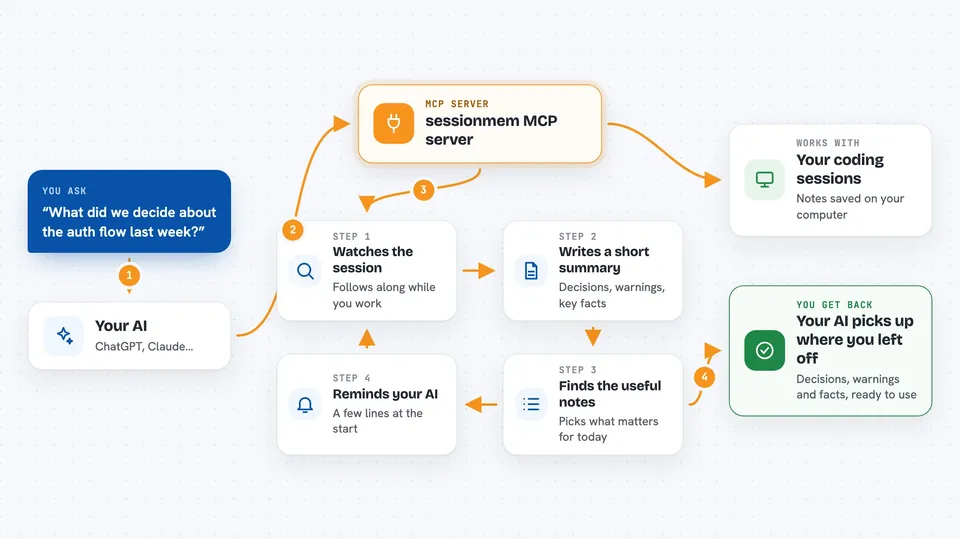
sessionmem is a small helper that keeps notes about your coding sessions and quietly reminds your AI assistant of the important bits the next time you start working. It is handy if you use an AI coding tool like Claude Code or Cursor and you are tired of explaining the same project details over and over. Everything is saved in a single file on your own computer.
What is an MCP server? The 30-second version
On its own, your AI can only chat about what is in the current conversation. An MCP server is a small helper program that gives your AI a new skill or a connection to something outside the chat. sessionmem is that helper here: it watches your coding sessions and stores short notes about decisions, warnings, and useful facts. Then, when you start a new session, it hands your AI a small reminder of the relevant notes so you do not have to repeat yourself.
What this MCP server does
You work with your AI coding tool as usual. In the background, sessionmem watches the session and, when it ends, writes down a short summary of what mattered, like a decision you made or a bug to avoid. The next time you start a session, it looks through those notes and picks the most relevant ones. It then quietly adds a small reminder at the start of the conversation. Your AI sees that reminder and can pick up where you left off.
 Click to zoom
What you can do with it
- Remember decisions you made in earlier sessions
- Remind your AI about warnings and things to avoid
- Keep track of your project stack and key facts
- Search your past session notes by topic
- List and review all saved memories for a project
- Export your memories to a file or import them back
- Automatically scrub secrets like API keys before saving
Try asking your AI
- “What did we decide about the authentication flow last week?”
- “Remind me which part of the billing code I should not touch.”
- “What is the current state of the Stripe migration?”
- “Search my memories for anything about the JWT bug.”
What it gives back to you
It gives your AI a short reminder at the start of a session, usually just a few lines about decisions, warnings, and facts. When you ask it to search, it returns a list of matching notes with short summaries. You can also list, show, or export memories yourself using simple commands. The changes it makes are small notes saved to a file on your computer.
Before you start
What you need
- Node.js installed on your computer
- A terminal like Command Prompt, Terminal, or PowerShell
- An AI coding tool that supports MCP, such as Claude Code, Cursor, or Cline
Good to know
It saves notes about your coding sessions on your computer, so be aware that project details are stored locally, though common secrets like API keys are scrubbed before saving.
Install it with your AI
Add sessionmem MCP server to your AI, no technical skills needed
You don't install anything by hand. You copy one prompt, paste it into an AI that can work on your computer, and it checks, installs and connects the server for you, asking you when it needs something.
Sign in to get the install prompt
Members get a ready-made prompt that lets the Claude desktop app check sessionmem MCP server, install it and connect it for them, step by step. You don't need any technical skills: you copy, paste and answer a few questions. Your connected AI can also find and install any of the 4,609 MCP servers here for you.
Who it's for
People who use AI coding assistants every day and want their assistant to remember project details between sessions.





