MCP server · Research
Open Museum MCP server
by cfpramod
Search open-access artworks across many museums at once, with verified licenses and ready citations.
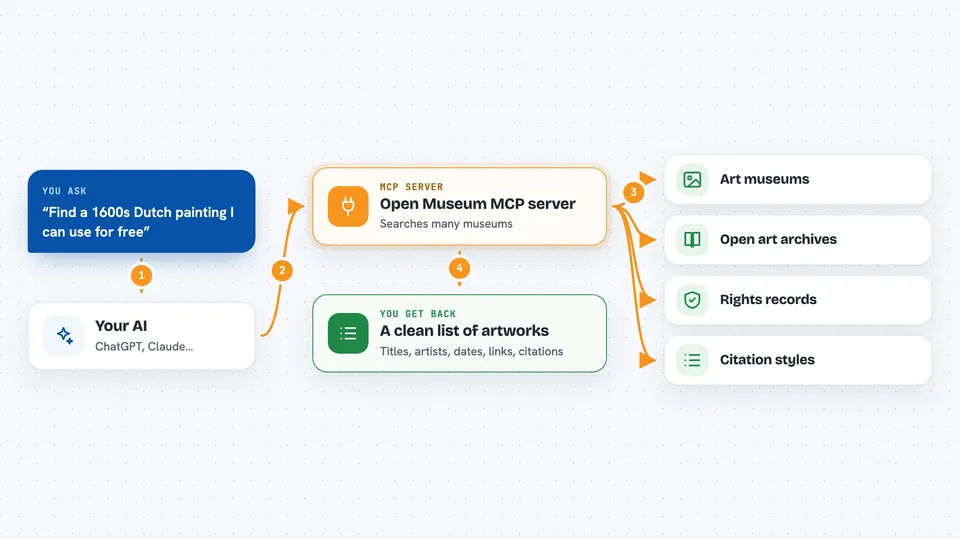
This is a helper that lets your AI search several museum collections at the same time, in one go. It only returns artworks that are free to reuse, and it hands you a citation you can paste into a paper or slide. It is handy if you write, teach, study art history, or just need a rights-safe image.
What is an MCP server? The 30-second version
On its own, your AI can only chat with you. An MCP server is a small helper program that gives your AI a new skill or a connection to an app or service. This one connects your AI to open-access museum collections like The Met, the Art Institute of Chicago, Wikimedia Commons, and Europeana. Once it is connected, your AI can look up artworks there and bring back details and citations when you ask.
What this MCP server does
You ask your AI something like find a Dutch painting from the 1600s with a free license. Your AI passes that request to this helper. The helper searches the museums it knows about, checks each record against that museum's own rights rules, and drops anything unclear. Then it hands your AI a clean list with titles, artists, dates, image links, and a citation you can use.
 Click to zoom
What you can do with it
- Search many museums at once with one request
- Filter results by year range, like 1640 to 1680
- Get only artworks with a verified open license
- Fetch full details for a single artwork by its ID
- Generate a citation in full, caption, or short style
- Discover a random artwork from a region or period
- See which regions and periods are well covered
Try asking your AI
- “Find a 17th-century Dutch genre painting and a same-period work from East Asia I can pair as a comparison. Give me caption citations for both.”
- “Show me Dutch genre painting between 1640 and 1680. Six works, full citations, prefer different artists.”
- “Suggest a non-canonical Edo-period work to pair with Vermeer's Woman Holding a Balance. Explain the contrast.”
- “Find a Van Gogh wheat field painting with a free license and give me a short citation.”
What it gives back to you
You get a list of artworks in a consistent shape: title, artist, date, medium, region, image link, and license details. Each result also comes with a citation you can copy. If you ask for one artwork by ID, you get that single record. If you ask for a citation style, you get just the formatted text.
Before you start
What you need
- An MCP client like Claude Desktop, VS Code with Copilot Chat, Cursor, or ChatGPT with MCP
- Node.js installed if you use the npx command (the one-click bundle skips this)
Good to know
It only returns artworks it can verify as open access, but you should still double-check the license before publishing or using an image commercially.
Install it with your AI
Add Open Museum MCP server to your AI, no technical skills needed
You don't install anything by hand. You copy one prompt, paste it into an AI that can work on your computer, and it checks, installs and connects the server for you, asking you when it needs something.
Sign in to get the install prompt
Members get a ready-made prompt that lets the Claude desktop app check Open Museum MCP server, install it and connect it for them, step by step. You don't need any technical skills: you copy, paste and answer a few questions. Your connected AI can also find and install any of the 4,361 MCP servers here for you.
Who it's for
Art-history students, researchers, writers, educators, and journalists who need rights-cleared artwork and citations.