MCP server · Notes
IAI Personal Memory Engine
by CodeAbra
Give your AI a long-term memory that keeps every chat and recalls the right context for you.
This is a memory helper that runs on your own computer and gives your AI assistant a long-term memory. It quietly saves what you talk about, then brings back the useful bits when you start a new chat. It is handy if you use Claude Code or a similar AI tool every day and are tired of repeating yourself.
What is an MCP server? The 30-second version
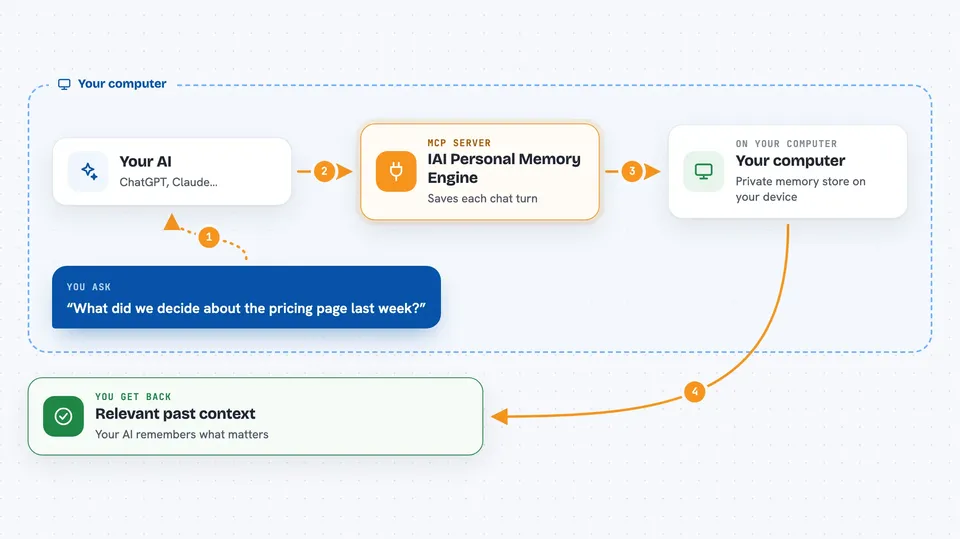
On its own, your AI can only chat about what is in front of it. An MCP server is a small helper program that gives your AI a new skill or a connection to something else. This one connects your AI to a personal memory store on your machine, so it can save what you said and look it up again later. You just talk normally, and the helper handles the remembering behind the scenes.
What this MCP server does
You chat with your AI like usual. In the background, this helper copies each turn of the conversation into a private store on your computer. When you start a new session, it picks a small slice of related memories and hands them to your AI as context. Over time, while your computer is idle, it tidies those notes, groups related ones, and keeps the useful ones fresh. You never have to say remember this or ask what we said last time.
 Click to zoom
What you can do with it
- Keep a word-for-word record of your conversations
- Bring back relevant past context at the start of a new chat
- Search your memory store by meaning or by exact words
- Correct an old memory when something changes
- Upload documents, notes, and files into your memory
- See your memories on a local dashboard and pin the important ones
- Run a nightly tidy-up that groups and refreshes what it learned
Try asking your AI
- “What did we decide about the pricing page last week?”
- “Remind me what my client Sarah prefers for meeting times.”
- “Search my memory for anything about the Q3 budget.”
- “That address changed, please update what you remember.”
What it gives back to you
You get short, relevant snippets of past conversations placed quietly at the start of your chat, so your AI already knows the background. When you ask directly, it returns a list of matching memories with dates and short quotes. It can also show you a summary of what it knows about you, or a list of open questions it is curious about. Everything stays in your chat as normal text.
Before you start
What you need
- Python 3.11 or 3.12 installed on your computer
- A supported AI host, such as Claude Code, Codex CLI, or Cursor
- For the all-in-one install: Git, Node.js 18 or newer, and Rust
Good to know
It reads and stores everything you say in your chats, so only use it on a computer and account you are comfortable keeping that record on, and back up the store and its key together.
Install it with your AI
Add IAI Personal Memory Engine to your AI, no technical skills needed
You don't install anything by hand. You copy one prompt, paste it into an AI that can work on your computer, and it checks, installs and connects the server for you, asking you when it needs something.
Sign in to get the install prompt
Members get a ready-made prompt that lets the Claude desktop app check IAI Personal Memory Engine, install it and connect it for them, step by step. You don't need any technical skills: you copy, paste and answer a few questions. Your connected AI can also find and install any of the 4,066 MCP servers here for you.
Who it's for
People who use an AI assistant every day for work and want it to remember past chats without repeating themselves.