
MCP server · Notes
DecisionNode MCP server
by decisionnode
Let your AI save and search your project decisions by meaning, from one shared local store.
DecisionNode is a memory box for the choices you make while building software. You write down a decision once, and later your AI helper can look it up by meaning when it becomes relevant again. It is handy if you work with AI coding tools and keep re-explaining the same choices.
What is an MCP server? The 30-second version
On its own, your AI can only chat with you. An MCP server is a small helper program that gives your AI a new skill or a connection to something else. This one connects your AI to a local store of your project decisions, kept on your own computer. So when you ask about something, the AI can search that store and bring back the decisions that fit.
What this MCP server does
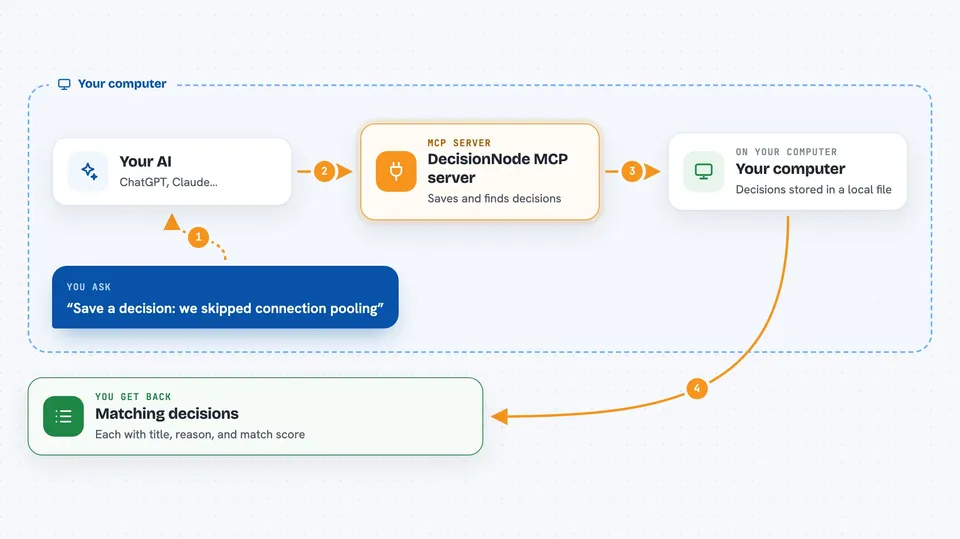
You record a decision, either by typing a command in your terminal or by asking your AI to save it. DecisionNode turns that decision into a kind of fingerprint (a vector) using Google Gemini, and keeps it in a local file on your machine. Later, when you or your AI need it, the AI asks DecisionNode to search by meaning, not just by exact words. DecisionNode compares your question to the stored fingerprints and hands back the closest decisions, ranked. Your AI then uses those to answer or to avoid repeating a mistake.
 Click to zoom
What you can do with it
- Save a decision with its reason and any constraints
- Search your past decisions by meaning, not exact wording
- Mark a decision as no longer active, or bring it back later
- Keep some decisions global so every project can see them
- See a history of who added or changed each decision
- Get a warning when a new decision looks like a duplicate
- Open a local web page to view your decisions as a graph
Try asking your AI
- “Search my decisions for anything about connection pooling”
- “Save a decision: we skipped connection pooling because only one process writes at a time”
- “List all active decisions for this project”
- “Deprecate the decision about the old login flow”
What it gives back to you
You get back a short list of matching decisions, each with its title, reason, and how closely it matches your question. Your AI can then read them out or use them silently while it works. When you save or change something, you get a confirmation that it was stored. In the local web view, you can also see your decisions as cards, a graph, or a map of points.
Before you start
What you need
- Node.js installed on your computer
- A free Gemini API key from Google (a kind of password for apps; the site gives you one for free)
Good to know
Your AI can add, change, and delete decisions in your local store, so it is worth checking the history now and then to see what it changed.
Install it with your AI
Add DecisionNode MCP server to your AI, no technical skills needed
You don't install anything by hand. You copy one prompt, paste it into an AI that can work on your computer, and it checks, installs and connects the server for you, asking you when it needs something.
Sign in to get the install prompt
Members get a ready-made prompt that lets the Claude desktop app check DecisionNode MCP server, install it and connect it for them, step by step. You don't need any technical skills: you copy, paste and answer a few questions. Your connected AI can also find and install any of the 4,609 MCP servers here for you.
Who it's for
Developers and technical teams who use AI coding tools and want their past decisions remembered across projects.





