
MCP server · Notes
MemoryLane MCP server
Lets your AI search a private history of what was on your screen, with summaries and text from each moment.
MemoryLane is a small desktop app for Mac and Windows that quietly watches your screen while you work. It turns each moment into a short written summary, keeps that text on your own computer, and throws the picture away. This MCP server is the part that lets your AI chat ask questions about that history.
What is an MCP server? The 30-second version
On its own, your AI can only chat with you. It has no idea what you did this morning or which app you had open an hour ago. An MCP server is a small helper program that gives your AI one new skill. This one connects your AI to MemoryLane, so it can look through your saved screen summaries and answer questions about your day.
What this MCP server does
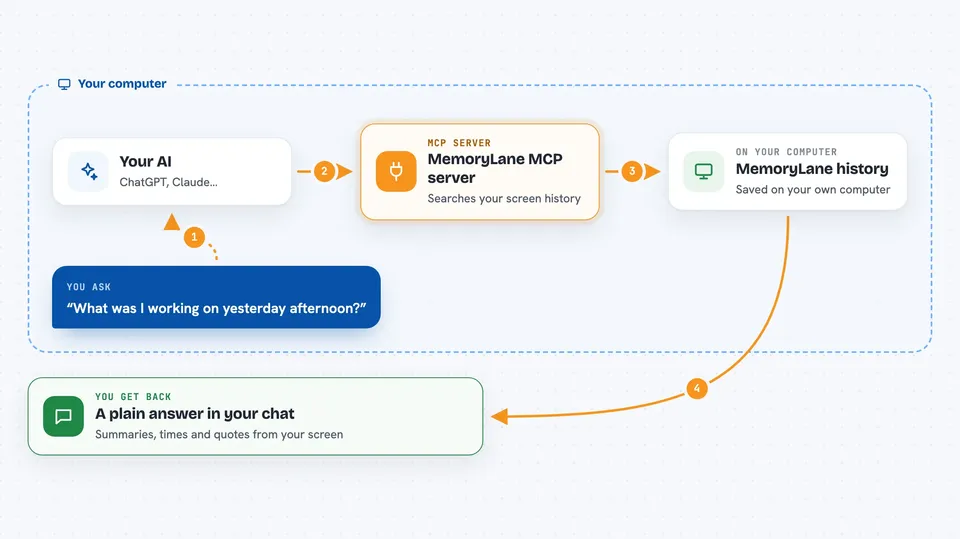
You ask your AI something like what was I working on yesterday afternoon. Your AI passes that question to this helper. The helper searches the MemoryLane history stored on your computer, using both keyword search and meaning based search. It finds the matching summaries and text, then hands them back to your AI. Your AI reads them and writes you a normal answer in the chat.
 Click to zoom
What you can do with it
- Search your screen history by keyword or by meaning
- See a timeline of what you were doing at a certain time
- Find which apps and windows you used most
- Spot tasks that repeat often and could be automated
- Pull up the text that was on screen at a past moment
- Ask follow up questions about a specific day or project
Try asking your AI
- “What was I working on yesterday afternoon?”
- “Show me everything I looked at about the Johnson invoice.”
- “Which apps did I spend the most time in this week?”
- “What did that error message on my screen say on Tuesday?”
What it gives back to you
You get normal chat answers: short summaries, lists of moments with times, and quotes of text that was on your screen. If you ask for a timeline, it comes back as a simple list you can read top to bottom. Nothing is drawn as a chart unless your AI decides to write one.
Before you start
What you need
- The MemoryLane desktop app installed and running on your Mac or Windows computer
- Some screen history captured already, so there is something to search
- An AI chat app that can connect to MCP servers, like Claude Desktop
Good to know
It reads a private history of your screen, so be careful about what gets captured while you work with sensitive information.
Install it with your AI
Add MemoryLane MCP server to your AI, no technical skills needed
You don't install anything by hand. You copy one prompt, paste it into an AI that can work on your computer, and it checks, installs and connects the server for you, asking you when it needs something.
Sign in to get the install prompt
Members get a ready-made prompt that lets the Claude desktop app check MemoryLane MCP server, install it and connect it for them, step by step. You don't need any technical skills: you copy, paste and answer a few questions. Your connected AI can also find and install any of the 4,066 MCP servers here for you.
Who it's for
Anyone who works at a computer all day and wishes they could remember what they saw, like support staff, analysts, writers, and project managers.




