
MCP server · Notes
DollhouseMCP server
by DollhouseMCP
Give your AI reusable personas, skills, templates, agents and memories you can activate on demand.
DollhouseMCP is a helper that lets you save and reuse ready-made ways of working with your AI. You get things like a writing persona, a code review skill, or a report template, and you switch them on when you need them. It is handy if you keep retyping the same instructions or want your AI to behave a certain way every time.
What is an MCP server? The 30-second version
On its own, your AI can only chat with you. An MCP server is a small helper program that gives your AI a new skill or a connection to something outside the chat. This one connects your AI to DollhouseMCP, a local library of reusable personas, skills, templates, agents and memories. Once connected, you can ask your AI to activate one of those items and it will follow it for you.
What this MCP server does
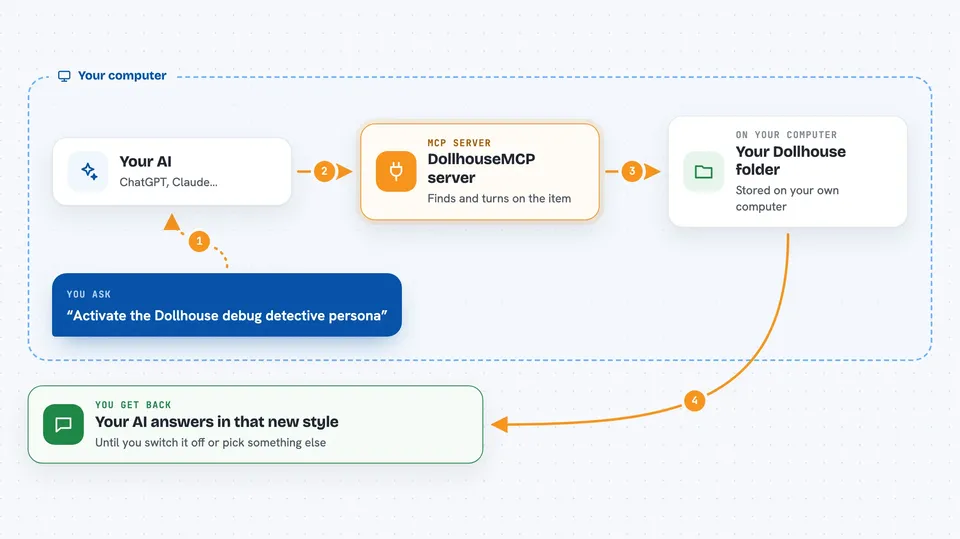
You ask your AI something like "activate the Dollhouse debug detective persona". The AI passes that request to this helper program running on your computer. The helper looks in your local Dollhouse folder, finds the item you named, and turns it on. From then on, your AI answers in that style or with that skill until you switch it off or pick something else.
 Click to zoom
What you can do with it
- Activate a persona so your AI talks and works a certain way
- Create a new skill, template, agent or memory by describing it in plain English
- Edit an existing element to refine how it behaves
- Browse and install elements other people shared in the public collection
- Bundle several elements together into one ensemble you can switch on
- Search your portfolio to find the right element quickly
- Keep memories so your AI remembers facts and preferences across sessions
Try asking your AI
- “What DollhouseMCP tools do you have available?”
- “List all available Dollhouse personas”
- “Activate the Dollhouse debug detective persona”
- “Create a skill for writing blog posts”
What it gives back to you
You get answers in the chat, plus lists of the elements in your portfolio and short descriptions of each. When you activate something, your AI's replies change right away to match that persona, skill or template. When you create or edit an element, the helper saves it as a file in your local Dollhouse folder and tells you it is done.
Before you start
What you need
- An MCP-compatible AI client such as Claude Code, Claude Desktop, Cursor, Gemini, Codex or a local LLM
- Node.js installed on your computer (the setup command uses npx)
Good to know
Some actions can change or delete things in your portfolio, so keep an eye on what you approve, and remember that activating a restrictive persona can lock down what your AI is allowed to do until you switch it off.
Install it with your AI
Add DollhouseMCP server to your AI, no technical skills needed
You don't install anything by hand. You copy one prompt, paste it into an AI that can work on your computer, and it checks, installs and connects the server for you, asking you when it needs something.
Sign in to get the install prompt
Members get a ready-made prompt that lets the Claude desktop app check DollhouseMCP server, install it and connect it for them, step by step. You don't need any technical skills: you copy, paste and answer a few questions. Your connected AI can also find and install any of the 4,361 MCP servers here for you.
Who it's for
People who use their AI every day for writing, coding, research or admin work and want reusable, switchable ways of working instead of retyping instructions.





