
MCP server · Productivity
Markdown to WhatsApp MCP server
by drsound
Lets your AI turn Markdown into WhatsApp formatting, so bold, lists and tables look right when you paste them into a chat.
This is a small helper that converts normal Markdown text into the formatting WhatsApp actually uses. If you write notes in ChatGPT or Claude and then paste them into WhatsApp, you have probably seen raw asterisks and broken tables. This fixes that before you copy.
What is an MCP server? The 30-second version
On its own, your AI can only chat with you. An MCP server is a small program that gives your AI one extra skill. This one gives it the skill of converting Markdown into WhatsApp formatting. So when you ask your AI to prepare a message for WhatsApp, it can run the conversion itself and hand you text that is ready to paste.
What this MCP server does
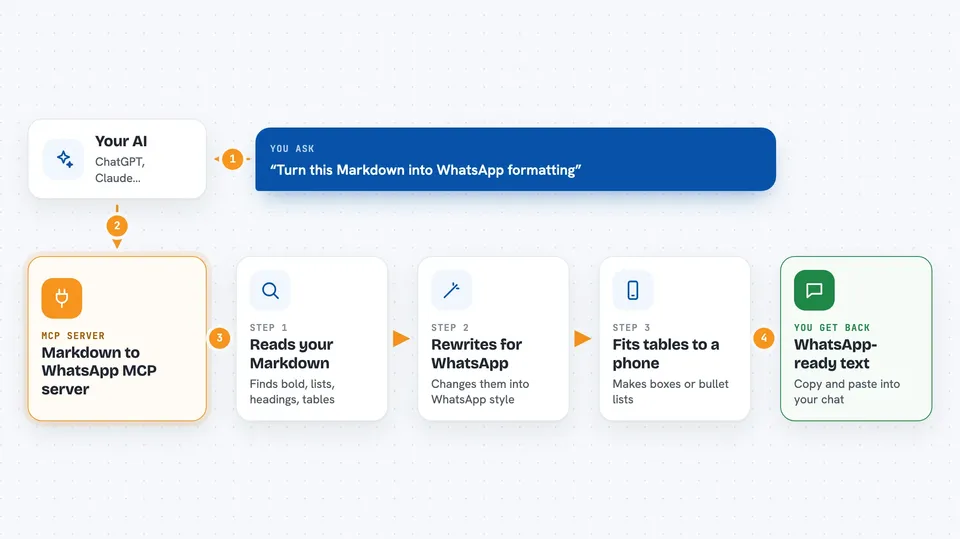
You ask your AI to write or reformat something for WhatsApp. The AI sends your text to this helper. The helper reads the Markdown, changes bold, italics, lists, headings and tables into WhatsApp's own syntax, and checks that tables fit inside a phone bubble. Then it sends the finished text back, and your AI shows it to you in the chat, ready to copy.
 Click to zoom
What you can do with it
- Turn Markdown bold, italics and strikethrough into WhatsApp formatting
- Convert headings into bold lines with optional emoji prefixes
- Turn bullet lists, numbered lists and task lists into WhatsApp-friendly lists
- Render Markdown tables as monospace boxes or as bulleted lists
- Wrap code blocks so they match how WhatsApp will show them on a phone
- Fix links, blockquotes and horizontal rules for WhatsApp
- Tell you which tables became boxes and which became lists
Try asking your AI
- “Turn this Markdown into WhatsApp formatting so I can paste it into a chat”
- “Rewrite my meeting notes as a WhatsApp message with bold headings and a bullet list”
- “Convert this table into something that fits in a WhatsApp bubble on a normal phone”
- “Make this text WhatsApp-ready, keep the code block as it is”
What it gives back to you
You get back the converted text, already in WhatsApp syntax, shown in the chat. If there were tables, the AI also gets a small summary saying which tables fit as a box and which became a list. Nothing is changed in WhatsApp itself: you still copy the text and paste it into your chat.
Before you start
What you need
- Node.js 20 or newer on your computer
- An AI app that can use MCP servers, like Claude Desktop or Claude Code
Good to know
It only converts text, it does not send anything to WhatsApp for you, so you still copy and paste the result yourself.
Install it with your AI
Add Markdown to WhatsApp MCP server to your AI, no technical skills needed
You don't install anything by hand. You copy one prompt, paste it into an AI that can work on your computer, and it checks, installs and connects the server for you, asking you when it needs something.
Sign in to get the install prompt
Members get a ready-made prompt that lets the Claude desktop app check Markdown to WhatsApp MCP server, install it and connect it for them, step by step. You don't need any technical skills: you copy, paste and answer a few questions. Your connected AI can also find and install any of the 4,609 MCP servers here for you.
Who it's for
Anyone who writes in ChatGPT or Claude and then pastes the result into WhatsApp, especially people sharing notes, updates or tables with a team or a group chat.





