
MCP server · Notes
agent-memory MCP server
Give your AI a long-term memory so it remembers facts, decisions, and preferences between chats.
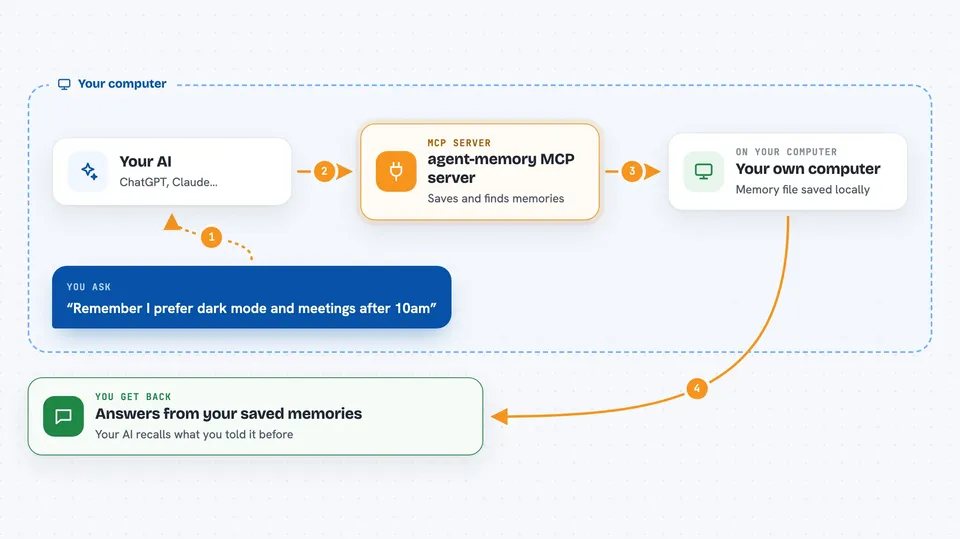
agent-memory is a small helper that gives your AI a memory it can keep. Instead of forgetting everything when a chat ends, your AI can save facts, decisions, and preferences, then look them up later by meaning. It is handy if you use an AI assistant often and are tired of repeating yourself.
What is an MCP server? The 30-second version
On its own, your AI can only chat with what is in front of it right now. An MCP server is a small helper program that gives your AI a new skill or a connection to something outside the chat. This one connects your AI to a memory store kept in a file on your own computer. So when you ask about something from before, your AI can look it up in that store and answer with the right context.
What this MCP server does
You tell your AI something worth remembering, like a preference or a decision. Your AI passes that to this helper, which saves it in a local memory file on your computer. Later, when you ask a question, your AI searches that file by meaning, not just exact words, and pulls back the closest matches. It also keeps a short identity layer and a current-context layer so your AI has quick continuity, and it can spot when a new fact replaces an old one. Everything stays on your machine, with no cloud service involved.
 Click to zoom
What you can do with it
- Save facts, decisions, and preferences your AI should remember
- Search your saved memories by meaning instead of exact keywords
- Keep a short identity layer so your AI knows who you are
- Track what you are currently working on as active context
- Note when new information replaces or updates an old memory
- Record corrections and lessons so past mistakes inform later answers
- Merge similar memories and tidy up the store over time
Try asking your AI
- “Remember that I prefer dark mode and meetings after 10am”
- “What did we decide about the pricing page last week”
- “What was I working on with Bill”
- “Actually my timezone is Eastern, not Pacific, please update that”
What it gives back to you
You get answers in plain chat, drawn from your saved memories. Your AI can show a short list of matching memories with a little context around each one. It can also give you a quick summary of your identity layer, your current focus, or stats about how many memories you have. When it saves something, it simply confirms it was stored.
Before you start
What you need
- Python installed on your computer
- The agent-memory package installed (pip install openclaw-memory)
- An MCP-compatible AI app such as Claude Desktop, Cursor, or Claude Code
- A folder path on your computer where the memory file can live
Good to know
It stores personal facts, decisions, and preferences in a file on your computer, so treat that file as private and be mindful about what you ask it to remember.
Install it with your AI
Add agent-memory MCP server to your AI, no technical skills needed
You don't install anything by hand. You copy one prompt, paste it into an AI that can work on your computer, and it checks, installs and connects the server for you, asking you when it needs something.
Sign in to get the install prompt
Members get a ready-made prompt that lets the Claude desktop app check agent-memory MCP server, install it and connect it for them, step by step. You don't need any technical skills: you copy, paste and answer a few questions. Your connected AI can also find and install any of the 4,066 MCP servers here for you.
Who it's for
People who use an AI assistant every day and want it to remember their preferences, projects, and past decisions without repeating themselves.




