MCP server · Productivity
Easy Notion MCP server
by Grey-Iris
Lets your AI read and write Notion pages using plain markdown, so notes and docs stay tidy.
This is a helper that connects your AI assistant to your Notion workspace. It lets the AI read your pages and create or update them, and it works in plain markdown, which is the simple text formatting you already see in Notion. It is handy if you keep notes, docs, or databases in Notion and want your AI to help without copying and pasting back and forth.
What is an MCP server? The 30-second version
On its own, your AI can only chat with you. An MCP server is a small helper program that gives your AI a new skill or a connection to an app, and here it connects your AI to Notion. Once it is set up, you can ask your AI to look something up in Notion or write something there, and it will do it for you. You do not need to understand how it works under the hood; you just talk to your AI like usual.
What this MCP server does
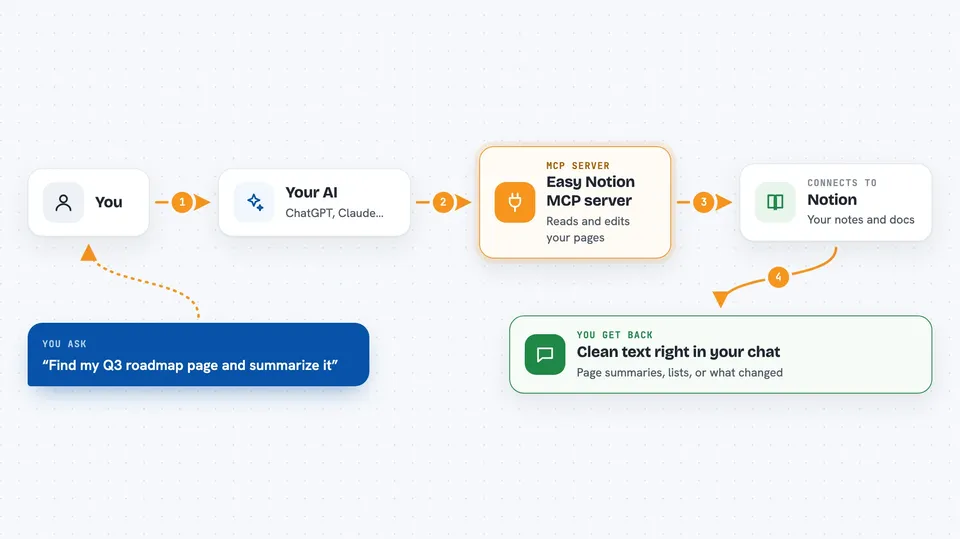
You ask your AI something about your Notion workspace, like finding a page or adding a note. The AI passes your request to this helper. The helper talks to Notion for you, reading pages or making changes. Then it hands the result back to your AI, which shows it to you in the chat. Because it uses markdown, the text it reads and writes looks clean and readable, not like technical code.
 Click to zoom
What you can do with it
- Search your Notion workspace for pages by keyword
- Read a page and show its content as clean markdown
- Create a new page with headings, lists, and tables
- Append new content to an existing page
- Update a section or toggle inside a page
- Query a Notion database and list its entries
- Upload a file from your computer into a Notion page
Try asking your AI
- “Find my page called Q3 roadmap in Notion and summarize it”
- “Create a new Notion page titled Meeting notes for today with a bullet list of action items”
- “Add a section called Next steps to my project page”
- “Search my Notion workspace for anything mentioning launch and list the page titles”
What it gives back to you
You get back readable text, lists, or summaries right in the chat. If the AI created or changed something in Notion, it tells you what it did, like the title of the new page or the section it updated. For searches, you get a list of matching pages with their names. For database queries, you get the rows and their values in a simple format.
Before you start
What you need
- A Notion account
- A Notion integration token (a kind of password for apps; Notion gives you one for free on their integrations page)
- The pages you want to use shared with that integration inside Notion
- An MCP-compatible AI client like Claude Desktop, Claude Code, Cursor, or Windsurf
Good to know
It can create, change, and archive things in your Notion workspace, so it is worth checking what your AI plans to do before letting it make changes to important pages.
Install it with your AI
Add Easy Notion MCP server to your AI, no technical skills needed
You don't install anything by hand. You copy one prompt, paste it into an AI that can work on your computer, and it checks, installs and connects the server for you, asking you when it needs something.
Sign in to get the install prompt
Members get a ready-made prompt that lets the Claude desktop app check Easy Notion MCP server, install it and connect it for them, step by step. You don't need any technical skills: you copy, paste and answer a few questions. Your connected AI can also find and install any of the 4,361 MCP servers here for you.
Who it's for
Anyone who keeps notes, docs, or databases in Notion and wants their AI assistant to help read, write, or organize them without manual copying.