MCP server · Productivity
konbu MCP server
by krtw00
Let your AI read and update your konbu planner: memos, todos, calendar events, and search.
konbu is a personal planner app that keeps your notes, to do lists, and calendar in one place. This MCP server is the bridge that lets your AI assistant work with that planner for you. It is handy if you already use konbu, or if you want to try it as a simple local planner on your own computer.
What is an MCP server? The 30-second version
On its own, your AI can only chat. An MCP server is a small helper program that gives your AI a new skill or a connection to an app. This one connects your AI to konbu, your planner. Once it is set up, you can just ask your AI in normal words, and it will look things up or make changes in konbu for you.
What this MCP server does
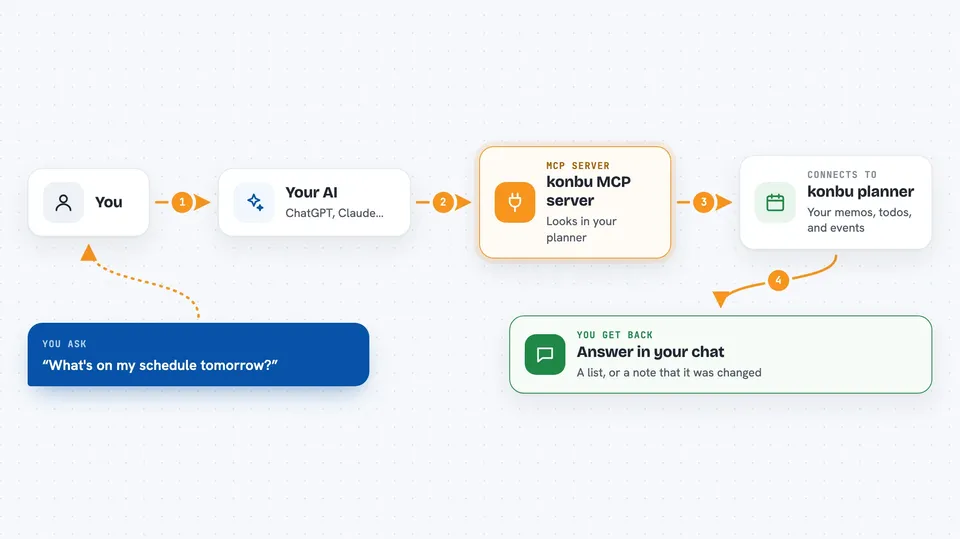
You ask your AI something in plain language, like what is on your schedule tomorrow. The AI passes that request to this konbu helper. The helper talks to your konbu planner, either a local copy on your machine or your own konbu server. It finds the answer or makes the change, then hands the result back to the AI. The AI then tells you the answer in the chat.
 Click to zoom
What you can do with it
- Look up what is on your calendar for a given day
- Add a new event, like an appointment, with a date and time
- Create a to do item, with a due date and tags
- Mark a to do as done or reopen it
- Search across your memos, todos, and events in one go
- Read or update a memo
- Delete a memo, todo, or event you no longer need
Try asking your AI
- “What's on my schedule tomorrow?”
- “Add a dentist appointment next Friday at 1pm”
- “Create a todo to buy groceries with tag shopping”
- “Show me notes tagged meeting from last week”
- “Mark the review PR todo as done”
What it gives back to you
You get answers in the chat, in normal sentences. For example, a list of tomorrow's events, or a confirmation that a todo was added. When you search, it gives you matching memos, todos, and events together. When it changes something, it tells you what it changed.
Before you start
What you need
- The konbu command line program installed on your computer (the README shows a one line install command)
- For the simple local mode: nothing else, no account and no server
- For the full mode: a konbu account, either on the free hosted site or your own server, plus an API key from Settings > Security
Good to know
This helper can change and delete things in your planner, so it is worth checking with your AI before you let it remove anything.
Install it with your AI
Add konbu MCP server to your AI, no technical skills needed
You don't install anything by hand. You copy one prompt, paste it into an AI that can work on your computer, and it checks, installs and connects the server for you, asking you when it needs something.
Sign in to get the install prompt
Members get a ready-made prompt that lets the Claude desktop app check konbu MCP server, install it and connect it for them, step by step. You don't need any technical skills: you copy, paste and answer a few questions. Your connected AI can also find and install any of the 4,361 MCP servers here for you.
Who it's for
People who keep their notes, tasks, and calendar in konbu and want to manage them by chatting with an AI instead of clicking around.