MCP server · Meetings
Samuraizer meeting notes server
by UladzKha
Let your AI read your local meeting transcripts, summaries, action items and decisions, and start new meeting runs.
Samuraizer is a tool that turns your meeting recordings into written notes: a transcript, a summary, a list of action items and a list of decisions. It runs completely on your own computer, so your recordings stay with you. This page is about its companion helper for AI assistants, which lets your AI look through those meeting results and start the pipeline for you.
What is an MCP server? The 30-second version
On its own, your AI can only chat with you. An MCP server is a small helper program that gives your AI a new skill or a connection to another tool. This one is the companion helper for Samuraizer, so your AI can reach the meetings you have already processed on your machine. Once it is connected, you can ask your AI about a meeting and it will fetch the answer from your own Samuraizer results instead of guessing.
What this MCP server does
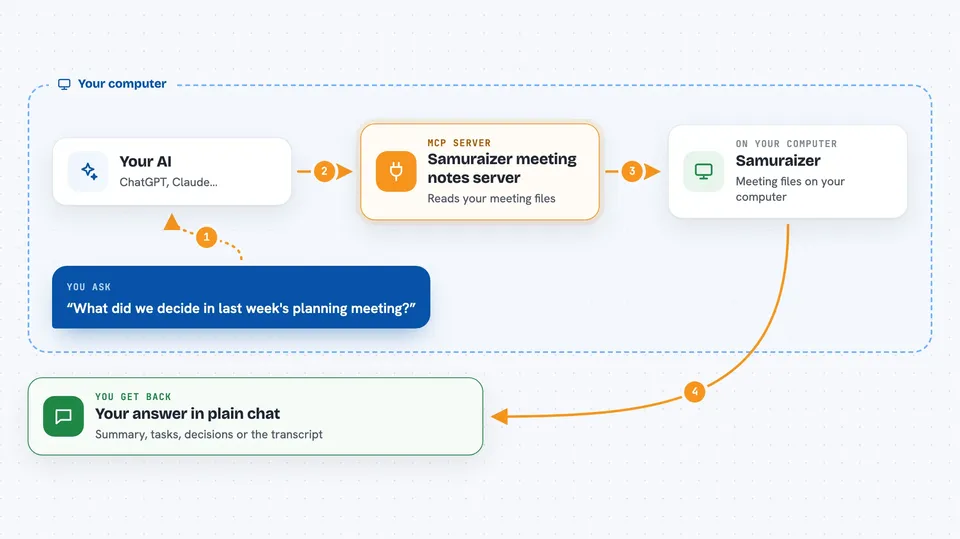
You ask your AI something about a meeting, like what was decided or who has which task. The AI passes that question to this helper. The helper looks at the meeting files Samuraizer already produced on your computer, which follow a shared format called memnex. It can also ask Samuraizer to run the pipeline on a recording, which means turning audio into a transcript and then into a summary, action items and decisions. The AI then tells you the answer or confirms that the run started.
 Click to zoom
What you can do with it
- Look up a processed meeting and read its transcript
- Get the summary of a meeting
- List the action items from a meeting
- List the decisions that were made
- Check who was in a meeting and when it happened
- Start the Samuraizer pipeline on a recording
- Check the status of a meeting run
Try asking your AI
- “What did we decide in last week's planning meeting?”
- “List the action items from the product sync and who owns each one”
- “Summarize the meeting I recorded this morning”
- “Run Samuraizer on the recording in my meetings folder”
What it gives back to you
You get answers in plain chat text: a summary, a list of tasks, a list of decisions, or the transcript itself. When you ask it to start a run, it tells you that the run began and you can ask about its status later. Everything it shows comes from the meeting files already saved on your computer.
Before you start
What you need
- Samuraizer installed on your computer, with at least one meeting already processed
- Ollama running locally if you want it to start new pipeline runs
- The Claude desktop app or another AI app that supports MCP servers
Good to know
It can start the Samuraizer pipeline, which uses your computer's processing power and your local Ollama model, and it reads your private meeting files, so only connect it on a machine you trust.
Install it with your AI
Add Samuraizer meeting notes server to your AI, no technical skills needed
You don't install anything by hand. You copy one prompt, paste it into an AI that can work on your computer, and it checks, installs and connects the server for you, asking you when it needs something.
Sign in to get the install prompt
Members get a ready-made prompt that lets the Claude desktop app check Samuraizer meeting notes server, install it and connect it for them, step by step. You don't need any technical skills: you copy, paste and answer a few questions. Your connected AI can also find and install any of the 4,361 MCP servers here for you.
Who it's for
People who record meetings and want their AI assistant to answer questions about what was said, decided and assigned, without sending recordings to the cloud.