MCP server · Notes
JotDown MCP server
by Harry-027
Let your AI create or update Notion pages and build markdown books from your content.
JotDown is a small helper program that connects your AI assistant to Notion and to a tool that builds markdown books. You write or talk about your content, and the AI can save it as a Notion page or turn it into a full book with chapters. It is handy if you write documentation, notes, or guides and want them filed away without a lot of copy and paste.
What is an MCP server? The 30-second version
On its own, your AI can only chat with you. An MCP server is a small helper program that gives your AI a new skill or a connection to another app. This one connects your AI to Notion and to a book-building tool, so the AI can look things up or create things there when you ask. You stay in the chat, and the helper does the running around behind the scenes.
What this MCP server does
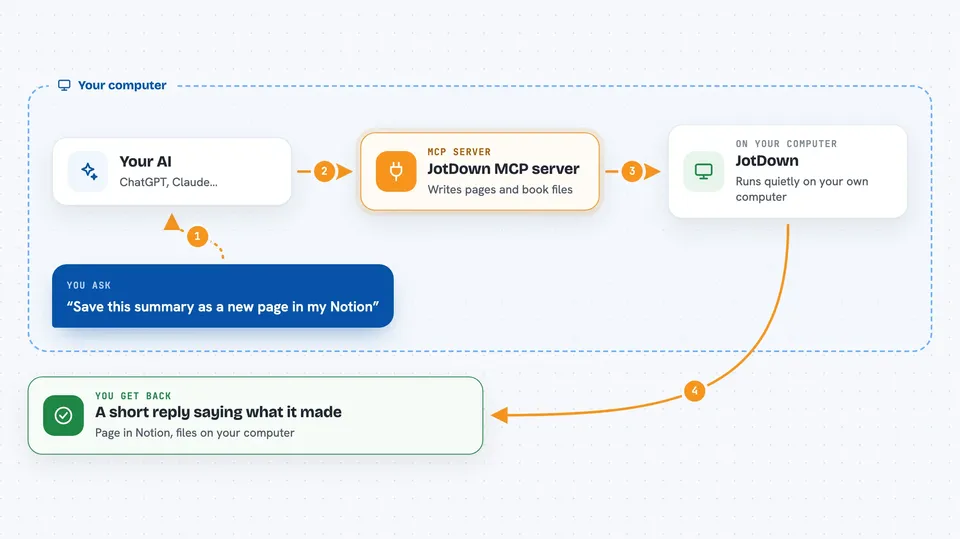
You ask your AI to save something to Notion or to build a book from your notes. The AI passes your request to JotDown, which is running quietly on your own computer. JotDown then talks to Notion to create or update a page, or it writes out the files that make up a markdown book, including a table of contents and chapter files. When it is done, you get a short answer back in the chat telling you what it made or changed.
 Click to zoom
What you can do with it
- Create a new Notion page from content your AI just wrote
- Update an existing Notion page with new information
- Turn a set of notes into a markdown book with chapters
- Generate the table of contents file for a book
- Create the README file and chapter files for a book
- Keep the structure of a book organized as it grows
Try asking your AI
- “Save this summary as a new page in my Notion workspace”
- “Update my Notion page called Project Notes with the points we just discussed”
- “Turn these five sections into a markdown book with a table of contents”
- “Add a new chapter to my book called Getting Started”
What it gives back to you
You get a short reply in the chat saying what was created or updated, such as the name of the new Notion page or the files written for your book. For Notion, the page itself appears in your workspace. For books, the files land on your computer, ready to open or publish. You can then ask follow-up questions or make changes in the same conversation.
Before you start
What you need
- A Notion account with an internal integration set up, and its secret token
- A Notion page titled Jot It Down shared with that integration
- Rust installed on your computer, plus the mdbook command line tool
- An MCP client such as the Claude desktop app, Cline, or Continue
Good to know
This server can create and change pages in your Notion workspace, so check what it wrote before you rely on it, and keep your Notion token private.
Install it with your AI
Add JotDown MCP server to your AI, no technical skills needed
You don't install anything by hand. You copy one prompt, paste it into an AI that can work on your computer, and it checks, installs and connects the server for you, asking you when it needs something.
Sign in to get the install prompt
Members get a ready-made prompt that lets the Claude desktop app check JotDown MCP server, install it and connect it for them, step by step. You don't need any technical skills: you copy, paste and answer a few questions. Your connected AI can also find and install any of the 4,609 MCP servers here for you.
Who it's for
Writers, technical writers, and anyone who keeps notes or documentation in Notion and wants help turning them into organized pages or books.