MCP server · Apple, iOS and Mac
WeChat FastBridge MCP server
Let your AI read and send WeChat messages on your Mac, without screenshots.
WeChat FastBridge is a small helper that connects your AI assistant to WeChat on your Mac. Once it is set up, you can ask your AI to read a chat, send a message, or send a file or sticker, and it does the clicking for you. It is handy for anyone who spends the day in WeChat and wants a hand with replies.
What is an MCP server? The 30-second version
On its own, your AI can only chat with you. An MCP server is a small helper program that gives your AI a new skill or a connection to an app. This one connects your AI to WeChat on your Mac, so it can look at your chats and send messages for you. You still ask in plain words; the helper does the technical part in the background.
What this MCP server does
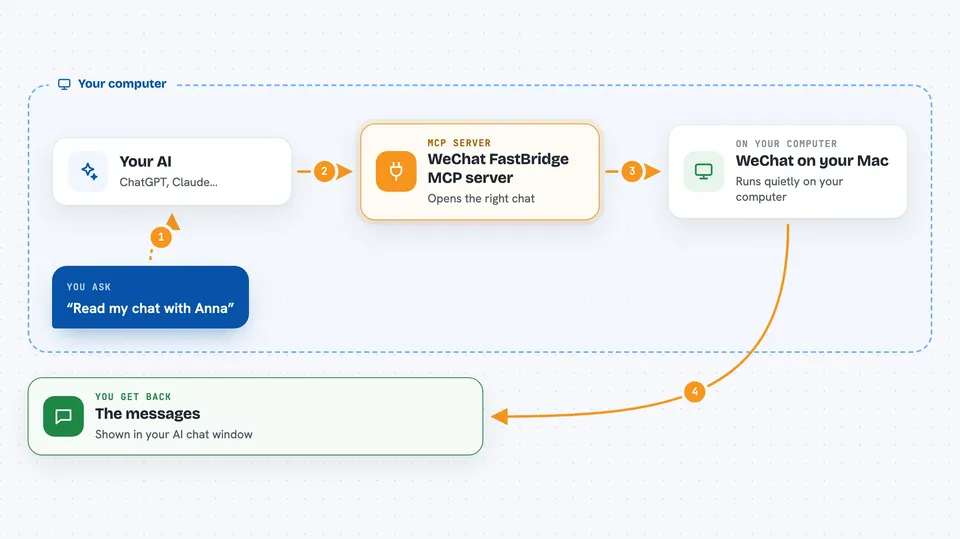
You ask your AI something like read my chat with Anna or tell Anna hello. Your AI passes that request to this helper, which runs quietly on your Mac. The helper uses the Mac's built-in accessibility features to open the right chat in WeChat, check it is the correct one, and then read or type. The result comes back to your AI as a short, tidy summary, and your AI shows it to you in the chat window.
 Click to zoom
What you can do with it
- Read the latest messages in a WeChat chat
- Send a text message to a chat by name
- Send a file or a sticker to a chat
- Wait for a new message in one chat and report it
- Watch a short list of chats you allow and tell you when something new arrives
- Keep track of recent context so follow-up questions make sense
Try asking your AI
- “Read my chat with Anna and tell me what she asked”
- “Send hello to the chat called Team Lunch”
- “Send this file to my chat with Jerry”
- “Wait for a new message in my chat with Support and summarize it”
What it gives back to you
You get short, plain answers in your AI chat: the new messages, a small amount of recent context, and the time it took. When it sends something, it tells you whether the send went through. Unchanged reads come back empty, so you are not flooded with repeats. Everything is kept short on purpose so the answer stays easy to read.
Before you start
What you need
- A Mac running macOS 13 or newer
- WeChat for Mac installed and running
- Node.js 20 or newer
- The Codex app, command line, or IDE extension, plus Accessibility permission for it in System Settings
Good to know
It can send messages on your behalf, and sending is not undoable, so check before you let it reply to someone important.
Install it with your AI
Add WeChat FastBridge MCP server to your AI, no technical skills needed
You don't install anything by hand. You copy one prompt, paste it into an AI that can work on your computer, and it checks, installs and connects the server for you, asking you when it needs something.
Sign in to get the install prompt
Members get a ready-made prompt that lets the Claude desktop app check WeChat FastBridge MCP server, install it and connect it for them, step by step. You don't need any technical skills: you copy, paste and answer a few questions. Your connected AI can also find and install any of the 4,361 MCP servers here for you.
Who it's for
People who live in WeChat all day, like support staff, small business owners, and anyone who wants help reading and answering chats on a Mac.