
MCP server · Research
Page2AI MCP server
by igorsaevets
Turn any web page into clean Markdown your AI can read, right on your own computer.
This is a small helper that lets your AI read web pages properly. You give it a link, and it hands your AI the page as tidy text instead of a messy wall of website code. It is handy for anyone who asks their AI questions about online documentation, help pages, or articles.
What is an MCP server? The 30-second version
On its own, your AI can only chat with what it already knows. An MCP server is a small helper program that gives your AI one new skill. This helper gives it the skill of opening a web page and turning it into clean Markdown, which is a simple text format with headings, tables, and code blocks kept in place. Once it is connected, your AI can fetch a page for you when you ask, instead of you copying and pasting the text yourself.
What this MCP server does
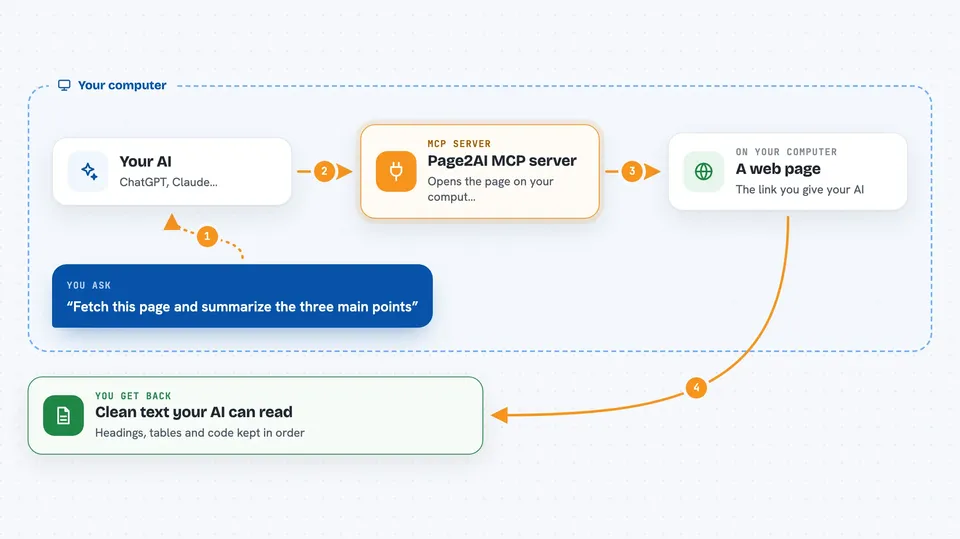
You ask your AI to fetch a web page. Your AI passes the link to this helper. The helper opens the page, strips out the menus, ads, and clutter, and keeps the useful parts: headings, tables, and code blocks. Your AI then reads that clean text and answers your question or writes something based on it. Everything happens on your own machine, and the only website it visits is the one you gave it.
 Click to zoom
What you can do with it
- Fetch a documentation page and summarize it
- Turn a long article into clean text your AI can quote
- Compare two web pages side by side
- Pull code examples out of a technical page
- Keep tables from a web page in readable form
- Read a help page and answer questions about it
Try asking your AI
- “Fetch this page and summarize the three main points: https://docs.anthropic.com/en/docs/build-with-claude/extended-thinking”
- “Use page_to_markdown on https://ai.google.dev/gemini-api/docs/thinking and write a short Python example from it”
- “Fetch both of these pages and tell me how their advice differs: https://docs.anthropic.com/en/docs/prompt-engineering and https://platform.openai.com/docs/guides/prompt-engineering”
- “Turn this page into Markdown and keep the tables: https://example.com/pricing”
What it gives back to you
You get the page back as clean Markdown text inside your chat. It starts with a small block of details like the page title, the link, and when it was captured. Then comes the article itself with headings, tables, and code blocks kept in order. Your AI reads that and gives you its answer, summary, or rewrite.
Before you start
What you need
- Node.js 20 or newer on your computer
- An AI app that supports MCP servers, like Claude Desktop, Claude Code, Cursor, or VS Code
Good to know
The hosted web address fetches pages from the author's server, so prefer running it locally if the links you use are private.
Install it with your AI
Add Page2AI MCP server to your AI, no technical skills needed
You don't install anything by hand. You copy one prompt, paste it into an AI that can work on your computer, and it checks, installs and connects the server for you, asking you when it needs something.
Sign in to get the install prompt
Members get a ready-made prompt that lets the Claude desktop app check Page2AI MCP server, install it and connect it for them, step by step. You don't need any technical skills: you copy, paste and answer a few questions. Your connected AI can also find and install any of the 4,361 MCP servers here for you.
Who it's for
Anyone who asks their AI about web pages, especially people reading documentation, doing research, or comparing help articles.


