
MCP server · Developer tools · official
SuperGrep code context MCP server
by infino-ai · official
Lets your AI search a code folder or log folder by meaning and by exact text, instead of reading every file.
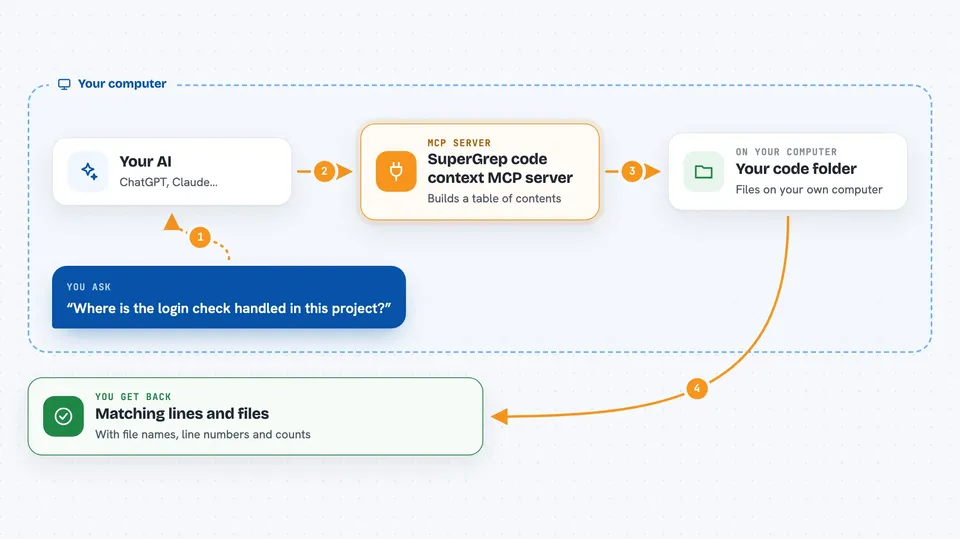
SuperGrep is a helper that gives your AI a search engine for a folder on your computer. It is made by Infino, the company behind it, and it is aimed at people who use AI coding assistants and want faster, cheaper answers. If you have ever watched your AI slowly open file after file trying to find something, this is for you.
What is an MCP server? The 30-second version
On its own, your AI can only chat with you and read files one at a time. An MCP server is a small helper program that gives your AI a new skill or a connection to something else. This one gives your AI a search index over a folder, so instead of reading everything it can ask the index where the answer lives. You install it once, and from then on your AI can look things up in that folder when you ask a question.
What this MCP server does
You point your AI at a folder, like a project or a folder of logs. The first time you ask something there, SuperGrep builds an index of that folder, which is like a detailed table of contents. When you ask a question, your AI uses this helper to search the index instead of reading every file. The helper returns the matching lines or files with their names and line numbers, and your AI reads only those and writes you the answer. After that it keeps the index up to date as files change.
 Click to zoom
What you can do with it
- Find every place an exact word or phrase appears, with counts
- Search by meaning when you do not know the exact words used in the code
- Ask a question that spans a whole project and get back the files that matter
- Count and rank things across a folder, like which files talk about a topic the most
- Search several folders or projects in one session
- Index logs and test output next to your code and search them together
Try asking your AI
- “Where is the login check handled in this project?”
- “Find every place that calls the sendEmail function and tell me how many there are”
- “Which files have the most code about payments?”
- “Why did this integration test start failing? Look at the logs and the test output.”
What it gives back to you
You get back the matching lines or files, each labeled with its file path and line number, plus counts when you asked for them. For bigger questions, you get the handful of files that matter rather than a wall of text. Your AI then reads those and writes the actual answer in the chat. Nothing is changed in your files; it only reads.
Before you start
What you need
- Claude Code installed, or another AI tool that supports MCP servers
- Node.js version 22 or newer, on macOS or Linux
- A free Infino account for the meaning-based search and ask features (no card needed, but you must keep the key it gives you safe)
Good to know
The search and ask features send a copy of the index of the folders you use them in to Infino's cloud, so do not use them on folders you are not allowed to upload.
Install it with your AI
Add SuperGrep code context MCP server to your AI, no technical skills needed
You don't install anything by hand. You copy one prompt, paste it into an AI that can work on your computer, and it checks, installs and connects the server for you, asking you when it needs something.
Sign in to get the install prompt
Members get a ready-made prompt that lets the Claude desktop app check SuperGrep code context MCP server, install it and connect it for them, step by step. You don't need any technical skills: you copy, paste and answer a few questions. Your connected AI can also find and install any of the 4,609 MCP servers here for you.
Who it's for
Developers and anyone who uses an AI assistant to work through a codebase, a folder of logs, or a large pile of text files.




