
MCP server · Developer tools
Language Server MCP server
by isaacphi
Let your AI read and navigate your code project: find definitions, references, errors, and rename things.
This is a helper that connects your AI assistant to a tool that understands code, called a language server. It lets the AI look up where a function is defined, where it is used, and what errors a file has, instead of guessing. It is handy for developers who want their AI to answer questions about a real project on their computer.
What is an MCP server? The 30-second version
On its own, your AI can only chat with you. An MCP server is a small helper program that gives your AI a new skill or a connection to something else. This one connects your AI to a language server, which is the same kind of tool your code editor uses to understand code. Once it is connected, the AI can look things up in your project when you ask, instead of making things up.
What this MCP server does
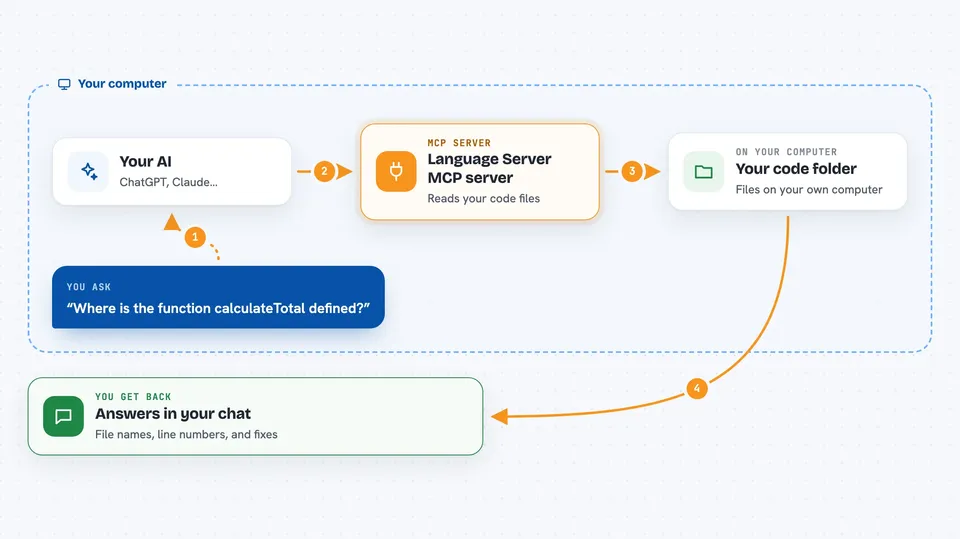
You point this helper at a folder on your computer that holds your code, and at a language server for your programming language. When you ask your AI something about the code, the AI sends the question to this helper. The helper asks the language server, which reads your files and figures out the answer. The helper sends the answer back, and your AI explains it to you in the chat.
 Click to zoom
What you can do with it
- Find where a function or type is defined in your project
- List every place a name is used across your code
- Show warnings and errors for a specific file
- Show the documentation or type hint for something you point at
- Rename a name everywhere in the project at once
- Make several small edits to a file by line number
Try asking your AI
- “Where is the function calculateTotal defined in this project?”
- “Show me every place that the User struct is used.”
- “What errors does the file src/main.go have right now?”
- “Rename the function oldName to newName across the whole project.”
What it gives back to you
You get answers in the chat: the source code of a definition, a list of file names and line numbers where something is used, or a list of warnings and errors for a file. When you ask for a rename, it tells you which files it changed. It can also make edits to a file, and you will see what it changed.
Before you start
What you need
- The Go programming language installed on your computer
- A language server for your programming language (for example gopls for Go, rust-analyzer for Rust, pyright for Python)
- The path to the folder that holds your project
- An MCP client like the Claude desktop app
Good to know
It can rename names and change files in your project, so keep your work saved or under version control before letting it make edits.
Install it with your AI
Add Language Server MCP server to your AI, no technical skills needed
You don't install anything by hand. You copy one prompt, paste it into an AI that can work on your computer, and it checks, installs and connects the server for you, asking you when it needs something.
Sign in to get the install prompt
Members get a ready-made prompt that lets the Claude desktop app check Language Server MCP server, install it and connect it for them, step by step. You don't need any technical skills: you copy, paste and answer a few questions. Your connected AI can also find and install any of the 4,609 MCP servers here for you.
Who it's for
Developers and programmers who want their AI assistant to answer questions about a real code project on their own computer.




