
MCP server · Productivity
AI Checker MCP server
by JayOfemi
Let your AI check whether your writing sounds AI-generated, and show which phrases give it away.
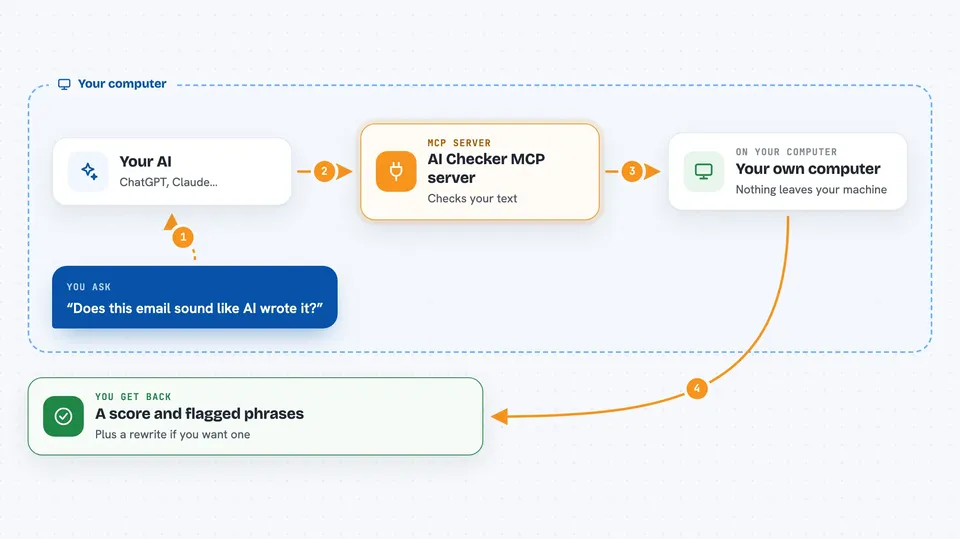
AI Checker is a small helper you add to your AI assistant so it can look at a piece of writing and tell you how AI-like it sounds. It also points out the exact phrases that make it read that way, runs a grammar pass, and can compare your text against your own documents to spot reuse. It is handy if you write emails, reports, or articles and want a second opinion before you send them.
What is an MCP server? The 30-second version
On its own, your AI can only chat with you. An MCP server is a small helper program that gives your AI a new skill or a connection to something outside the chat. This one gives your AI a writing-check skill, so it can read your text and tell you how AI-like it sounds. You install it once, and after that your AI can use it whenever you ask.
What this MCP server does
You paste some text into your chat and ask your AI to check it. Your AI passes that text to this helper, which runs the check on your own machine. The helper comes back with a likelihood score, a confidence level, and the exact phrases that read as AI. Your AI then explains the result to you in plain words, and can rewrite the text if you want.
 Click to zoom
What you can do with it
- Check whether a piece of writing sounds AI-generated
- See the exact phrases that make your text read as AI
- Get a grammar pass on your writing
- Compare your text against your own documents to spot reuse
- Ask your AI to rewrite the parts that read as AI
- Run the whole check on your own computer, with nothing sent to a server
Try asking your AI
- “Use ai-checker to check this text and tell me how AI-like it sounds”
- “Which phrases in this paragraph make it read as AI?”
- “Check this email against my saved documents and tell me if anything is reused”
- “Give this draft a grammar pass and rewrite the parts that sound stiff”
What it gives back to you
You get back a likelihood score with a confidence level, not a simple yes or no. Your AI also lists the exact phrases that pushed the score up, and can show you a grammar pass or a reuse check against your own documents. In the chat, this usually looks like a short explanation plus a list of flagged phrases, and a rewritten version if you asked for one.
Before you start
What you need
- The Claude desktop app, or another AI tool that supports MCP servers
- Node.js 22 or newer installed on your computer
- An internet connection the first time, so the helper can be downloaded
Good to know
AI-text detection is only a signal, not a verdict, and it tends to flag non-native English writers unfairly, so use it on your own work and treat the score as a hint, not a judgement.
Install it with your AI
Add AI Checker MCP server to your AI, no technical skills needed
You don't install anything by hand. You copy one prompt, paste it into an AI that can work on your computer, and it checks, installs and connects the server for you, asking you when it needs something.
Sign in to get the install prompt
Members get a ready-made prompt that lets the Claude desktop app check AI Checker MCP server, install it and connect it for them, step by step. You don't need any technical skills: you copy, paste and answer a few questions. Your connected AI can also find and install any of the 4,361 MCP servers here for you.
Who it's for
Anyone who writes for work, like office workers, students, editors, and non-native English writers who want a second opinion on how their text reads.





