
MCP server · Productivity
Distill MCP server
Let your AI rename messy files with clear, descriptive names based on what is inside them.
This is a small helper that connects your AI assistant to Distill, a Mac app that reads your files and gives them better names. Instead of files called IMG_4521.jpg or Scan_003.pdf, you get names like 250401 Invoice Telekom.pdf. It is handy if your Downloads or Desktop folder is full of files you cannot tell apart.
What is an MCP server? The 30-second version
On its own, your AI can only chat with you. An MCP server is a small helper program that gives your AI a new skill or a connection to an app. This one connects your AI to Distill on your Mac, so the AI can ask Distill to look at your files and rename them for you. You just say what you want in plain words, and the helper passes the request along.
What this MCP server does
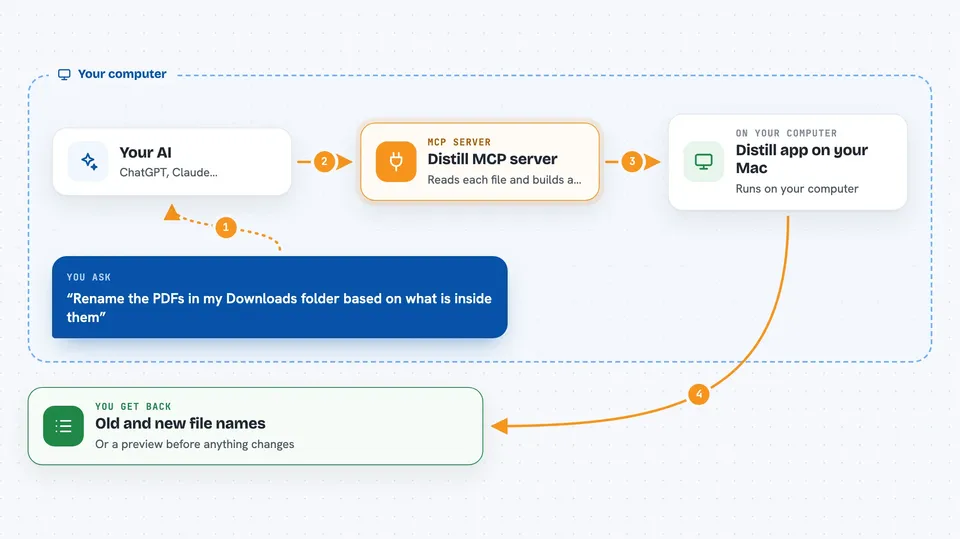
You tell your AI something like rename the PDFs in my Downloads folder based on what is inside them. The AI sends that request to this helper, and the helper passes it to the Distill app running on your Mac. Distill reads each file, works out the date, the type, the sender and other details, and builds a new name using your naming rules. Then the helper sends the results back to your AI, so you see the new names or a preview right in the chat.
 Click to zoom
What you can do with it
- Rename a whole folder of files with descriptive names
- Preview suggested names before anything is changed
- Undo a rename if you do not like the result
- See the history of past renames with dates and old names
- Watch a folder so new files get renamed automatically
- Check which AI provider is being used and how many credits are left
- Change the naming rules, like date format or capitalisation
Try asking your AI
- “Look at the 47 PDFs in my Downloads folder and suggest better names based on their content.”
- “Rename the files in my Scans folder using the date and the sender name.”
- “Undo the last rename I did in my Documents folder.”
- “Watch my Invoices folder and rename any new file that lands there.”
What it gives back to you
You get a list of files with their old names and their new names, or a preview of suggested names if you asked for suggestions first. You can also get a history of past renames, the current status of the app, and how many credits are left. Everything shows up as normal text in your chat, so you can read it and decide what to do next.
Before you start
What you need
- A Mac running macOS 14 (Sonoma) or later
- The Distill app installed and running
- A Distill token from Distill Settings, under API & MCP
- Credits in Distill for the AI renaming (100 free, then pay per use)
Good to know
This can rename your files, so try the preview option first and check the suggestions before you let it change anything.
Install it with your AI
Add Distill MCP server to your AI, no technical skills needed
You don't install anything by hand. You copy one prompt, paste it into an AI that can work on your computer, and it checks, installs and connects the server for you, asking you when it needs something.
Sign in to get the install prompt
Members get a ready-made prompt that lets the Claude desktop app check Distill MCP server, install it and connect it for them, step by step. You don't need any technical skills: you copy, paste and answer a few questions. Your connected AI can also find and install any of the 4,609 MCP servers here for you.
Who it's for
Anyone on a Mac whose folders are full of badly named files, especially people who deal with invoices, scans, photos or downloaded documents.




