
MCP server · Research
Read Website Fast MCP server
by just-every
Lets your AI open a web page, strip out the clutter, and hand you back clean readable text.
This is a small helper that lets your AI read web pages for you. Instead of pasting a whole messy page into the chat, you give it a link and it brings back just the useful article text. It is handy for anyone who reads a lot online and wants quick summaries or notes.
What is an MCP server? The 30-second version
On its own, your AI can only chat with what it already knows or what you paste in. An MCP server is a small helper program that gives your AI a new skill. This one gives it the skill of opening web pages and turning them into clean text. So when you ask about a link, the AI uses this helper to go fetch that page and read it for you.
What this MCP server does
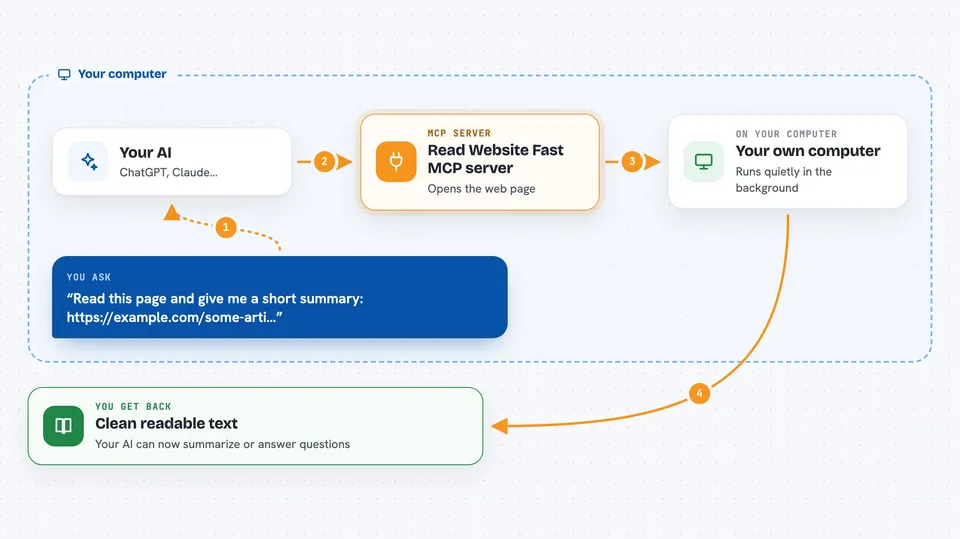
You give your AI a web address. The AI passes that address to this helper program running on your computer. The helper downloads the page, throws away menus, ads and sidebars, and keeps the main article. It turns what is left into plain Markdown text, which is just simple formatting your AI reads easily. Then the AI gets that clean text back and can summarize it, answer questions about it, or save it for you.
 Click to zoom
What you can do with it
- Read a single web page and turn it into clean text
- Follow links on a site and read several pages at once
- Summarize a long article without all the ads and menus
- Pull the main content out of a blog post or news story
- Keep the links inside the text so you can follow them later
- Reuse pages it already read, so repeat visits are faster
Try asking your AI
- “Read this page and give me a short summary: https://example.com/some-article”
- “Fetch the main content of this blog post and list the key points”
- “Crawl this documentation site up to 5 pages and tell me what it covers”
- “What does this news article say? Here is the link”
What it gives back to you
You get clean readable text in the chat, usually as a tidy block of Markdown. The AI can then turn that into a summary, a list of key points, or answers to your questions. If you asked it to read several pages, you get the combined content back. It does not change anything on the websites it reads.
Before you start
What you need
- An MCP client such as Claude Code, VS Code, Cursor or a JetBrains IDE
- Node.js installed on your computer (the helper runs through npx)
Good to know
It reads pages from the internet, so avoid pointing it at private or internal links you would not want fetched, and some sites block automated reading or need JavaScript, which this tool does not support.
Install it with your AI
Add Read Website Fast MCP server to your AI, no technical skills needed
You don't install anything by hand. You copy one prompt, paste it into an AI that can work on your computer, and it checks, installs and connects the server for you, asking you when it needs something.
Sign in to get the install prompt
Members get a ready-made prompt that lets the Claude desktop app check Read Website Fast MCP server, install it and connect it for them, step by step. You don't need any technical skills: you copy, paste and answer a few questions. Your connected AI can also find and install any of the 4,609 MCP servers here for you.
Who it's for
Anyone who reads a lot online and wants their AI to fetch and summarize web pages for them, like researchers, writers, analysts and students.


