MCP server · Browser automation
Purroxy MCP server
by KuvopLLC
Lets your AI replay recorded website actions for you, like logging in and pulling data, without ever seeing your password.
Purroxy is a small desktop app that watches you use a website once, then repeats those same steps for you later when you ask your AI. It is handy if you regularly log into a site and copy information out by hand. Your password stays on your own computer the whole time.
What is an MCP server? The 30-second version
On its own, your AI can only chat. It cannot log into your bank, your supplier portal, or your admin dashboard. An MCP server is a small helper program that gives your AI a new skill or a connection to an app or service. Purroxy is that helper here: it connects your AI to websites behind a login, so the AI can go and do the steps you recorded for it.
What this MCP server does
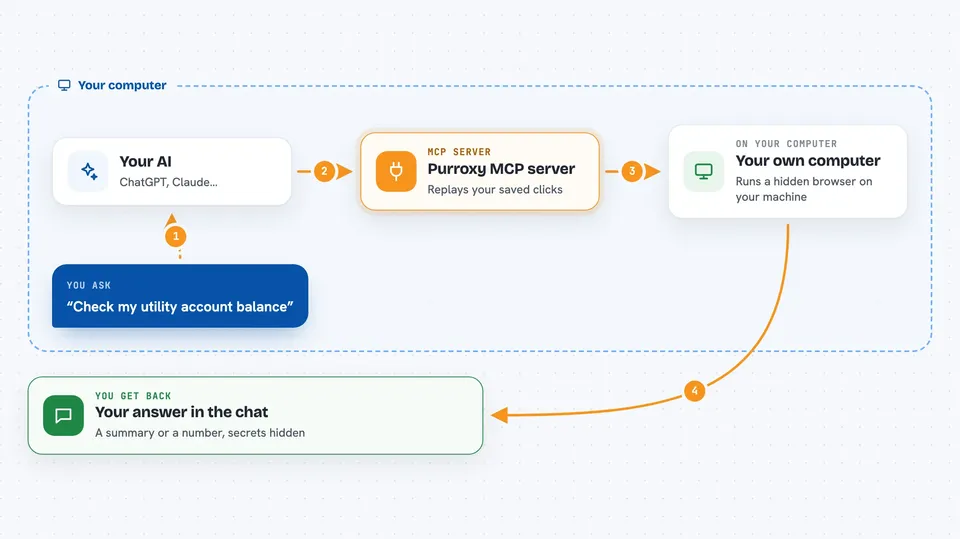
You open Purroxy's built-in browser, go to a website, and log in yourself. Then you walk through the task you want done, like searching for an order and copying the status. Purroxy records every click, search, and page move as a reusable action. Later, when you ask your AI to do that task, the AI calls Purroxy, Purroxy replays the recorded steps in a background browser, and hands the results back to your AI. Your password is typed in by Purroxy from your computer's keychain and is never sent to the AI.
 Click to zoom
What you can do with it
- Log into a website you use and record a task once
- Replay that task later by just asking your AI
- Fill in different values each time, like a date or an order number
- Pull results out of a page and show them in your chat
- Keep your password out of the AI's hands using your computer's keychain
- Scrub sensitive values from page content before your AI sees it
- Run the recorded steps in a hidden browser on your own machine
Try asking your AI
- “Log into my supplier portal and tell me the status of order 48213”
- “Check my utility account and show me the current balance”
- “Go to the internal dashboard and list today's open tickets”
- “Look up the tracking page for shipment 7712 and summarise where it is”
What it gives back to you
You get back a short answer in the chat, usually a summary or a small list of the values you asked for. If the task produces a number, like a balance or a count, that number appears in the reply. Sensitive values are redacted before the AI sees them, so you may see a placeholder instead of the real secret. If something went wrong, like a page change breaking the recorded steps, you get a note about it.
Before you start
What you need
- The Purroxy desktop app installed on your computer (macOS, Windows, or Linux)
- The Claude desktop app
- A login for the website you want to automate
- One-time setup in Purroxy's Settings to connect it to Claude
Good to know
It can click and type on real websites on your behalf, so only record tasks you are comfortable having replayed, and remember it is pre-release software that may break.
Install it with your AI
Add Purroxy MCP server to your AI, no technical skills needed
You don't install anything by hand. You copy one prompt, paste it into an AI that can work on your computer, and it checks, installs and connects the server for you, asking you when it needs something.
Sign in to get the install prompt
Members get a ready-made prompt that lets the Claude desktop app check Purroxy MCP server, install it and connect it for them, step by step. You don't need any technical skills: you copy, paste and answer a few questions. Your connected AI can also find and install any of the 4,361 MCP servers here for you.
Who it's for
Office workers who regularly log into the same websites to check or copy information, and want their AI to do those repetitive steps for them.