
MCP server · Video editing
Kinocut MCP server
by KyaniteLabs
Lets your AI trim, caption, resize, and quality-check videos on your own computer.
Kinocut is a free helper that lets your AI edit video files sitting on your own machine. You describe what you want in plain words, and it does the cutting, captioning, and resizing for you. It is handy if you deal with interviews, podcasts, or short clips for social media and do not want to learn video editing software.
What is an MCP server? The 30-second version
On its own, your AI can only chat. An MCP server is a small helper program that gives your AI a new skill or a connection to another tool. Kinocut is that helper for video editing: it plugs into the video tool FFmpeg on your computer so your AI can actually cut, caption, and resize your files when you ask. You stay in the chat, and the work happens on your machine.
What this MCP server does
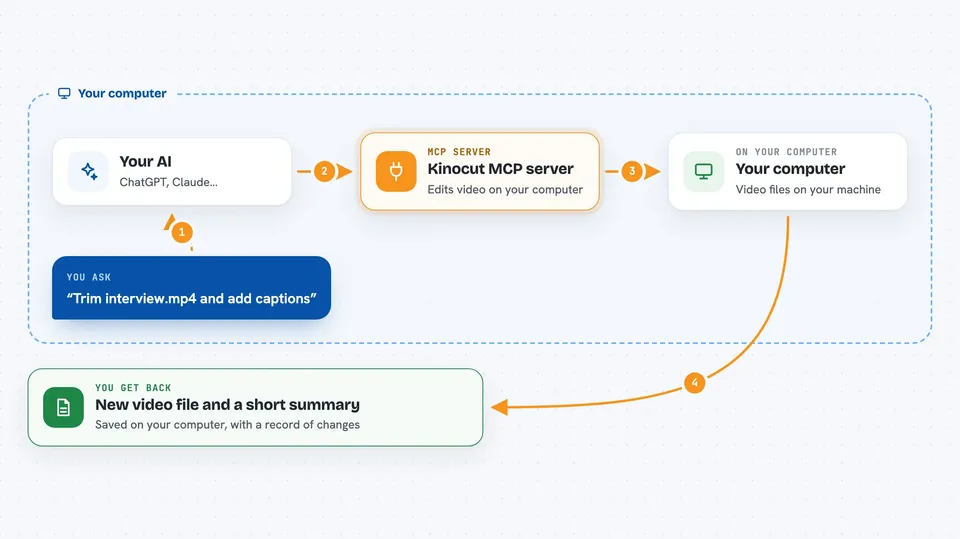
You tell your AI something like trim this interview and add captions. The AI passes that request to Kinocut, which checks it first so nothing gets broken. Kinocut then runs the real video tool on your computer to do the cut, the captions, or the resize. When it is done, it hands back the new file plus a short record of what it changed. You can review that record before you publish anything.
 Click to zoom
What you can do with it
- Trim a long recording down to the best few minutes
- Add captions to a video from a transcript file
- Resize a video into a vertical format for Shorts or Reels
- Turn one recording into several clips for social media
- Check a video for problems like black frames before you publish
- Normalize or adjust the audio in a clip
- Keep a record of every edit so you can redo or review it
Try asking your AI
- “Trim interview.mp4 from 2 minutes 15 seconds for 45 seconds and save it as a new file”
- “Add burned captions to this clip using captions.srt”
- “Resize this video to a vertical 9 by 16 format for Reels”
- “Run a quality check on the final clip and show me the result”
What it gives back to you
You get back the new video file saved on your computer, plus a short summary in the chat of what was done. Kinocut also creates a record, called a Video Receipt, that lists the steps it took and the settings it used. Some checks also give you a thumbnail or a small report about the video's quality.
Before you start
What you need
- The video tool FFmpeg installed on your computer
- Python installed so you can add the Kinocut package
- An MCP client like Claude Code or Cursor
Good to know
It edits real video files on your computer, so keep backups of anything important before you let it make changes.
Install it with your AI
Add Kinocut MCP server to your AI, no technical skills needed
You don't install anything by hand. You copy one prompt, paste it into an AI that can work on your computer, and it checks, installs and connects the server for you, asking you when it needs something.
Sign in to get the install prompt
Members get a ready-made prompt that lets the Claude desktop app check Kinocut MCP server, install it and connect it for them, step by step. You don't need any technical skills: you copy, paste and answer a few questions. Your connected AI can also find and install any of the 4,361 MCP servers here for you.
Who it's for
People who edit interviews, podcasts, or social media clips and want their AI to do the boring parts for them.





