
MCP server · Developer tools
DevDocs MCP server
by madhan-g-p
Lets your AI look up offline, version-matched programming documentation from DevDocs.io.
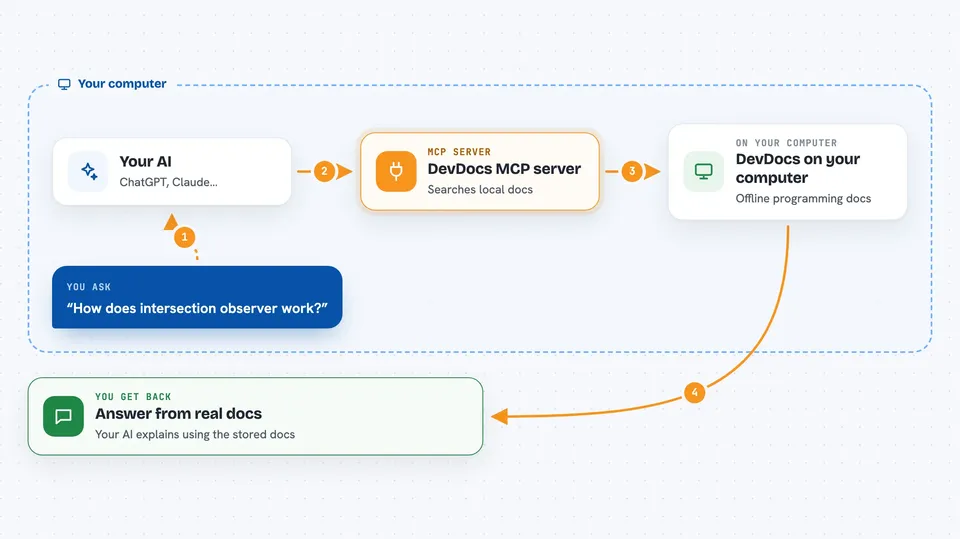
This is a small helper program that gives your AI assistant a library of programming documentation it can search. It pulls that documentation from DevDocs.io and keeps a copy on your own computer. It is handy if you use ChatGPT or Claude to help with code and want answers based on the exact versions of the tools in your project.
What is an MCP server? The 30-second version
On its own, your AI can only chat with you using what it already learned. An MCP server is a small helper program that gives your AI a new skill or a connection to another service. This one connects your AI to DevDocs.io, a well-known site full of programming documentation. Once it is connected, your AI can look things up in that documentation for you when you ask.
What this MCP server does
You ask your AI a question about a programming library, like how a function works. The AI passes your question to this helper program running on your computer. The helper searches the documentation it has stored locally and finds the matching entries. It sends those entries back to your AI, which then explains the answer to you. Because the docs are stored on your machine, it works without waiting on the internet.
 Click to zoom
What you can do with it
- Download documentation for the libraries your project uses
- Search that documentation for a topic or function name
- Get an explanation of a specific entry in the docs
- Match documentation to the exact versions listed in your project file
- Look things up without an internet connection after the first download
Try asking your AI
- “Look up how the intersection observer works in the docs you have”
- “Find the documentation for React 18 hooks and explain useEffect”
- “Search the TypeScript docs for how to type a function argument”
- “What does the docs say about this method in the version my project uses”
What it gives back to you
You get answers in the chat, written by your AI but based on the real documentation it just looked up. It can show you the matching entries, short explanations, or a summary of what the docs say. If it downloaded new documentation, it will tell you that too. Everything appears as normal text in your conversation.
Before you start
What you need
- Node.js 18 or newer installed on your computer
- The project files downloaded from GitHub
- A folder where the documentation can be stored
Good to know
This project is still under heavy development, so some features may not work as expected yet.
Install it with your AI
Add DevDocs MCP server to your AI, no technical skills needed
You don't install anything by hand. You copy one prompt, paste it into an AI that can work on your computer, and it checks, installs and connects the server for you, asking you when it needs something.
Sign in to get the install prompt
Members get a ready-made prompt that lets the Claude desktop app check DevDocs MCP server, install it and connect it for them, step by step. You don't need any technical skills: you copy, paste and answer a few questions. Your connected AI can also find and install any of the 4,609 MCP servers here for you.
Who it's for
Developers and anyone who uses an AI assistant to write or understand code and wants answers based on real, version-correct documentation.



