
MCP server · Notes
Neotoma MCP server
Give your AI a private, versioned memory in a local database so facts stay traceable and correctable.
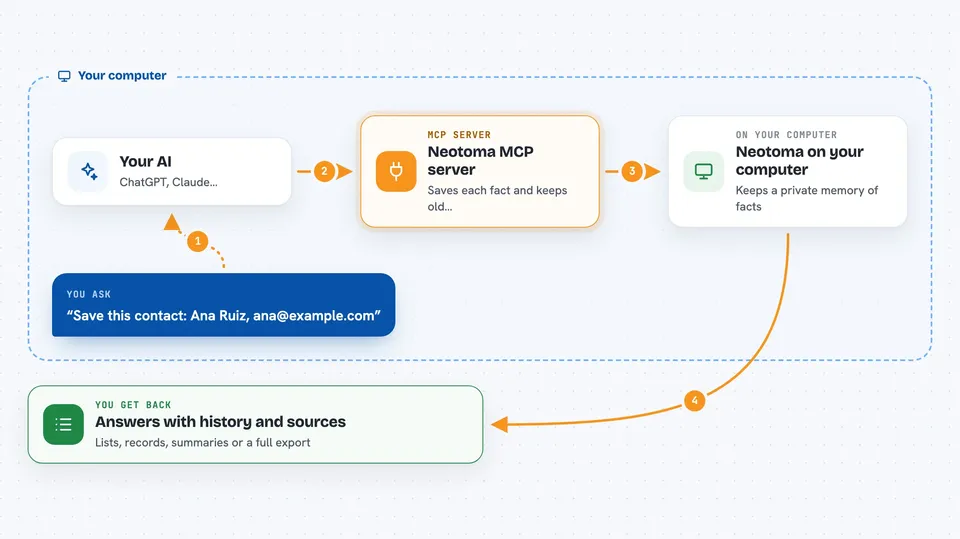
Neotoma is a memory layer for AI assistants. It stores facts as records in a small database on your own computer, keeps every version, and remembers where each fact came from. It is handy if you use ChatGPT or Claude for real work and want the same information to be available across sessions and tools, without losing track of what changed or who said it.
What is an MCP server? The 30-second version
On its own, your AI can only chat. An MCP server is a small helper program that gives your AI a new skill or a connection to an app or service. This one connects your AI to Neotoma, a local store of records like contacts, tasks and decisions. Once connected, your AI can save things there and look them up for you when you ask.
What this MCP server does
You ask your AI to remember or look up something. The AI uses this helper to talk to Neotoma on your computer. Neotoma saves each fact as a separate observation, keeps the old ones, and builds a current picture of each record. When you ask a question, it reads that picture back and shows you the answer, along with where each piece came from. Nothing is overwritten, so you can always see how a record changed over time.
 Click to zoom
What you can do with it
- Save contacts, tasks, decisions and other records in one place
- Look up a record by name, email or another identifier
- See the full history of a record and where each fact came from
- Correct a fact while keeping the old version for the record
- Link records together, for example a task that belongs to a project
- Export a summary or a full copy of your data
- Search your records with keywords, and with meaning if you set up a key
Try asking your AI
- “Save this contact: Ana Ruiz, ana@example.com, works at Northwind.”
- “What is the current status of the expense report task?”
- “Show me the history of the Acme contract record and where each change came from.”
- “Find all tasks that are still open and list them with their owners.”
What it gives back to you
You get answers in the chat: lists of records, a single record with its fields, a short summary, or a history showing each change and its source. When you ask it to save or correct something, it confirms what it stored or changed. You can also ask for an export file if you want a copy of everything.
Before you start
What you need
- Node.js 20 or newer and npm 9 or newer
- The Claude desktop app, Cursor, Claude Code, Codex CLI or another MCP-capable tool
- A terminal window to run the setup commands
Good to know
It can change and delete records in your local store, so check before asking it to merge, delete or correct anything important.
Install it with your AI
Add Neotoma MCP server to your AI, no technical skills needed
You don't install anything by hand. You copy one prompt, paste it into an AI that can work on your computer, and it checks, installs and connects the server for you, asking you when it needs something.
Sign in to get the install prompt
Members get a ready-made prompt that lets the Claude desktop app check Neotoma MCP server, install it and connect it for them, step by step. You don't need any technical skills: you copy, paste and answer a few questions. Your connected AI can also find and install any of the 4,361 MCP servers here for you.
Who it's for
People who use an AI assistant for ongoing work and want a private, traceable memory of contacts, tasks and decisions that stays on their own machine.





