
MCP server · Email
Email MCP server
by marlinjai
Lets your AI read, search, send and tidy up your email across Gmail, Outlook and iCloud.
This is a helper that connects your AI assistant to your email accounts. It works with Gmail, Outlook, iCloud and most other email services. It is handy if you spend a lot of time in your inbox and want to ask your AI to find, send or sort messages for you.
What is an MCP server? The 30-second version
On its own, your AI can only chat with you. An MCP server is a small helper program that gives your AI a new skill. This helper gives it a connection to your email accounts, so when you ask a question about your inbox or tell it to send something, it can actually go and do it. You stay in charge: it only acts when you ask.
What this MCP server does
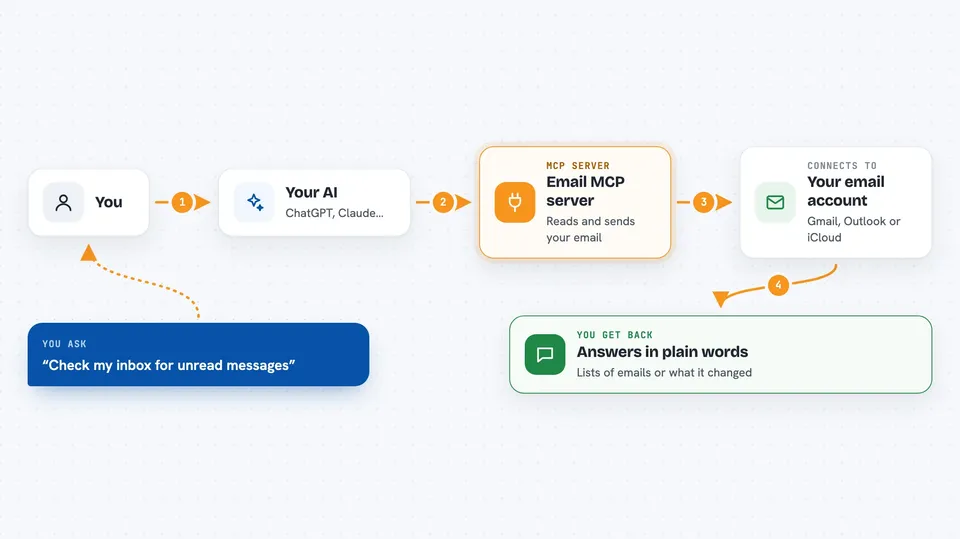
You ask your AI something about your email, like finding a message or sending a reply. The AI passes your request to this helper program running quietly on your computer. The helper signs in to your email account and does the work there. Then it sends the result back to your AI, which shows it to you in plain words in the chat. It can also make changes, like moving messages or marking them as read.
 Click to zoom
What you can do with it
- Search your inbox by sender, subject or date
- Read a full email or an entire back-and-forth thread
- Send, reply to and forward messages
- Save drafts without sending them
- Move, delete or mark many emails at once
- Download attachments to your computer
- Report spam and set up rules to block future junk
- Move or copy emails between two different accounts
Try asking your AI
- “Check my inbox for unread messages”
- “Search for emails from alice@example.com in the last week”
- “Reply to the latest email from Bob and thank him”
- “Move all newsletters to the Archive folder”
- “Draft a follow-up email to the team about the meeting”
What it gives back to you
You get answers in plain words in the chat: lists of matching emails with sender, subject and date, or a summary of a thread. When you ask it to do something, it tells you what it changed, like which messages were moved or deleted. Attachments can be saved to a folder on your computer. It can also show you your folders and labels.
Before you start
What you need
- Node.js installed on your computer (the setup wizard uses it)
- An email account you can sign in to, such as Gmail, Outlook or iCloud
- For iCloud, an app-specific password from your Apple ID account page
- For other email services, your mail server details (host and port)
Good to know
It can send, move and permanently delete real emails, so check before you say yes to anything that changes or removes messages.
Install it with your AI
Add Email MCP server to your AI, no technical skills needed
You don't install anything by hand. You copy one prompt, paste it into an AI that can work on your computer, and it checks, installs and connects the server for you, asking you when it needs something.
Sign in to get the install prompt
Members get a ready-made prompt that lets the Claude desktop app check Email MCP server, install it and connect it for them, step by step. You don't need any technical skills: you copy, paste and answer a few questions. Your connected AI can also find and install any of the 4,361 MCP servers here for you.
Who it's for
Anyone who gets a lot of email and wants an AI assistant to help find, send and sort messages, especially busy office workers juggling several accounts.





