
MCP server · Research
Brave Search MCP server
by mikechao
Let your AI search the web, news, images, videos and local places through Brave.
This is a small helper that lets your AI assistant search the internet using Brave's search service. Instead of guessing or saying it cannot look things up, your AI can pull real results from the web, news, images, videos, and even nearby businesses. It is handy for anyone who wants their AI to answer with current information.
What is an MCP server? The 30-second version
On its own, your AI can only chat with what it already knows. An MCP server is a little helper program that gives your AI a new skill or a connection to an outside service. This one connects your AI to Brave Search, so when you ask a question it can actually go look things up online. You just ask in normal words, and the helper does the searching behind the scenes.
What this MCP server does
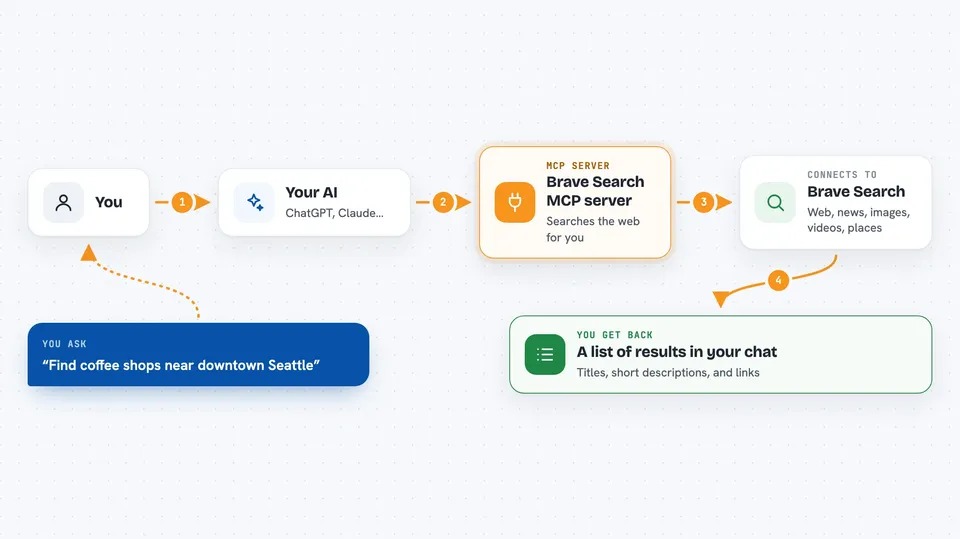
You ask your AI something like a question or a topic you want to know about. Your AI passes that request to this helper, which sends it to Brave's search service. Brave returns matching web pages, news stories, images, videos, or local places. The helper hands those results back to your AI, and your AI shows them to you in the chat as a list or a short summary. You never have to open a browser yourself.
 Click to zoom
What you can do with it
- Search the web for a topic and get a list of results
- Find recent news articles about a company or event
- Look up images related to a word or idea
- Find videos on a subject
- Search for local businesses, restaurants, or services near a place
- Limit results to the last day, week, month, or year
- Pull the readable text of web pages for your AI to summarize
Try asking your AI
- “Search the web for the latest news about electric cars in Europe”
- “Find images of modern office desks”
- “What are the top news stories about our industry this week”
- “Find coffee shops near downtown Seattle”
- “Search for videos explaining how solar panels work”
What it gives back to you
You get back a list of results in the chat, usually with titles, short descriptions, and links. For news you get recent articles, for images you get image links, and for local search you get places with addresses. Your AI can then summarize them or answer your question using what it found.
Before you start
What you need
- A Brave Search API account and API key (a kind of password for apps; Brave gives you one after you sign up)
- An AI app that supports MCP servers, such as Claude Desktop, Claude Code, or ChatGPT with developer mode
Good to know
Each search uses your Brave API key, and depending on your Brave plan searches may count against a paid quota, so keep an eye on how often you use it.
Install it with your AI
Add Brave Search MCP server to your AI, no technical skills needed
You don't install anything by hand. You copy one prompt, paste it into an AI that can work on your computer, and it checks, installs and connects the server for you, asking you when it needs something.
Sign in to get the install prompt
Members get a ready-made prompt that lets the Claude desktop app check Brave Search MCP server, install it and connect it for them, step by step. You don't need any technical skills: you copy, paste and answer a few questions. Your connected AI can also find and install any of the 4,361 MCP servers here for you.
Who it's for
Anyone who wants their AI to answer with fresh, real information from the web, like researchers, writers, analysts, and everyday office workers.


