
MCP server · Productivity
CardDAV MCP server
by ni-c
Lets your AI look up, add, and fix contacts in your own address book.
This is a helper that connects your AI to your own contacts, the ones stored on a CardDAV server. That is the open standard behind Nextcloud, Fastmail, iCloud, Radicale, and Baikal address books. It is handy if you keep your contacts on one of those and want your AI to find a person, read their details, or fix a wrong phone number for you.
What is an MCP server? The 30-second version
On its own, your AI can only chat. It cannot see your contacts or change them. An MCP server is a small helper program that gives your AI a new skill, and here that skill is talking to your CardDAV address book. Once it is connected, you can ask your AI about a person and it will go look them up for you.
What this MCP server does
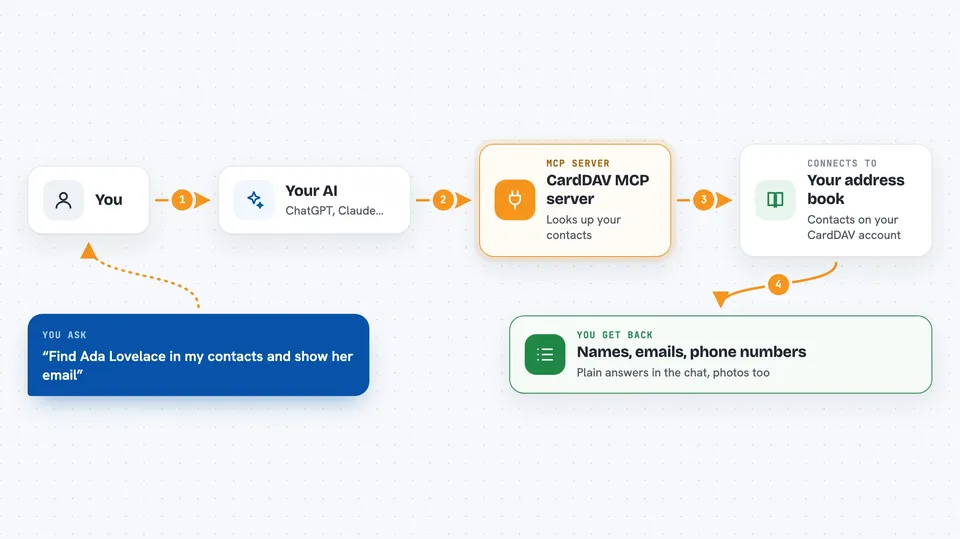
You ask your AI something about your contacts, like who someone is or what their email is. Your AI uses this helper to talk to your CardDAV server. The helper asks the server for the contact, or for a list of matching people. It hands the answer back to your AI, and your AI tells you in plain words. If you ask it to add or fix a contact, it does that too, but it asks you first before anything that cannot be undone.
 Click to zoom
What you can do with it
- Find a person in your address book by name or email
- Read a contact's full card, including phone numbers and addresses
- Add a new contact to one of your address books
- Fix or update details on an existing contact
- See and manage contact groups
- Fetch a contact's photo
- List what changed in your address book recently
Try asking your AI
- “Find Ada Lovelace in my contacts and show me her email and phone number”
- “Add a new contact for Sam Rivera with email sam@example.net”
- “Update my contact for the dentist with the new phone number 555-0142”
- “Show me the photo for my contact named Maria”
- “Which contacts are in my work address book?”
What it gives back to you
You get back plain answers in the chat, like a short list of matching people with their names and emails, or the full details of one contact. If you asked for a photo, you get the image. If you asked it to change something, it tells you what it changed. Every answer built from your contacts is marked as coming from your address book, so your AI treats it as something a person wrote, not as instructions.
Before you start
What you need
- Node.js 22 or newer, or Docker
- A CardDAV server and an account on it, like Nextcloud, Fastmail, iCloud, Radicale, or Baikal
- Your CardDAV server address, username, and an app-specific password (most services give you one for each app; your normal password often will not work)
- The Claude desktop app, Claude Code, or another app that can run MCP servers
Good to know
It can add, change, move, and delete contacts, so check before you say yes to anything that cannot be undone.
Install it with your AI
Add CardDAV MCP server to your AI, no technical skills needed
You don't install anything by hand. You copy one prompt, paste it into an AI that can work on your computer, and it checks, installs and connects the server for you, asking you when it needs something.
Sign in to get the install prompt
Members get a ready-made prompt that lets the Claude desktop app check CardDAV MCP server, install it and connect it for them, step by step. You don't need any technical skills: you copy, paste and answer a few questions. Your connected AI can also find and install any of the 4,609 MCP servers here for you.
Who it's for
Anyone who keeps their contacts on a CardDAV server and wants their AI to look people up or keep the address book tidy without opening a web page.





