MCP server · Developer tools
Healthchecks MCP server
by ni-c
Lets your AI see which scheduled jobs are late or down, read what a failing job printed, and manage checks.
This is a small helper that connects your AI assistant to Healthchecks, a service that watches your scheduled jobs and alerts you when one stops checking in. Once it is set up, you can just ask your AI which jobs are healthy, which are late, and what a failing job actually said. It is handy if you run backups, nightly scripts, or any task that is supposed to run on a schedule.
What is an MCP server? The 30-second version
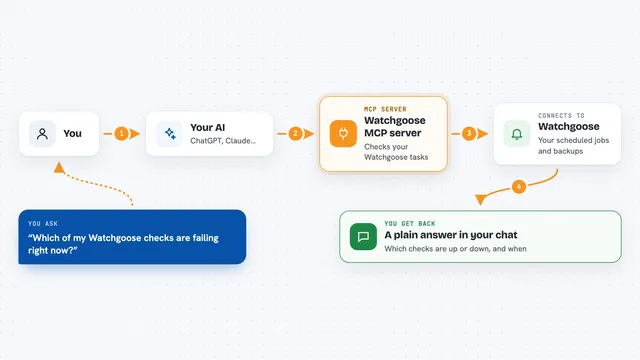
On its own, your AI can only chat with you. It cannot see your Healthchecks account or know whether your nightly backup ran. An MCP server is a small helper program that gives your AI a new skill, here a connection to Healthchecks. So when you ask about a late job, your AI uses this helper to look it up and answer you.
What this MCP server does
You ask your AI something about your scheduled jobs, like which checks are down. Your AI passes that question to this helper program. The helper talks to Healthchecks using your project API key, either on healthchecks.io or on your own self-hosted copy. It brings back the list of checks, their status, recent pings, and even the output a job printed when it failed. Then your AI explains it to you in plain words.
What you can do with it
- List all checks in your project and filter them by tag or status
- See which checks are down or late and since when
- Read the output a failing job sent with its ping
- Look at recent up and down changes for a check
- Create a new check for a job you want to monitor
- Pause a check you do not need right now, or resume it later
- Delete a check you no longer want
Try asking your AI
- “Which of my Healthchecks jobs are down right now?”
- “Show me the last few pings for the nightly backup check”
- “What did the failing job print when it reported an error?”
- “Create a new check called Weekly Report that expects a ping every Monday”
What it gives back to you
You get answers in the chat: a list of checks with their names and status, the time a check last reported, or the actual text a job printed when it failed. Write actions come back as a short confirmation, like a new check being created or one being paused. Everything is worded so you can read it without knowing any technical details.
Before you start
What you need
- A Healthchecks account (free plan works) or your own self-hosted Healthchecks instance
- A project API key from Healthchecks, found under Project Settings then API Access (it is 32 characters long)
- Node.js version 22 or newer if you install it on your computer
- The Claude desktop app, Claude Code, or another AI app that supports MCP servers
Good to know
It can create, change, pause and delete checks in your Healthchecks account, and deleting a check cannot be undone, so keep an eye on what you ask the AI to do.
Install it with your AI
Add Healthchecks MCP server to your AI, no technical skills needed
You don't install anything by hand. You copy one prompt, paste it into an AI that can work on your computer, and it checks, installs and connects the server for you, asking you when it needs something.
Sign in to get the install prompt
Members get a ready-made prompt that lets the Claude desktop app check Healthchecks MCP server, install it and connect it for them, step by step. You don't need any technical skills: you copy, paste and answer a few questions. Your connected AI can also find and install any of the 4,609 MCP servers here for you.
Who it's for
Anyone who runs scheduled jobs or backups and wants a quick, plain-language way to check on them without opening the Healthchecks website.