
MCP server · Developer tools
DevUtils MCP server
by ofershap
Lets your AI decode tokens, make IDs, hash text, explain cron schedules, and clean up JSON for you.
This is a small helper that gives your AI assistant a set of everyday developer utilities. You paste in a token, a cron schedule, or a messy chunk of JSON, and the AI works it out for you. It is handy for anyone who deals with technical bits and pieces but does not want to open a separate tool for each one.
What is an MCP server? The 30-second version
On its own, your AI can only chat with you. An MCP server is a small helper program that gives your AI a new skill or a connection to something useful. This one connects your AI to a box of developer utilities, so it can decode, generate, hash, and check things for you. You just ask in normal words, and the AI uses this helper behind the scenes.
What this MCP server does
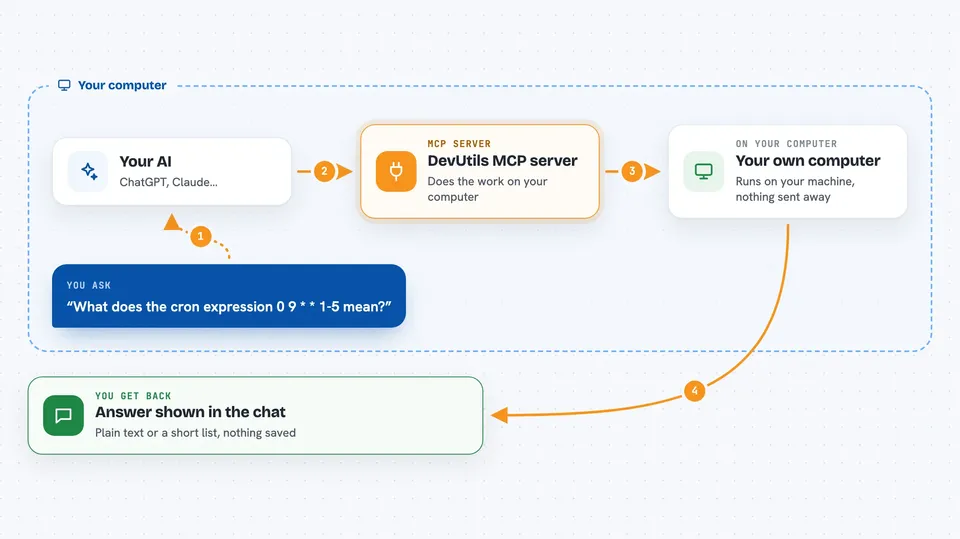
You ask your AI something like "what does this cron expression mean" or "decode this token". The AI passes your request to this helper program running on your own computer. The helper does the actual work, like converting a timestamp or hashing a string. Then the AI shows you the result right in the chat, in plain words.
 Click to zoom
What you can do with it
- Decode a JWT token and see its header, payload, and whether it has expired
- Generate one or more UUIDs or a ULID
- Hash a string with md5, sha1, sha256, sha384, or sha512
- Explain a cron expression in plain English and list its next run times
- Convert between Unix timestamps and readable dates
- Pretty-print, shrink, or check a chunk of JSON
- Test a regex pattern against a piece of text
Try asking your AI
- “Decode this JWT token: eyJhbGciOiJSUzI1NiIsInR5cCI6IkpXVCJ9...”
- “What does the cron expression 0 9 * * 1-5 mean?”
- “Generate 5 UUIDs for me”
- “Hash this string with SHA-256: hello world”
- “Format this JSON: {"a":1,"b":2}”
What it gives back to you
You get the answer back in the chat, usually as a short block of text or a small list. For example, a decoded token comes back as a header and payload, a cron question comes back as a plain sentence, and a JSON request comes back as neatly indented text. Nothing is saved anywhere, it just shows up in the conversation.
Before you start
What you need
- The Claude desktop app, Cursor, or VS Code with Copilot
- Node.js installed on your computer (the helper runs through a tool called npx)
Good to know
It runs on your own computer and does not connect to outside services, but avoid pasting real passwords or secret keys into the chat.
Install it with your AI
Add DevUtils MCP server to your AI, no technical skills needed
You don't install anything by hand. You copy one prompt, paste it into an AI that can work on your computer, and it checks, installs and connects the server for you, asking you when it needs something.
Sign in to get the install prompt
Members get a ready-made prompt that lets the Claude desktop app check DevUtils MCP server, install it and connect it for them, step by step. You don't need any technical skills: you copy, paste and answer a few questions. Your connected AI can also find and install any of the 4,361 MCP servers here for you.
Who it's for
Anyone who works with tokens, timestamps, cron schedules, or JSON and wants quick answers without opening a separate tool.



