MCP server · Research
Mendeley MCP server
by pallaprolus
Lets your AI search your Mendeley library, read your papers, and organize your folders for you.
This is a small helper that connects your Mendeley reference library to an AI assistant like Claude. Once it is set up, you can ask your AI to find papers, read them, and tidy up your folders, all in plain conversation. It is handy for students, researchers, and anyone who keeps a big pile of PDFs in Mendeley.
What is an MCP server? The 30-second version
On its own, your AI can only chat with you. An MCP server is a small helper program that gives your AI a new skill or a connection to an app. This one connects your AI to your Mendeley account, so it can look things up and make changes there when you ask. You stay in the chat, and the helper does the clicking in the background.
What this MCP server does
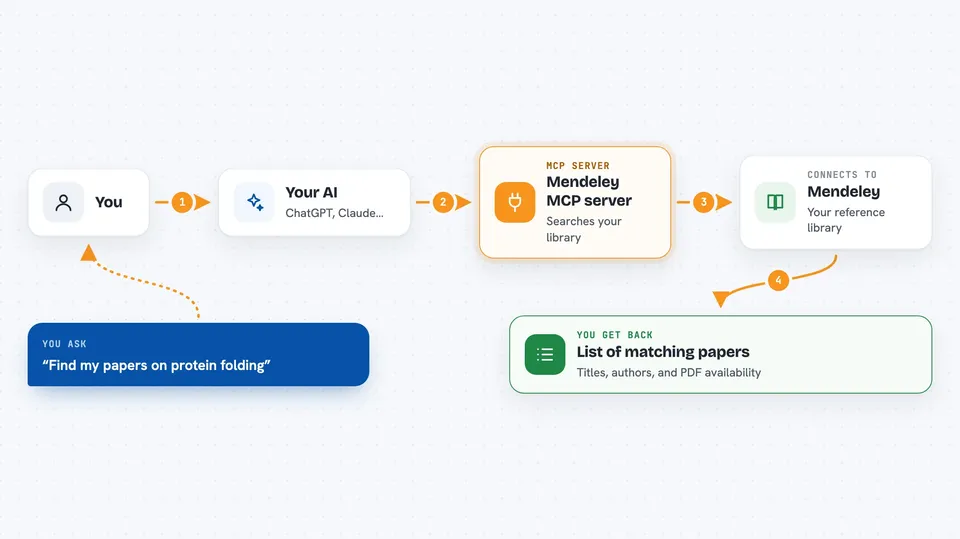
You ask your AI something like find my papers on protein folding. The AI passes that request to this helper. The helper talks to Mendeley using your account and pulls back the matching papers. Then the AI shows you the results in the chat, with titles, authors, and whether a PDF is attached. If you ask it to add, move, or delete something, the helper makes that change in your library too.
 Click to zoom
What you can do with it
- Search your own Mendeley library by title, author, abstract, or notes
- Browse your folders and see what is inside each one
- Read the highlights and sticky notes you made on a PDF
- Look up a paper by its DOI or search Mendeley's global catalog
- Add new papers to your library and fix details like the year or abstract
- Create, rename, and delete folders, and move papers between them
- Export a paper or a whole folder as BibTeX for your reference manager
Try asking your AI
- “Search my Mendeley library for papers about transformer architectures”
- “What papers do I have in my Machine Learning folder?”
- “Find the paper with DOI 10.1038/nature14539 and summarize it”
- “What did I highlight in the attention paper?”
- “Export my Lit Review folder as BibTeX”
What it gives back to you
You get back plain answers in the chat: lists of papers with titles, authors, years, and whether a PDF is attached. If you ask for a summary or a detail, the AI reads the paper text and writes it out for you. When you ask it to change something, it tells you what it did, like added the paper to your Screening folder. BibTeX exports come back as text you can copy into a file.
Before you start
What you need
- A Mendeley account (free to sign up at mendeley.com)
- A Mendeley API app, which you register on their developer site to get a Client ID and Client Secret (these are like a username and password for apps)
- Python installed on your computer, or Docker if you prefer that route
- The Claude desktop app or another AI app that supports MCP servers
Good to know
It can delete papers and folders from your Mendeley library, and those deletions cannot be undone, so double check before saying yes.
Install it with your AI
Add Mendeley MCP server to your AI, no technical skills needed
You don't install anything by hand. You copy one prompt, paste it into an AI that can work on your computer, and it checks, installs and connects the server for you, asking you when it needs something.
Sign in to get the install prompt
Members get a ready-made prompt that lets the Claude desktop app check Mendeley MCP server, install it and connect it for them, step by step. You don't need any technical skills: you copy, paste and answer a few questions. Your connected AI can also find and install any of the 4,361 MCP servers here for you.
Who it's for
Researchers, students, and academics who keep a large reference library in Mendeley and want to search and organize it by chatting instead of clicking.