MCP server · Notes
Piia Engram MCP server
by Patdolitse
Your AI can remember who you are, how you work, and what you have learned, across different AI tools.
Piia Engram is a small helper that keeps a personal profile of you on your own computer: your preferences, your standards, and the lessons you have picked up along the way. It is handy if you use more than one AI tool, like Claude Code, Codex, or Cursor, and you are tired of explaining yourself again in every new chat. Your AI can read this profile so each conversation starts from what you already told it.
What is an MCP server? The 30-second version
On its own, your AI can only chat with you in the moment. An MCP server is a small helper program that gives your AI a new skill or a connection to something outside the chat. This one connects your AI to a folder of notes about you that lives on your own machine. So when you ask your AI to help with your work, it can look up your preferences and past lessons first, instead of starting from nothing.
What this MCP server does
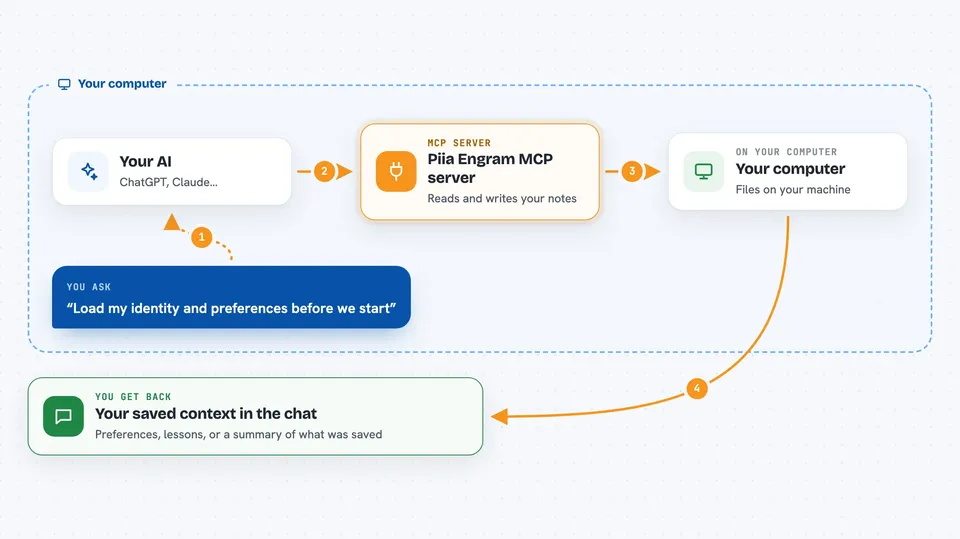
You tell Piia Engram once who you are, how you like to work, and what you have learned. It saves that as simple files on your computer. Later, when you ask your AI for help, the AI asks this helper for your context, and the helper hands back the relevant bits. You can also paste in a summary of a session and it will pull out the lessons and decisions for you. Everything stays on your machine, and you can open, edit, or delete the files yourself.
 Click to zoom
What you can do with it
- Save your preferences and quality standards once, so every AI tool can use them
- Store lessons learned and key decisions so past mistakes do not repeat
- Get a ready-to-paste identity card for tools that cannot connect directly
- Pull the most relevant lessons from past projects into a new one
- Extract lessons and decisions from a pasted session summary
- Keep a list of local tools and programs your AI can look up
- Check which of your notes are getting stale and worth revisiting
Try asking your AI
- “Load my identity and preferences before we start”
- “What lessons do I have about authentication middleware”
- “Extract the lessons and decisions from this session summary”
- “Give me a starter pack of relevant knowledge for a new Python API project”
What it gives back to you
You get back plain answers in the chat: your saved preferences, a list of relevant lessons, or a short summary of what was stored. It can also hand you a Markdown identity card you can copy and paste into another tool. When it saves something new, it tells you what it wrote and where.
Before you start
What you need
- Python installed on your computer
- The pip install command run in your terminal
- An AI tool that supports MCP, like Claude Code, Codex, or Cursor
Good to know
It saves notes about you on your computer, so review what the AI wants to write before you approve it, especially anything with passwords or private details.
Install it with your AI
Add Piia Engram MCP server to your AI, no technical skills needed
You don't install anything by hand. You copy one prompt, paste it into an AI that can work on your computer, and it checks, installs and connects the server for you, asking you when it needs something.
Sign in to get the install prompt
Members get a ready-made prompt that lets the Claude desktop app check Piia Engram MCP server, install it and connect it for them, step by step. You don't need any technical skills: you copy, paste and answer a few questions. Your connected AI can also find and install any of the 4,066 MCP servers here for you.
Who it's for
People who use several AI coding tools and want their preferences and lessons to follow them instead of resetting each time.