
MCP server · Productivity
PDFops MCP server
by pdfops
Lets your AI inspect, fill, merge, and create PDFs on your computer without you touching a PDF editor.
PDFops is a helper for your AI that deals with PDF files for you. You point it at a form, a set of documents, or some invoice details, and it does the work on your machine. It is handy if you fill in the same forms over and over, or if you need to staple several PDFs into one packet.
What is an MCP server? The 30-second version
On its own, your AI can only chat. An MCP server is a small helper program that gives your AI a new skill or a connection to another app or service. This one connects your AI to PDFops, a service that works with PDF files. So when you ask your AI to fill a form or merge some PDFs, it can actually do it instead of just telling you how.
What this MCP server does
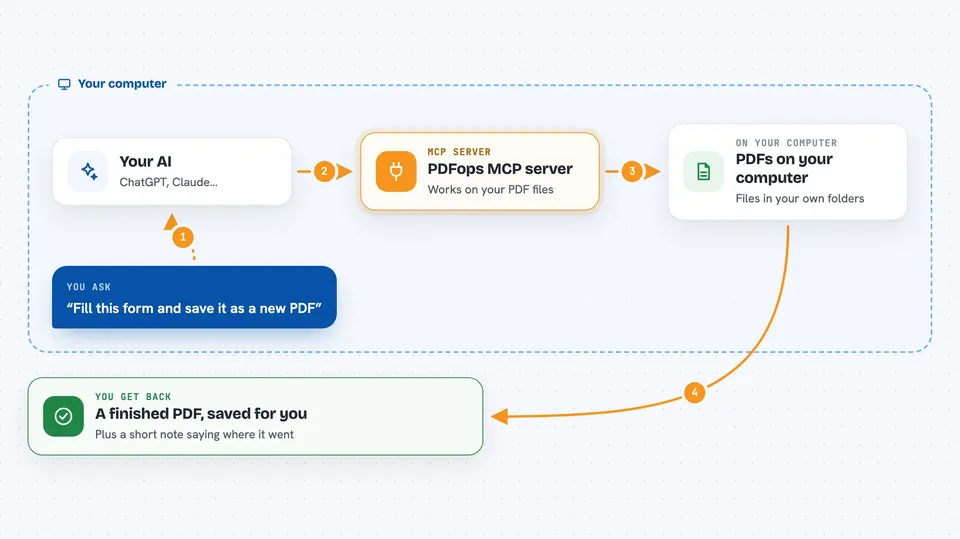
You ask your AI something like fill this form or merge these files. Your AI passes the request to this helper, which talks to the PDFops service. PDFops does the work and sends back the finished PDF or a short confirmation. Your AI then tells you where the file was saved, or shows you the result in the chat.
 Click to zoom
What you can do with it
- See what fields a PDF form has and what type each one is
- Fill in a form with names, addresses, and other details you give it
- Flatten a filled form so the answers are locked in and the form part is gone
- Merge several PDFs into one file in the order you want
- Create a simple invoice PDF from details like client, hours, rate, and tax
- Check how many PDFops requests you have left this month
Try asking your AI
- “What fields does ~/forms/fw9.pdf have?”
- “Fill ~/forms/fw9.pdf for Ada Lovelace, 12 Analytical Way, London, and save it flattened as ~/out/w9-ada.pdf”
- “Merge ~/out/w9-ada.pdf, ~/docs/nda.pdf and ~/docs/cover.pdf into one packet, cover first”
- “Invoice Globex for 3 days of consulting at $650, 8.5% tax, due in 30 days”
What it gives back to you
You get back short answers in the chat, like a list of form field names or a one-line note saying the file was saved. When you ask for a merged or filled PDF, the file appears where you told it to save. If you are using a hosted setup, the PDF can come back right inside the chat instead.
Before you start
What you need
- Node.js installed on your computer (the free program that runs npx)
- The Claude desktop app, Claude Code, Cursor, VS Code, or another AI app that supports MCP servers
- An optional free PDFops API key from pdfops.dev/pricing if you want more than the keyless trial (100 requests per month)
Good to know
The filled, merged, or generated PDF is saved over any file with the same name, so pick your output paths carefully.
Install it with your AI
Add PDFops MCP server to your AI, no technical skills needed
You don't install anything by hand. You copy one prompt, paste it into an AI that can work on your computer, and it checks, installs and connects the server for you, asking you when it needs something.
Sign in to get the install prompt
Members get a ready-made prompt that lets the Claude desktop app check PDFops MCP server, install it and connect it for them, step by step. You don't need any technical skills: you copy, paste and answer a few questions. Your connected AI can also find and install any of the 4,609 MCP servers here for you.
Who it's for
Anyone who deals with PDF forms, contracts, or invoices at work and wants their AI to handle the paperwork.





