
MCP server · Notes
URL Manager MCP server
by Piccolo123
Your AI can save web links into organized, searchable collections and share them with your team.
URL Manager is a place to keep web links and notes in order, instead of letting them pile up in browser bookmarks. Once this MCP server is connected, your AI can save pages for you, sort them into categories, and find them again later. It is handy if you collect a lot of links for work, study, or a team project.
What is an MCP server? The 30-second version
On its own, your AI can only chat with you. An MCP server is a small helper program that gives your AI a new skill, in this case a connection to URL Manager, so it can save and look up your links for you. When you ask your AI to remember a page, it passes that request to this helper, and the helper stores it in your URL Manager account. You never have to touch the helper yourself.
What this MCP server does
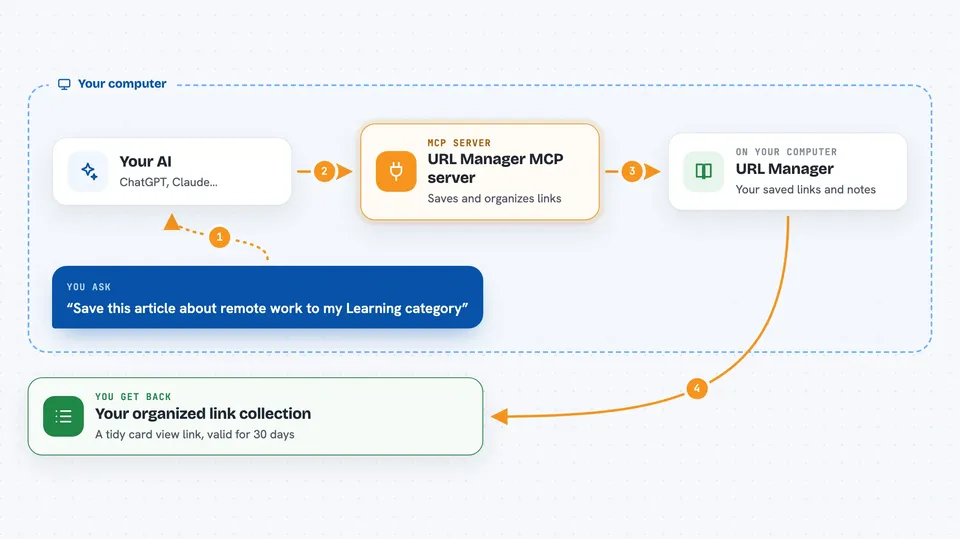
You tell your AI something like "save this link for later" or "find my saved articles about budgeting". The AI uses this helper to talk to URL Manager, which keeps your links, notes, categories, and tags. The helper can add a new link, update one, search across everything you saved, or move items into a category. When it is done, it can hand you a link to a page showing all your saved items as tidy cards.
 Click to zoom
What you can do with it
- Save any web link or plain note into your library
- Sort saved items into categories and add tags
- Search across all your saved titles, notes, and links
- Update or bulk-edit many saved items at once
- Create shared folders and invite teammates with a link
- Copy a shared item into your own personal collection
- Get a link to a card view of everything you organized
Try asking your AI
- “Save this article about remote work to my Learning category”
- “Find everything I saved about budgeting last month”
- “Create a shared folder called Team Resources and send me an invite link”
- “Move these five links into my Shopping category and tag them as gifts”
What it gives back to you
You get back clear answers in the chat, like a list of matching links with their titles and categories, or a confirmation that an item was saved or updated. It can also give you a web link that opens a card view of your organized collection. That link stays valid for 30 days and you can reuse it.
Before you start
What you need
- Python 3.10 or newer on your computer
- An internet connection to reach the URL Manager service
- An MCP-compatible app such as Claude Desktop, Cursor, or Windsurf
Good to know
It can change or remove items in your saved library and in shared folders, so ask your AI to confirm before deleting or moving things that others can see.
Install it with your AI
Add URL Manager MCP server to your AI, no technical skills needed
You don't install anything by hand. You copy one prompt, paste it into an AI that can work on your computer, and it checks, installs and connects the server for you, asking you when it needs something.
Sign in to get the install prompt
Members get a ready-made prompt that lets the Claude desktop app check URL Manager MCP server, install it and connect it for them, step by step. You don't need any technical skills: you copy, paste and answer a few questions. Your connected AI can also find and install any of the 4,361 MCP servers here for you.
Who it's for
People who save lots of links for work, study, or team projects and want them organized and searchable instead of scattered in browser bookmarks.





