
MCP server · Productivity
Postcard.bot MCP server
by PostcardBot
Let your AI send real paper postcards to people anywhere in the world, one at a time or in bulk.
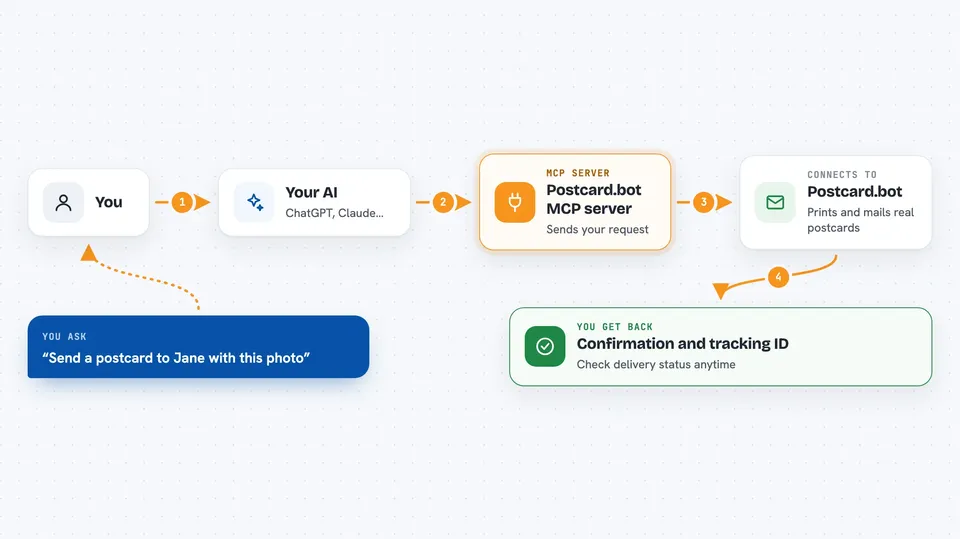
This is a helper that lets your AI send actual paper postcards through the mail. You tell your AI who to send it to and what to say, and Postcard.bot prints it and ships it for you. It is handy if you send thank-you notes, event invites, or marketing mail and would rather not do it by hand.
What is an MCP server? The 30-second version
On its own, your AI can only chat with you. An MCP server is a small helper program that gives your AI a new skill or a connection to an app or service. This one connects your AI to Postcard.bot, a service that prints and mails real postcards. Once it is connected, your AI can look up your balance or send a card when you ask, instead of you filling in forms yourself.
What this MCP server does
You ask your AI in normal words to send a postcard, and it uses this helper to talk to Postcard.bot. Postcard.bot then prints the card and puts it in the mail, usually within 24 hours. You can also ask your AI to check your balance, look up prices, or check whether a card was delivered. For bigger jobs, you can give it a list of people and it sends the same card to all of them.
 Click to zoom
What you can do with it
- Send a single postcard to one person with a message and a photo
- Send the same postcard to a list of up to 5,000 people at once
- Check your account balance and current price tier
- Look up the full price list for postcards
- Check the delivery status of a card you already sent
- Set up a web address that gets notified when cards are sent, delivered, or fail
- Remove a notification address you no longer need
Try asking your AI
- “Send a postcard to Jane Doe at 123 Main St, San Francisco CA 94102 with a photo of the Golden Gate Bridge and the message Wish you were here!”
- “How much balance do I have left on Postcard.bot?”
- “Send this same holiday card to everyone on my client list”
- “Did the postcard I sent to Jane last week get delivered yet?”
What it gives back to you
For a single card, you get back a confirmation with an ID you can use later to check delivery. For a bulk send, you get a bulk ID right away and can ask for progress as cards go out. Balance and price questions come back as simple numbers and lists. Status checks tell you whether a card was sent, delivered, failed, or returned.
Before you start
What you need
- A Postcard.bot account (you sign in with Google or email)
- Prepaid credit on your account, since postcards cost money to print and mail
- An MCP-compatible app like Claude Desktop, Claude Code, Cursor, or Windsurf
Good to know
Sending postcards costs real money from your prepaid balance, and bulk sends can reserve a large amount upfront, so check the recipient list and prices before you confirm.
Install it with your AI
Add Postcard.bot MCP server to your AI, no technical skills needed
You don't install anything by hand. You copy one prompt, paste it into an AI that can work on your computer, and it checks, installs and connects the server for you, asking you when it needs something.
Sign in to get the install prompt
Members get a ready-made prompt that lets the Claude desktop app check Postcard.bot MCP server, install it and connect it for them, step by step. You don't need any technical skills: you copy, paste and answer a few questions. Your connected AI can also find and install any of the 4,609 MCP servers here for you.
Who it's for
People who send physical mail as part of their work, like small business owners, marketers, event planners, and anyone doing customer outreach or thank-you notes.





