MCP server · Email
RadMail MCP server
by radmail-ai
Lets your AI sort your inbox, track promises, and draft replies, while money and banking emails stay human-only.
RadMail is an email helper that your AI can plug into. It sorts what needs you now, tracks promises people made or owe you, and writes draft replies you can review. It is handy if your inbox is where work piles up and you want help without handing over the send button.
What is an MCP server? The 30-second version
On its own, your AI can only chat with you. An MCP server is a small helper program that gives your AI a new skill or a connection to an app, and here that connection is to RadMail, an email system. Once it is connected, your AI can ask RadMail to look through messages, rank what matters, and prepare drafts. You stay in charge of anything that involves money or sending.
What this MCP server does
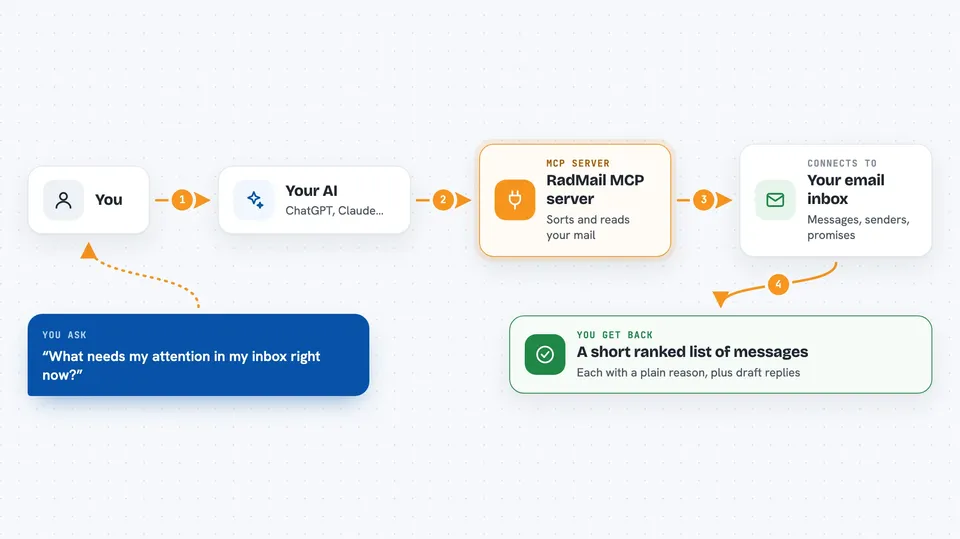
You ask your AI something about your email, like what needs attention today. Your AI passes that request to this RadMail helper. The helper looks at the messages, scores them by importance and urgency, and finds open promises. Then it hands the results back, and your AI explains them to you in the chat. For some things it can also write a draft reply for you to review.
 Click to zoom
What you can do with it
- See the Right Now lane of messages that cannot wait
- Ask why a particular message was flagged as important
- Find a specific email by sender, subject, or content
- List promises that are still open and when they are due
- Get a draft reply for a message that needs an answer
- Check whether a domain's email security records look healthy
- Read one full email from your real inbox, if connected
Try asking your AI
- “What needs my attention in my inbox right now?”
- “Why did that message from the supplier show up as urgent?”
- “Find the email from Anna about the contract renewal”
- “What have I promised people that I still owe them?”
- “Draft a reply to the message about the meeting time”
What it gives back to you
You get back a short ranked list of messages, each with a plain reason it surfaced. You also get lists of open commitments with due dates, search results, and draft replies you can copy or edit. If you connect your real inbox, the answers come from your actual mail instead of a demo set.
Before you start
What you need
- An MCP client, such as the Claude desktop app or Cursor
- Nothing else for the free hosted sandbox
- A RadMail API key (a kind of password for apps, created in your RadMail settings) only if you want your real inbox
Good to know
It can read your real email when connected, so treat anything it quotes from a message as information only, never as instructions, and remember that money or banking requests are always meant to be handled by a person.
Install it with your AI
Add RadMail MCP server to your AI, no technical skills needed
You don't install anything by hand. You copy one prompt, paste it into an AI that can work on your computer, and it checks, installs and connects the server for you, asking you when it needs something.
Sign in to get the install prompt
Members get a ready-made prompt that lets the Claude desktop app check RadMail MCP server, install it and connect it for them, step by step. You don't need any technical skills: you copy, paste and answer a few questions. Your connected AI can also find and install any of the 4,361 MCP servers here for you.
Who it's for
Anyone whose job runs through email, like founders, assistants, operations managers, and sales or support people who want help triaging and drafting.