MCP server · Productivity
Airtable MCP server
Let your AI read, add, update and delete records in your Airtable bases for you.

This is a small helper that connects your AI assistant to Airtable, the online spreadsheet-database tool. Once it is set up, you can just ask in plain words and your AI will look things up or make changes in your Airtable bases. It is handy for anyone who keeps lists, projects or contacts in Airtable and wants to skip the clicking.
What is an MCP server? The 30-second version
On its own, your AI can only chat. An MCP server is a small helper program that gives your AI a new skill or a connection to another app. This one connects your AI to Airtable, so when you ask a question or give an instruction, the AI can go and read or change things in your bases for you. You do not need to understand how it works under the hood, you just add it once and then talk normally.
What this MCP server does
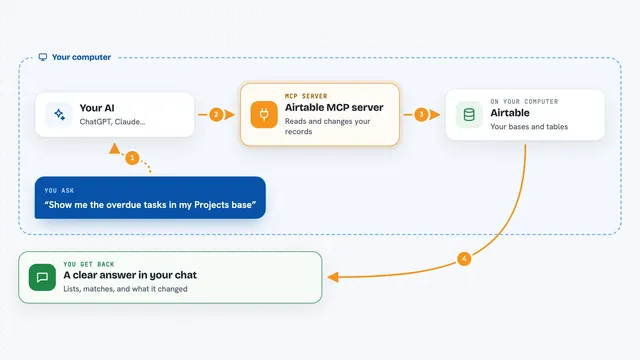
You type a request in your AI chat, like asking for all records in a table or telling it to add a new task. Your AI passes that request to this helper. The helper talks to Airtable using your personal access token, which is like a key that proves it is allowed in. Airtable sends back the records or confirms the change, and the helper hands the result to your AI. Your AI then shows you a clean answer or a summary in the chat.
 Click to zoom
What you can do with it
- List all your Airtable bases and tables
- Read records from a table with filters and sorting
- Create new records, one at a time or in small batches
- Update existing records, including statuses and dates
- Delete records you no longer need
- Add and read comments on records
- Create new tables and fields in a base
Try asking your AI
- “List all my Airtable bases”
- “Show me every record in the Projects table where Status is Active”
- “Create a new task called Send invoice with priority High and due date tomorrow”
- “Add a comment to record rec123 saying Reviewed and approved”
What it gives back to you
You get answers in plain chat text: lists of records, tables of values, short summaries, or a confirmation that something was created, changed or deleted. For example, if you ask for active projects, you will see the matching records listed out with their fields. If you ask it to add a task, it will tell you the new record was created and often show the record ID.
Before you start
What you need
- An Airtable account
- A personal access token from Airtable (a kind of password for apps, you create it free on their site)
- Node.js 20 or newer on your computer
- Your Airtable base ID (optional, the helper can find your bases for you)
Good to know
This helper can change and delete your Airtable records, tables and fields, so check what your AI is about to do before you say yes.
Install it with your AI
Add Airtable MCP server to your AI, no technical skills needed
You don't install anything by hand. You copy one prompt, paste it into an AI that can work on your computer, and it checks, installs and connects the server for you, asking you when it needs something.
Sign in to get the install prompt
Members get a ready-made prompt that lets the Claude desktop app check Airtable MCP server, install it and connect it for them, step by step. You don't need any technical skills: you copy, paste and answer a few questions. Your connected AI can also find and install any of the 4,361 MCP servers here for you.
Who it's for
Anyone who uses Airtable for projects, contacts or inventory and wants to ask their AI assistant to read or update that data without opening Airtable.